How to use Notion layout builder in databases
TL;DR
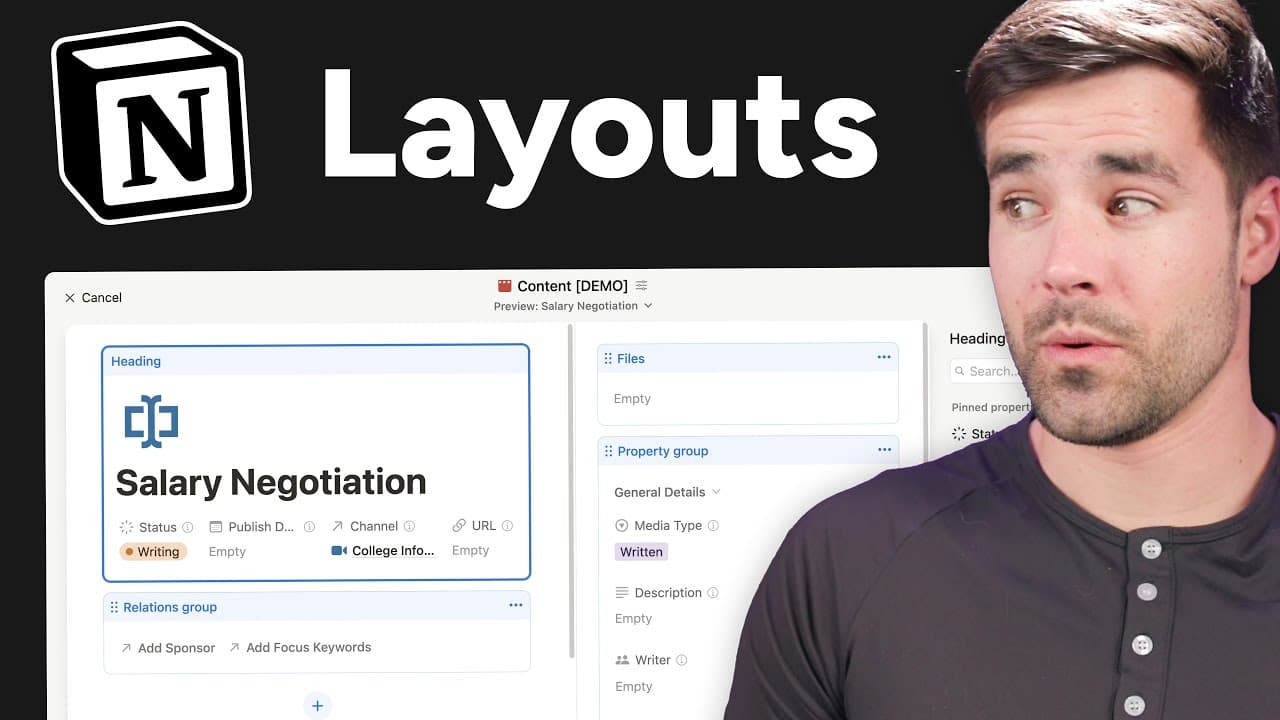
The layout builder creates a custom layout for all pages in a database, using a side panel for properties, multiple sections, and pinned items. It keeps the page body from being pushed down the fold and works well in Side Peak mode with keyboard shortcuts for quick access. This video walks through setup, organization, and live customization across databases.
Transcript
Notion's new layout builder is seriously my favorite feature of the year. And if you work with complex databases that have a lot of different properties, I think you're going to agree with me because now we can take those properties and put them in a side panel that's very easily shown or hidden with a keyboard shortcut. And there's a ton of custom... Read More
Key Insights
- Layout builder applies a custom layout to every page in a database, ensuring consistency across dozens or hundreds of entries.
- A side panel for properties can be shown or hidden with keyboard shortcuts, keeping the main content area accessible at all times.
- Properties can be grouped into sections to organize related fields such as general details, relations and sponsorships.
- Pinned properties render horizontally when space allows, keeping body content closer to the top for quick reference.
- The feature is accessible in any Notion workspace and is specific to database views, not individual pages.
- The property panel can be opened from the view details icon or the three dot menu, providing multiple access points.
- Side Peak mode enhances Notion usage by allowing easy, in-context access to project details without leaving the page view.
- Notion allows moving the property group to the panel, which improves page layout and reduces vertical scrolling.
Install to Summarize YouTube Videos and Get Transcripts
Explore YouTube Video Summarizer or Get YouTube Transcript Extractor
Questions & Answers
Q: How to enable Notion layout builder for a database
To enable the Notion layout builder you hover over a page in a database and select customize layout. This opens a brand new experience to customize the layout for all pages in the database, with a preview option to check appearance on different pages. This tool applies changes across the entire database, ensuring consistency and saving time when editing many pages.
Q: What is the purpose of the side panel in layout builder
The side panel houses properties and can be shown or hidden to keep the page body visible where the main content like a video script stays above the fold. It helps you view and adjust properties without scrolling through the page, and it works well in Side Peak mode for quick access during editing.
Q: How do you organize properties in Notion layout builder
Properties can be organized into multiple sections such as general properties, sponsorship properties, and helper properties. By creating sections, you can group related fields together, move them under the section, and manage visibility. This keeps the interface clean and focused on the task at hand while still exposing necessary data.
Q: What are pinned properties and how do they work
Pinned properties are a set of items that appear in a horizontal layout within the panel when there is enough room. Pinning makes frequently used fields readily accessible, reducing the need to scroll or click through 17 more properties. This enhances speed and efficiency when updating or reviewing key data.
Q: Can layout builder be used across all pages in a database
Yes, the layout builder creates a layout that applies to every single page in the database. This means any changes you make affect the appearance and organization for all entries, which is useful for maintaining consistency across a large content set.
Q: How does Side Peak mode relate to layout builder
Side Peak mode is enhanced by the new layout builder because the panel and pinned fields provide rapid access to script outlines and project details without leaving the current view. This mode keeps essential information nearby while you work on the main content.
Q: What happens to the page body when using the panel
When using the panel, the page body remains accessible and is not pushed down too far, thanks to the horizontal arrangement of pinned properties. This design keeps the main content, such as the script, near the top for quick reference and editing.
Q: What is the workflow for editing a page after applying layout changes
After applying layout changes, you can quickly switch between pages in the database using the preview option to ensure the layout looks good on different entries. You can move the property group, adjust sections, and decide which properties are always visible to optimize the editing workflow.
Summary & Key Takeaways
-
The video demonstrates how to enable and access the Notion layout builder, including how to hide or reveal the property panel and use the view details option on mobile. It emphasizes the convenience of a side panel that keeps body content visible and reachable.
-
It explains creating and organizing property sections and pinning properties to the panel for quick access, reducing clutter and improving workflow when editing pages.
-
It shows how to customize layout for an entire database, including moving the property group, adding sections, and making properties visible by default for faster editing.
Read in Other Languages (beta)
Share This Summary 📚
Summarize YouTube Videos and Get Video Transcripts with 1-Click
Try YouTube Summary with ChatGPT & Claude or YouTube Transcript Generator
Explore More Summaries from Thomas Frank Explains 📚

Summarize YouTube Videos and Get Video Transcripts with 1-Click
Try YouTube Summary with ChatGPT & Claude or YouTube Transcript Generator