How to Build a Habit Tracker in Notion from Scratch
TL;DR
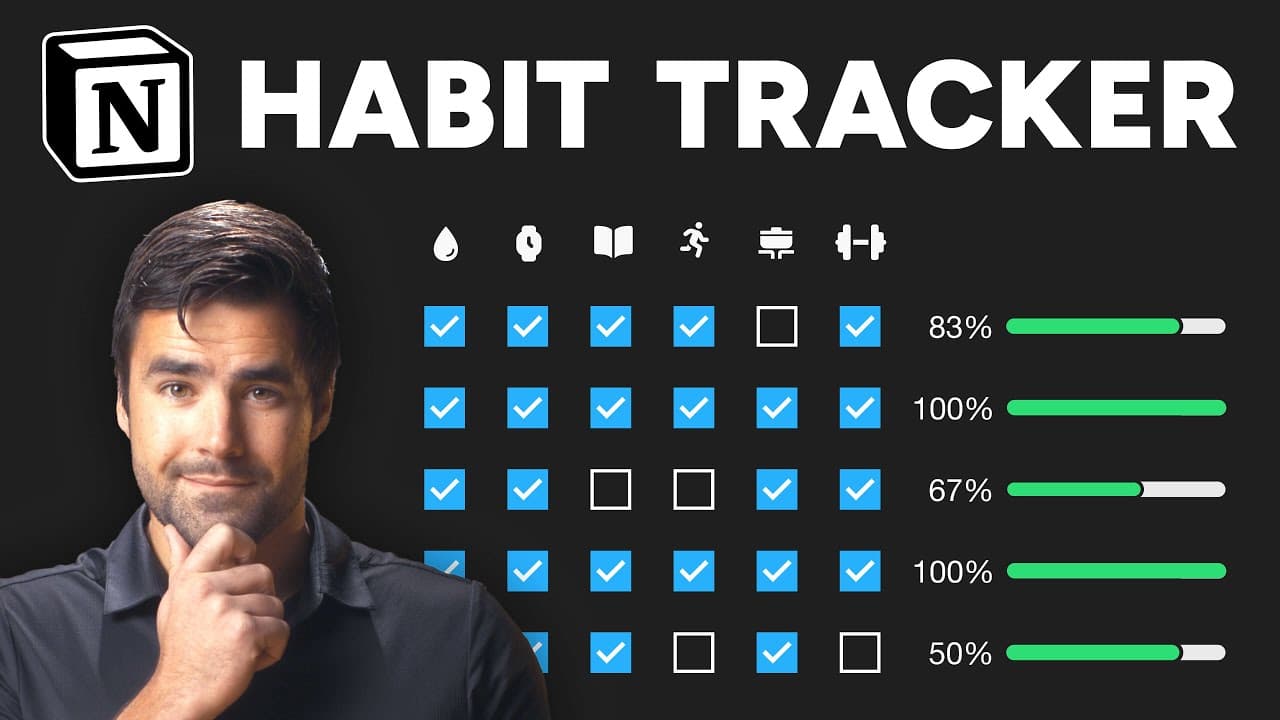
Build a habit tracker in Notion by starting with a reusable checklist, then progress to dated records and a flexible database with checkbox properties. The tutorial presents five fully functioning levels, from a basic to-do list to an advanced tracker with a day score and counters for current and longest streaks. Read on for the exact setup steps, including the New Day button, dynamic dates, icons, tables, and gallery cards.
Transcript
In this video, I'm going to teach you how to build a habit tracker in Notion at five levels of complexity. We'll start from the absolute basics, the to-do list style habit tracker, eventually work our way into databases. And finally, at level five, end up with an extremely advanced habit tracker with a day score property and a streak counter that c... Read More
Key Insights
- A to-do list habit tracker is the simplest possible version in Notion, created by typing the bracket syntax to make checkboxes. The workflow is to check habits off during the day and uncheck them the next morning, which is how Matt D'Avella tracked his habits in a separate app.
- Template buttons in Notion let you regenerate a habit checklist on demand. Choosing the insert blocks into the current page action opens a mini Notion editor where you build the exact block structure you want duplicated each time the button is clicked.
- The @today mention offers two options, a fixed date such as March 5th 2024, and date when duplicated. The second option is the useful one for habit trackers because it resolves to whatever the specific day is when the button is clicked.
- Databases are chosen over to-do lists for flexibility, letting the same habit records appear as gallery cards or table rows. They also make it possible to track stats, which is what levels four and five build on top of the level three foundation.
- Checkbox properties are the simplest way to represent individual habits in a database. Giving each property a representative icon lets you scrunch the table column down to icon width only, while hovering still reveals a tooltip with the full property name.
- Duplicating a finished checkbox property is faster than building each habit from scratch. After duplicating, you only rename the copy and swap the icon, which produces a matrix of checkboxes that can be ticked off as the day progresses.
- A date property enables sorting the habit database so the current day appears at the top. The sort is configured on the date field in descending order, which keeps today's entry visible without scrolling through past records.
- A recurring database template creates a new habit journal entry every single day automatically, defaulting to midnight creation. This guarantees a record exists even on days you forget to track, so missed habits show up as evidence rather than as absent rows.
- "Every single level is going to be a fully functioning habit tracker, so you can go through as much of the video as you want." (0:16)
- "And when he woke up the next day, he would uncheck all of those habits and check them off again." (0:52)
- "And it's always going to be the specific day when you click the button." (2:24)
- "And now when I hit new day, there is my habit tracker for the day." (3:05)
- "So to keep things simple, we are going to use checkbox properties for each habit." (4:12)
Install to Summarize YouTube Videos and Get Transcripts
Explore YouTube Video Summarizer or Get YouTube Transcript Extractor
Questions & Answers
Q: How do you build a habit tracker in Notion from scratch?
Start with a to-do list by using the back and forward bracket syntax, then add each habit beside a checkbox. For more flexibility and daily records, create a New Day template button or an inline database with checkbox properties for every habit.
Q: What are the five levels of the Notion habit tracker?
The tracker begins with an extremely simple to-do list and then adds dated daily records through a template button. Later levels use a database, improve statistics tracking, and culminate in an advanced tracker with a day score plus current and longest streak counters for each habit.
Q: How does the simplest to-do list habit tracker work?
Create a to-do list with the back and forward bracket syntax, then enter habits such as drink water. Check each habit during the day, and uncheck everything the next morning so the same list can be used again.
Q: How do you create a New Day button for a Notion habit tracker?
Type slash to add a button, name it New Day, and choose the action that inserts blocks into the current page. Build the duplicated content inside the button editor using a heading, a dynamic date, a horizontal rule, two columns, and the habit checkboxes.
Q: How do you make each New Day record show the correct date?
Type the at symbol, search for today, and select the date when duplicated option. This uses the specific day when the button is clicked, unlike the fixed March 5th, 2024 option shown in the tutorial.
Q: Why use a Notion database for habit tracking?
A database provides flexibility because daily records can appear as gallery cards or table rows, with habits checkable in either view. It also supports better statistics tracking in the more advanced levels.
Q: How do you create habit properties in a Notion database?
Add an inline database, name it Habits, and begin in a table layout because properties are easier to create there. Use one checkbox property for each habit, then give every property a descriptive name and representative icon.
Q: How do you make a compact checkbox table for habits?
Shrink each habit property column until only its representative icon is visible. The full property name remains available in a tooltip when you hover over the icon, producing a compact table for checking off habits.
Summary & Key Takeaways
-
The tutorial covers five levels of habit tracker complexity in Notion. Level one is a plain to-do list built with bracket syntax, where habits are checked off during the day and unchecked the next morning. This mirrors what Matt D'Avella did in a different app, believed to be Apple Notes, which is why it is included for thoroughness.
-
Level two introduces a template button named New Day with a sun emoji. The button action inserts blocks into the current page, containing a heading one with an @today mention set to date when duplicated, a horizontal rule made with a triple dash, and a two column layout holding the habit checkboxes. Clicking it produces a fresh dated record.
-
Level three replaces the to-do lists with an inline database called Habits, built first in table layout because properties are easier to create there. Each habit is a checkbox property with a representative icon, columns are scrunched to icon width, a date property enables descending sort, a recurring daily template is set as default, and a gallery view is added with page content preview set to none.
Read in Other Languages (beta)
Share This Summary 📚
Summarize YouTube Videos and Get Video Transcripts with 1-Click
Try YouTube Summary with ChatGPT & Claude or YouTube Transcript Generator
Explore More Summaries from Thomas Frank Explains 📚


Summarize YouTube Videos and Get Video Transcripts with 1-Click
Try YouTube Summary with ChatGPT & Claude or YouTube Transcript Generator