How to scrape YouTube transcripts with n8n and Airtable
TL;DR
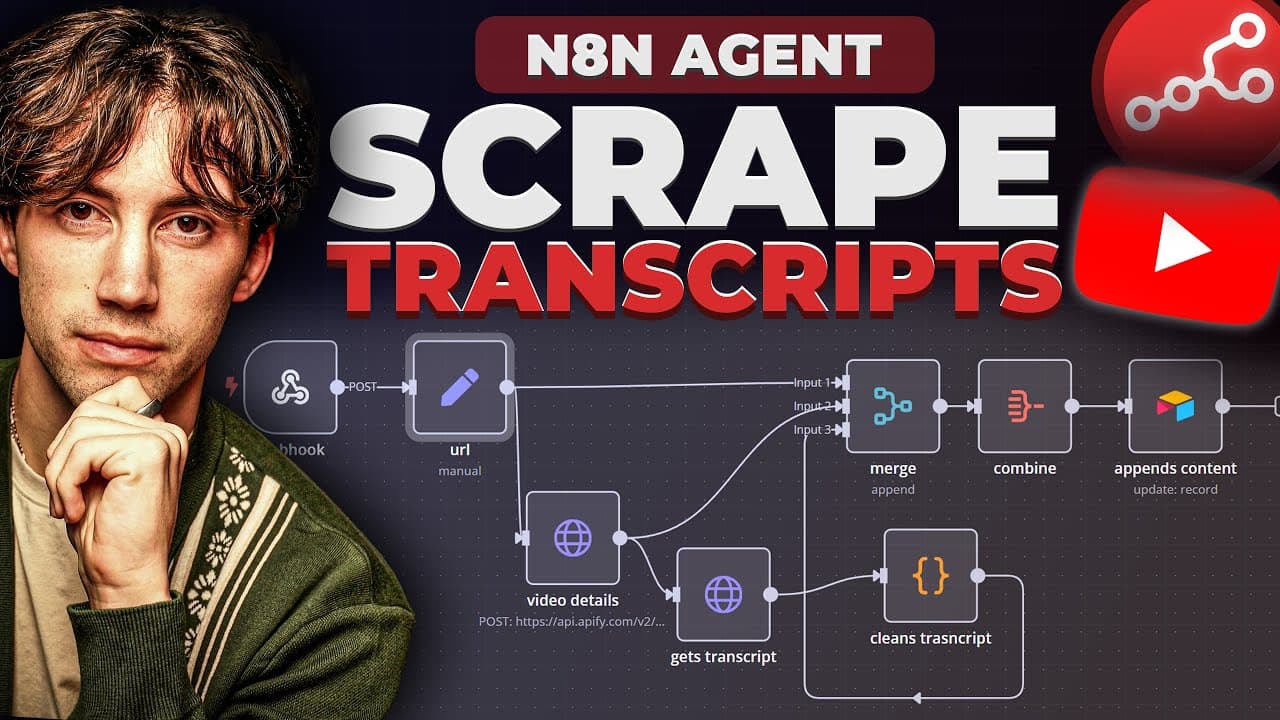
You can automatically fetch a YouTube transcript with a form driven Airtable workflow and trigger a background n8n automation. The system saves the transcript to Airtable, then optionally vectorizes it in a vector store for quick Q&A. It uses a webhook, an Apify key, and a Pinecone-like vector database to enable search and retrieval across transcripts.
Transcript
today I'm going to show you how I built this three-part workflow that allows me to grab YouTube transcripts put the entire transcript within an air table database and then I can actually later on vectorize that within a rag like system that allows me to talk to an agent about any YouTube video so I can pick out little parts of the video ask questio... Read More
Key Insights
- Transcripts are stored in Airtable with fields for video name, description, transcript, and video URL.
- A form view is created in Airtable to simplify input of video URLs and trigger the automation.
- A webhook connects Airtable to the n8n workflow so new submissions start the process automatically.
- The automation updates the record with the video URL and prepares data for downstream tasks.
- An HTTP request and a code node are used to fetch and clean the transcript from YouTube.
- The workflow includes an Apify setup and an API key to access transcript data.
- Transcript data is then added to a vector store like Pinecone for fast context-aware querying.
- The system enables posing specific questions to the transcripts and retrieving precise answers from the stored content.
- More videos from this channel:
- More from this channel: AI Foundations
Install to Summarize YouTube Videos and Get Transcripts
Explore YouTube Video Summarizer or Get YouTube Transcript Extractor
Questions & Answers
Q: How to trigger transcript scraping from a YouTube URL in Airtable?
The video shows creating a form in Airtable that accepts a video URL. When the form is submitted, an automation triggers and sends a webhook to the n8n workflow. The automation then updates the record with the URL and passes the information along to fetch and store the transcript, enabling a smooth, repeatable process for new videos.
Q: What tools are required to set up this YouTube transcript workflow?
The setup requires Airtable to store video data and transcripts, n8n to orchestrate the workflow, Apify for data access or scraping, and a vector store such as Pinecone for indexing transcripts. Additionally, you connect via a webhook, and you may use a code node to clean and structure the transcript before storage, ensuring the data is ready for vectorization.
Q: How does the vectorization step integrate with the transcript workflow?
Once transcripts are stored in Airtable and the workflow completes initial processing, a step adds the transcript records to a vector database. This enables context-aware querying where you can ask questions about the transcript and retrieve relevant parts from the indexed content, supporting granular, video-specific research.
Q: What is the purpose of the Apify key in this workflow?
The Apify key is referenced as part of the tool stack required to access or fetch transcript data efficiently. It contributes to the cost efficiency and accessibility of the scraping process, allowing the automation to retrieve transcripts reliably as part of the overall data pipeline that feeds Airtable and the vector store.
Q: How can you perform a quick search against stored transcripts?
With transcripts indexed in a vector store, you can input a targeted query and the system returns contextually relevant segments from the stored transcripts. The design supports searching across thousands of characters long transcripts, enabling precise retrieval of information mentioned in the video.
Q: What are the stages labeled in the Airtable workflow and why?
The Airtable base includes stages such as transcript complete and vectorized to indicate progress. This labeling helps track which transcripts have been fully obtained and stored, and which have been vectorized for search, guiding users through the data readiness lifecycle.
Q: Can this setup handle multiple videos and maintain organization?
Yes, the workflow is designed to scale by storing each video as a separate record with fields for video name, description, transcript, and URL. The vector store aggregates all transcripts, enabling cross-video research while keeping data organized per video and easily retrievable.
Q: What makes this approach useful for deep research?
The combination of Airtable, n8n, and a vector store enables you to systematically collect transcripts, structure data, and access it with contextual queries. This supports deep research by letting you extract and analyze specific statements from long videos without manual note taking, while still preserving full transcript context.
Summary & Key Takeaways
-
This video demonstrates creating an Airtable base to store YouTube video data, including a transcript field and a URL field, and uses a form view to input the video URL. It then wires up a form submission to trigger an n8n workflow via a webhook, updating records and preparing data for downstream processing.
-
The tutorial walks through setting up a three-part workflow to fetch transcripts, store them, and vectorize for a RAG setup. It highlights the role of Apify, Airtable, and a vector store for enabling conversational access to transcript content.
-
The overall workflow enables granular retrieval from transcripts by indexing and storing data, then querying it with context from a vector database. The approach supports deep research and agent-backed exploration of video content without manual copying or copying long transcripts by hand.
Read in Other Languages (beta)
Share This Summary 📚
Summarize YouTube Videos and Get Video Transcripts with 1-Click
Try YouTube Summary with ChatGPT & Claude or YouTube Transcript Generator
Explore More Summaries from AI Foundations 📚

Summarize YouTube Videos and Get Video Transcripts with 1-Click
Try YouTube Summary with ChatGPT & Claude or YouTube Transcript Generator