How to Automate Work With Grok Bot Agents
TL;DR
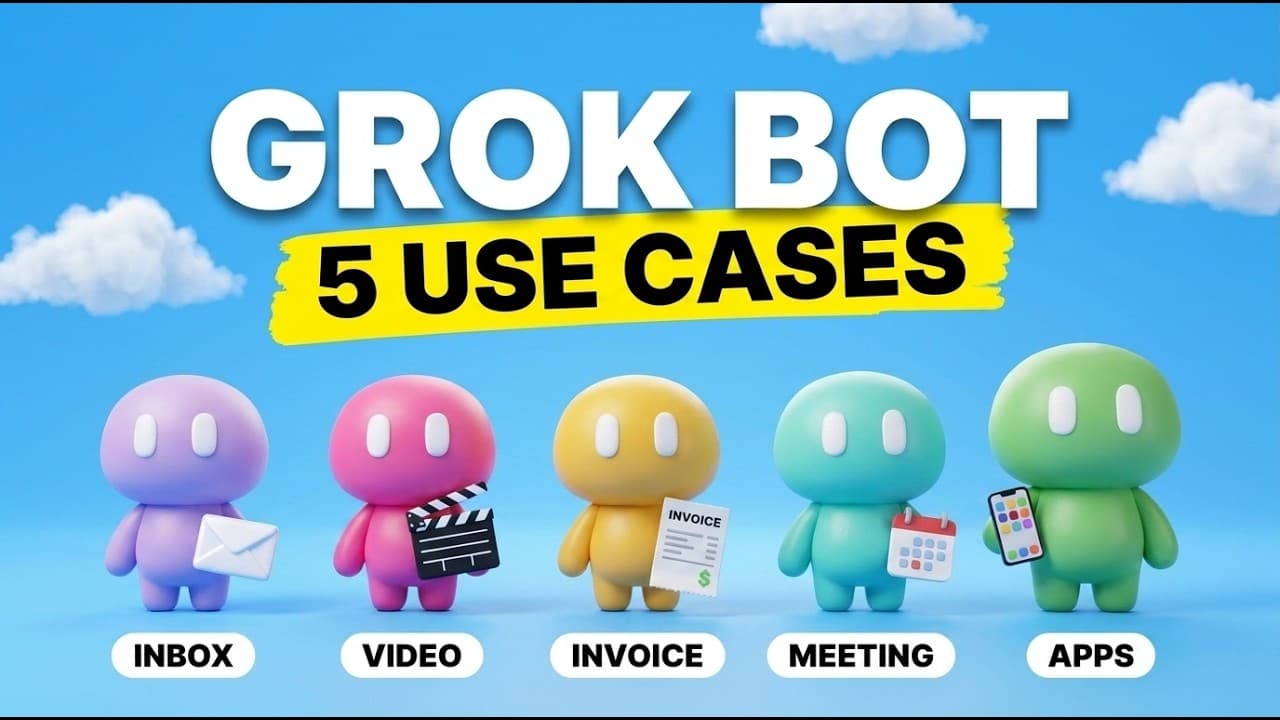
Grok Bot can coordinate specialized AI agents through individual and group chats, allowing one agent to collect information and another to turn it into actionable work. Demonstrated workflows include converting Gmail messages into prioritized ClickUp tasks and generating product advertisements from phone photos through reusable skills and the Higgsfield plugin.
Transcript
SpaceX just dropped Grockbot, the new AI agent platform that lets you text multiple agents at once to get work done for you. And while everybody is talking about it, I haven't seen many cool use cases for this. So, in this video, I'm going to show you five use cases that I found where we can have multiple agents literally texting each other in orde... Read More
Key Insights
- Grok Bot is an AI agent platform built around direct messages and group chats, where multiple specialized agents can communicate with one another to complete related tasks for a user.
- An inbox triage agent can review Gmail messages and Google Calendar information, identify items needing attention, and organize categories such as receipts, financial matters, and collaboration opportunities into a daily briefing.
- The ClickUp workflow converts important email items into project tasks, adding priority levels and due dates so the user and team can see, assign, and track work in shared list or board views.
- A chief of staff agent can receive findings from the inbox agent and handle administrative follow-up, illustrating how separate agents can divide responsibilities instead of placing an entire workflow inside one general-purpose bot.
- Grok Bot works through desktop and mobile applications whose conversations remain synchronized, allowing a task submitted from a phone, such as creating an advertisement from product photos, to appear in the desktop conversation as well.
- A skill is a repeatable workflow described in a Markdown file, giving an agent consistent instructions for completing a task in a particular style without requiring the user to provide the same detailed prompt each time.
- The Higgsfield plugin gives the demonstrated video agent access to 86 tools for generating assets including images, video, and audio, although the presenter notes that using the Higgsfield service requires a paid plan.
- Reference-image quality affects the resulting product asset, so the demonstration captures several phone photos of the camera before asking the agent to generate an advertisement using the previously installed product-ad skill.
- More videos from this channel:
- More from this channel: Brock Mesarich | AI for Non Techies
Install to Summarize YouTube Videos and Get Transcripts
Explore YouTube Video Summarizer or Get YouTube Transcript Extractor
Questions & Answers
Q: What is Grok Bot and how does it work?
Grok Bot is presented as an AI agent platform that functions like a messaging application. Users chat with specialized bots individually or place several agents in configured group chats. Those agents can communicate with one another and divide a workflow into specialized tasks. The demonstrated interface includes content, invoice, chief of staff, video, and inbox triage agents.
Q: How can Grok Bot automate email triage?
An inbox triage agent can connect to Gmail, review the user's messages on a scheduled trigger, and prepare a high-priority morning briefing. In the demonstration, it also checks Google Calendar information and organizes items requiring attention, including receipts, financial messages, and collaboration opportunities. The agent can then pass urgent work into a broader administrative workflow.
Q: How does Grok Bot turn emails into ClickUp tasks?
The user instructs the inbox agent to inspect email, identify the highest-priority obligations, and add them to a ClickUp board. The agent creates tasks with urgency levels and due dates, allowing both the user and the team to see the resulting work. ClickUp's board view can then show tasks as to do or in progress.
Q: Why use multiple Grok Bot agents in one workflow?
Multiple agents allow each bot to specialize in a different part of the work. The example pairs an inbox triage agent, which gathers and prioritizes email information, with a chief of staff agent responsible for administrative tasks. Their communication lets one agent's findings become another agent's actions, while shared project tasks keep the user and team informed.
Q: What is a Grok Bot skill?
A Grok Bot skill is described as a repeatable workflow stored in a Markdown file that explains how to perform a particular task. It gives the agent consistent instructions about the desired process and style. As a result, the user can make a short request, such as generating a product advertisement, without rewriting a detailed production prompt every time.
Q: How do you install the demonstrated video skills?
The presenter directs users to a linked download page, where they can enter a price of $0, select the download option, and obtain a zip file. The zip file is then uploaded into the relevant Grok Bot agent with a request to upload the skills. Installed skills can be accessed by typing a slash in the chat interface.
Q: How can Grok Bot create a product advertisement from phone photos?
The workflow uses the Grok Bot mobile app, a video agent, an installed product-ad skill, and the Higgsfield plugin. The user takes several reference photos of a product, sends them to the agent, and enters a simple request to generate a product advertisement. The skill supplies the recurring style instructions, and the completed result also synchronizes to the desktop app.
Q: What does the Higgsfield plugin add to Grok Bot?
The Higgsfield plugin connects the agent to an all-in-one creative AI platform. After the user creates an account, adds the plugin, and authorizes access, the demonstration shows 86 available tools covering image, video, and audio generation. The presenter notes that Higgsfield requires payment, but prefers it for accessing multiple creative models through one configured service.
Summary & Key Takeaways
-
Grok Bot presents AI agents through a chat interface resembling familiar messaging applications. Users can create specialized bots, communicate with them from desktop or mobile devices, and place multiple agents in group chats. The central idea is that specialists can exchange information and coordinate different parts of a larger workflow.
-
The inbox workflow connects Gmail, Google Calendar, and ClickUp. An inbox triage agent reviews messages, identifies important items, and prepares a briefing. It can convert email obligations into ClickUp tasks with urgency levels and due dates, making the resulting workload visible to both the user and the wider team.
-
The creative workflow uses reusable skills and the Higgsfield plugin to produce image, video, and audio assets. A skill stores instructions for a repeatable style, reducing the need for detailed prompts. In the demonstration, phone photos of a camera are submitted with a simple request to generate a product advertisement.
Read in Other Languages (beta)
Share This Summary 📚
Summarize YouTube Videos and Get Video Transcripts with 1-Click
Try YouTube Summary with ChatGPT & Claude or YouTube Transcript Generator
Explore More Summaries from Brock Mesarich | AI for Non Techies 📚
Summarize YouTube Videos and Get Video Transcripts with 1-Click
Try YouTube Summary with ChatGPT & Claude or YouTube Transcript Generator