How to Use Node.js Worker Threads for CPU Tasks
TL;DR
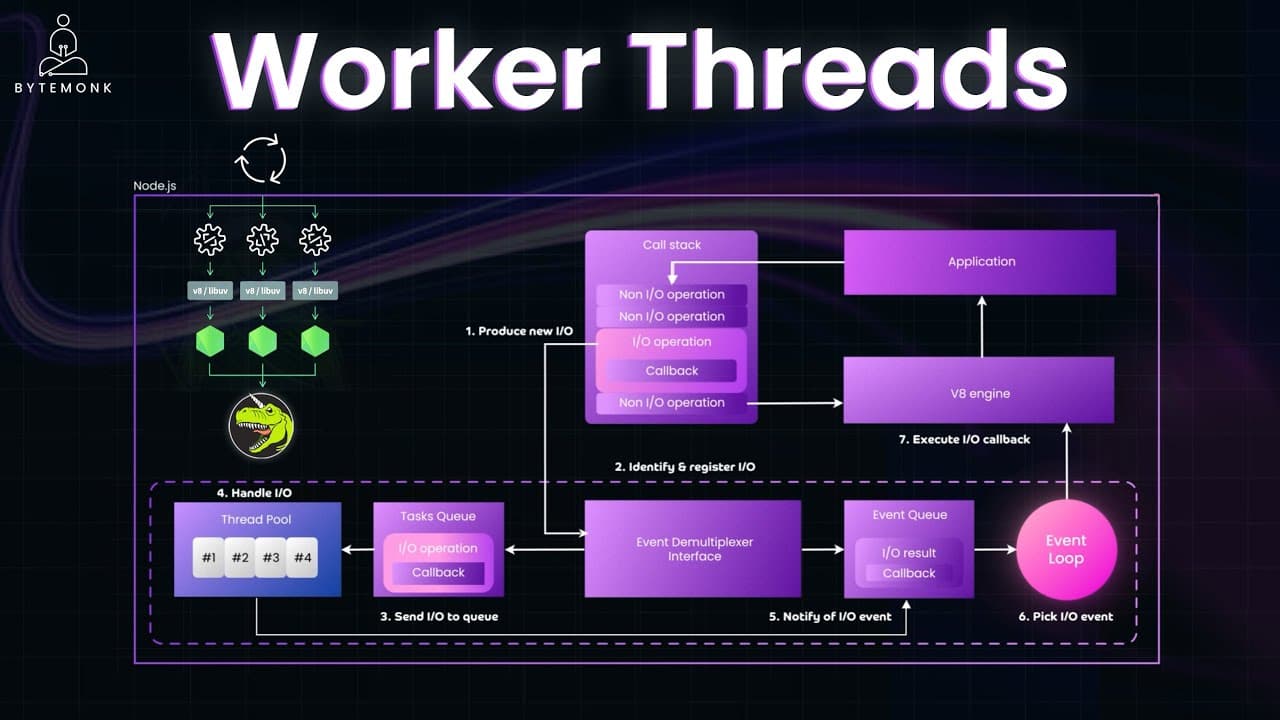
Use worker threads to move CPU-heavy JavaScript operations onto separate threads, preserving the responsiveness of Node.js's main event loop. Libuv supports non-blocking system operations through an internal thread pool, usually containing four threads by default, but it does not execute custom JavaScript logic such as large loops, mathematical processing, or JSON parsing.
Transcript
In the last video, we explored how NodeJS uses a single thread model with an event loop to efficiently handle IO tasks like reading files, making network request or quering databases without blocking the main thread. But we also saw its limitation. CPU inensive tasks like data processing, image manipulation or encryption can block the event loop ma... Read More
Key Insights
- Node.js is single-threaded at the JavaScript level, so it executes only one JavaScript task at a time. Its ability to handle many I/O operations efficiently comes from asynchronous infrastructure rather than parallel execution of application code on the main thread.
- Libuv is responsible for much of Node.js's asynchronous behavior. It places supported system-level operations into a task queue, assigns them to its internal thread pool, and returns their completed results to the event loop for callback execution.
- The libuv thread pool usually contains four threads by default, although its size can be changed through an environment variable. These threads handle operations such as file access, cryptographic work, DNS lookups, and compression rather than arbitrary JavaScript application logic.
- Async and await provide cleaner syntax for asynchronous code without making the entire program wait. An awaited file read pauses only its containing async function, while the event loop remains available to process other tasks until the file operation completes.
- CPU-heavy JavaScript blocks the main event loop when it runs directly on the main thread. A loop that sums numbers up to one billion consumes processing time and delays subsequent statements, demonstrating why computational work can make an application unresponsive.
- Libuv's background threads cannot execute custom JavaScript logic such as mathematical loops or JSON parsing. The internal pool is designed for supported system-level operations written in C or C++, so it does not solve event-loop blocking caused by application computations.
- Worker threads provide true parallel execution for CPU-heavy JavaScript by running code on separate threads. Each worker behaves like a small Node.js environment with its own memory and event loop, leaving the main thread free to continue serving users.
- Worker results can be integrated with async and await by wrapping worker creation in a promise. The main process resolves that promise when the worker sends a message and handles failures through the worker's error event, keeping coordination clear and non-blocking.
Install to Summarize YouTube Videos and Get Transcripts
Explore YouTube Video Summarizer or Get YouTube Transcript Extractor
Questions & Answers
Q: Why do CPU-heavy tasks block Node.js applications?
CPU-heavy tasks block Node.js applications because custom JavaScript executes on the main thread, one task at a time. A long mathematical loop, data-processing routine, image operation, encryption task, or JSON-parsing operation can occupy that thread for an extended period. While it is running, the event loop cannot execute other JavaScript work, so later statements and application activity are delayed.
Q: What is the difference between libuv and worker threads?
Libuv supports Node.js asynchronous behavior by handling certain system-level operations through the operating system or its internal thread pool. Its threads do not run custom JavaScript logic. Worker threads, by contrast, create separate environments that can execute JavaScript in parallel. They are therefore intended for CPU-heavy application code that would otherwise block the main event loop.
Q: How does Node.js process non-blocking file reads?
Node.js registers the file operation and hands the asynchronous work to libuv, which manages it behind the scenes through the operating system or its thread pool. The main event loop remains free while the file is being read. When the operation finishes, completion is reported, the event loop receives the task, and the associated JavaScript function resumes with the result.
Q: Does async and await prevent CPU-heavy JavaScript from blocking?
Async and await make asynchronous code easier to read, but the example only shows non-blocking behavior because the awaited file operation is handled outside the main JavaScript thread. Await pauses the containing async function without blocking the rest of the program. A CPU-heavy JavaScript loop still runs on the main thread and continues blocking other JavaScript until its computation finishes.
Q: What operations are handled by the libuv thread pool?
The libuv thread pool handles supported system-level operations such as reading and writing files, cryptographic operations, DNS lookups, and compression. These tasks are implemented in C or C++ and can execute in the background away from the main JavaScript thread. When an operation completes, its result is returned through the event loop so the related JavaScript code can continue.
Q: How do Node.js worker threads keep an application responsive?
Worker threads keep an application responsive by moving CPU-heavy JavaScript onto separate threads. The main event loop can continue processing requests and executing lightweight application logic while a worker performs the expensive computation in parallel. After completing its task, the worker sends the result back to the main thread, so heavy processing does not freeze the primary JavaScript execution path.
Q: How can a worker thread return a result to the main process?
A worker can return its computed result through parentPort. In the example, worker.js performs a large summation and sends the final value to the main process as a message. The main code listens for the worker's message event and resolves a promise with that value. It also listens for the error event so failures can be handled separately.
Q: When should Node.js worker threads be used?
Worker threads should be used when custom JavaScript performs CPU-heavy work that would occupy the main thread, such as large mathematical loops, data processing, image manipulation, encryption, or JSON parsing. Ordinary I/O tasks such as file access, database queries, and network requests already benefit from Node.js's asynchronous model, so the presented reason for workers is computational JavaScript rather than routine I/O.
Summary & Key Takeaways
-
Node.js executes JavaScript one task at a time on its main thread, yet it handles I/O-heavy workloads efficiently through libuv and the event loop. File access, cryptographic operations, DNS lookups, and compression can run in the background, allowing the main thread to continue processing other work until results become available.
-
Libuv manages asynchronous system-level work with a task queue and an internal thread pool, usually containing four threads by default. After a task finishes, an event demultiplexer signals completion, the event loop receives the completed task, and the associated callback returns to the call stack for execution by the V8 engine.
-
CPU-heavy JavaScript cannot benefit from libuv's background threads because custom loops and mathematical logic still execute on the main thread. Worker threads solve this limitation by running JavaScript in separate environments with independent memory and event loops, then returning results through messages while the main application remains responsive.
Read in Other Languages (beta)
Share This Summary 📚
Summarize YouTube Videos and Get Video Transcripts with 1-Click
Try YouTube Summary with ChatGPT & Claude or YouTube Transcript Generator
Explore More Summaries from ByteMonk 📚



Summarize YouTube Videos and Get Video Transcripts with 1-Click
Try YouTube Summary with ChatGPT & Claude or YouTube Transcript Generator