How to Build a Grok Bot Team for Automated Work
TL;DR
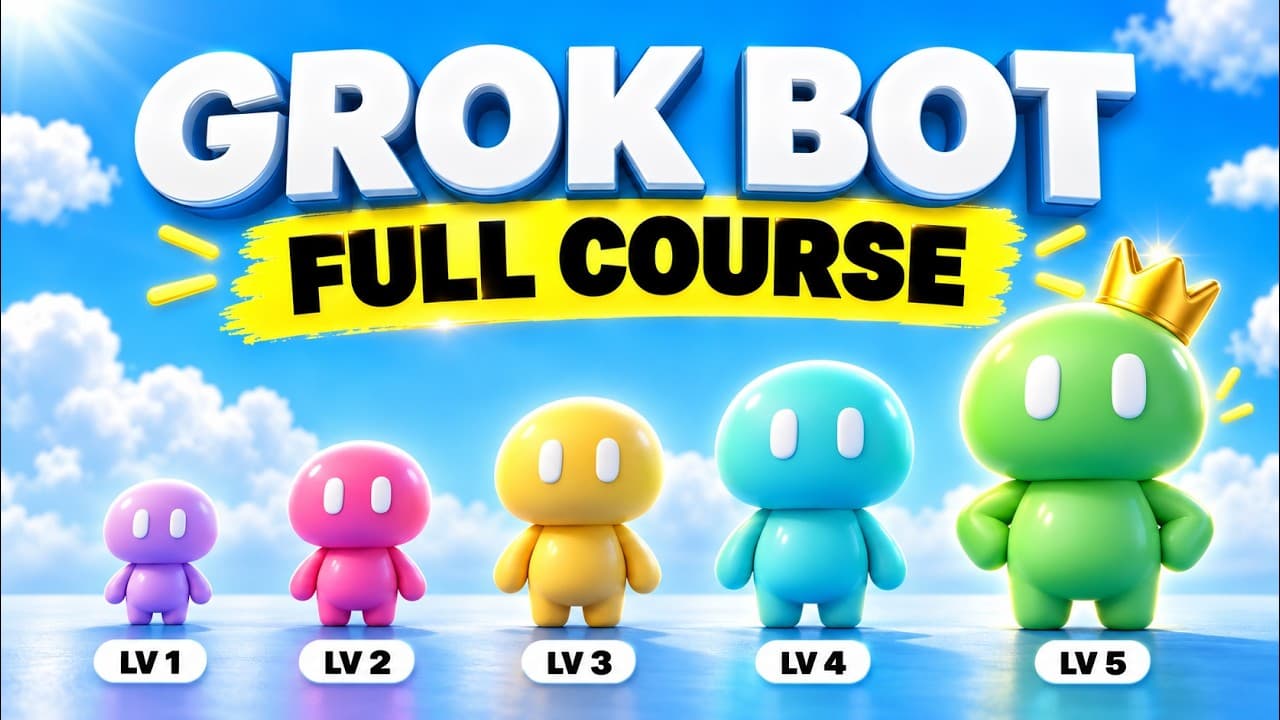
Build specialized Grok Bot agents, connect them to everyday tools, and let a main agent delegate work across the team. The course organizes this process into seven levels, progressing from simple messages and app connections to routines, memory, skills, templates, and coordinated agents that can handle content, meetings, email, invoices, and personal tracking.
Transcript
Grokbot is hands-down the most powerful AI tool you can use right now as a non-technical person. You can text it like a real employee from your phone, and it can do the work while you're away. Right now, I have an entire team of AI agents working for each other. They make Instagram carousels, post them, and create DM automations automatically. They... Read More
Key Insights
- Grok Bot is designed for people who want AI agents without managing terminal commands, Python, configuration files, hosting, or servers. Its desktop and mobile apps let users begin creating agents and assigning work after downloading the app and signing in.
- Hermes Agent is free and open source, but users still pay for whichever AI model they connect to it. Grok Bot requires a paid Super Grok or Cursor plan, with the additional cost exchanged for a simpler setup and less technical back-end work.
- Grok Bot agents maintain persistent conversations instead of treating every interaction as an isolated task or chat. This allows a specialized agent to remember relevant patterns, such as a recurring breakfast and protein target, and proactively follow up throughout the day.
- Specialized agents are organized around clear responsibilities, including health, content, inbox triage, invoices, brand partnerships, Instagram carousels, and short-form content. Descriptive role names make each bot's purpose immediately understandable without requiring human-style names.
- Tool connections allow Grok Bot to work across the user's technology stack instead of merely answering messages. Built-in plugins provide native integrations, while MCP can bring in custom tools for services and workflows that are not covered by the standard options.
- A content workflow can turn a YouTube video into an Instagram carousel, publish it, and connect a DM automation. The course uses this sequence to show how agents can move beyond content generation and perform several linked operational steps.
- Routines, memory, skills, and templates make recurring work more systematic. These capabilities let agents retain useful context, follow repeatable procedures, and reuse established formats instead of requiring the user to describe the entire process for every new assignment.
- Agent teams work by allowing specialized bots to communicate and delegate tasks among themselves. A main agent can coordinate email, brand partnership, content, and invoice agents, creating a structure that resembles a chief of staff directing employees with distinct responsibilities.
- More videos from this channel:
- More from this channel: Brock Mesarich | AI for Non Techies
Install to Summarize YouTube Videos and Get Transcripts
Explore YouTube Video Summarizer or Get YouTube Transcript Extractor
Questions & Answers
Q: How do you start using Grok Bot as a beginner?
Start by downloading the Grok Bot app, signing in, and creating an agent for one clearly defined responsibility. The course recommends beginning with ordinary messages so the interaction feels like texting a friend or employee. Grok Bot can run on a macOS desktop and a phone, allowing users to assign tasks even when they are away from their computer.
Q: How is Grok Bot different from Hermes Agent and OpenClaw?
Grok Bot arrives as a hosted, assembled product that users can operate through an app, while Hermes Agent and OpenClaw require more technical setup involving the terminal, Python, and configuration files. Hermes Agent provides greater control over hosting, models, systems, and workflows. Grok Bot prioritizes ease of use for beginners and non-technical users who do not want to maintain infrastructure.
Q: How much does Grok Bot cost compared with Hermes Agent?
The source does not provide an exact price. It states that Grok Bot requires a paid Super Grok or Cursor plan. Hermes Agent is free and open source, although users must still pay for the AI model they choose, such as a cloud subscription or API. The stated tradeoff is cost for convenience versus lower harness cost and greater technical responsibility.
Q: How do persistent conversations improve Grok Bot agents?
Persistent conversations allow each agent to retain context across days or weeks instead of starting from a blank task history. In the health example, the agent remembers a usual breakfast, records protein consumed, knows the daily protein goal, and sends proactive follow-ups. This continuity makes an agent behave more like an ongoing teammate than a one-time chat session.
Q: How can Grok Bot connect to everyday business tools?
Grok Bot can connect through built-in plugins and through custom tools supplied with MCP. These connections let agents pull information from services such as email and ClickUp or work with tools used for images, videos, web research, meetings, and automation. Once connected, an agent can perform tasks across the technology stack from instructions sent through desktop or mobile.
Q: How can Grok Bot automate a content workflow?
The course demonstrates a workflow that converts a YouTube video into an Instagram carousel, automatically publishes the result, and wires a DM automation to the post. Higgsfield is used while building a content agent, and Blotato appears among the listed resources. The larger lesson is to connect several production and distribution steps instead of stopping after content generation.
Q: How can meeting notes be delegated to multiple agents?
The course uses Granola for a meeting agent and shows one meeting note being delegated to five agents. Meeting action items can be extracted and sent to specialized agents responsible for the relevant work. Tracking agents in ClickUp provides an additional organizational layer, while routines help turn delegation into a repeatable process instead of an isolated instruction.
Q: How do you turn separate Grok bots into an agent team?
Create specialized agents with distinct responsibilities, then give a main agent a coordinating role similar to a chief of staff. The main agent can contact an email agent, which can involve a brand partnership agent or another specialist as needed. Allowing agents to interact and delegate connected tasks is the key step that turns separate bots into a functioning team.
Summary & Key Takeaways
-
Grok Bot is presented as an accessible AI agent platform for beginners and non-technical users. Unlike Hermes Agent and OpenClaw, it does not require terminal commands, Python, configuration files, or self-hosting. Users can download the app, sign in, create specialized agents, and assign work through ordinary messages on desktop or mobile.
-
The course develops Grok Bot usage across seven levels: messaging, connecting tools, tracking agents in ClickUp, creating routines, adding memory and skills, using templates, and coordinating agent teams. Demonstrations include producing Instagram carousels from YouTube content, publishing posts, creating DM automations, researching live web information, and processing meeting notes.
-
The most advanced workflow uses multiple specialized agents that communicate with one another. A main agent can act like a chief of staff, sending requests to email, brand partnership, content, invoice, or other agents. This structure turns isolated bots into a coordinated team that can delegate and complete connected tasks while the user is away.
Read in Other Languages (beta)
Share This Summary 📚
Summarize YouTube Videos and Get Video Transcripts with 1-Click
Try YouTube Summary with ChatGPT & Claude or YouTube Transcript Generator
Explore More Summaries from Brock Mesarich | AI for Non Techies 📚
Summarize YouTube Videos and Get Video Transcripts with 1-Click
Try YouTube Summary with ChatGPT & Claude or YouTube Transcript Generator