How to build a B2B SaaS AI support platform
TL;DR
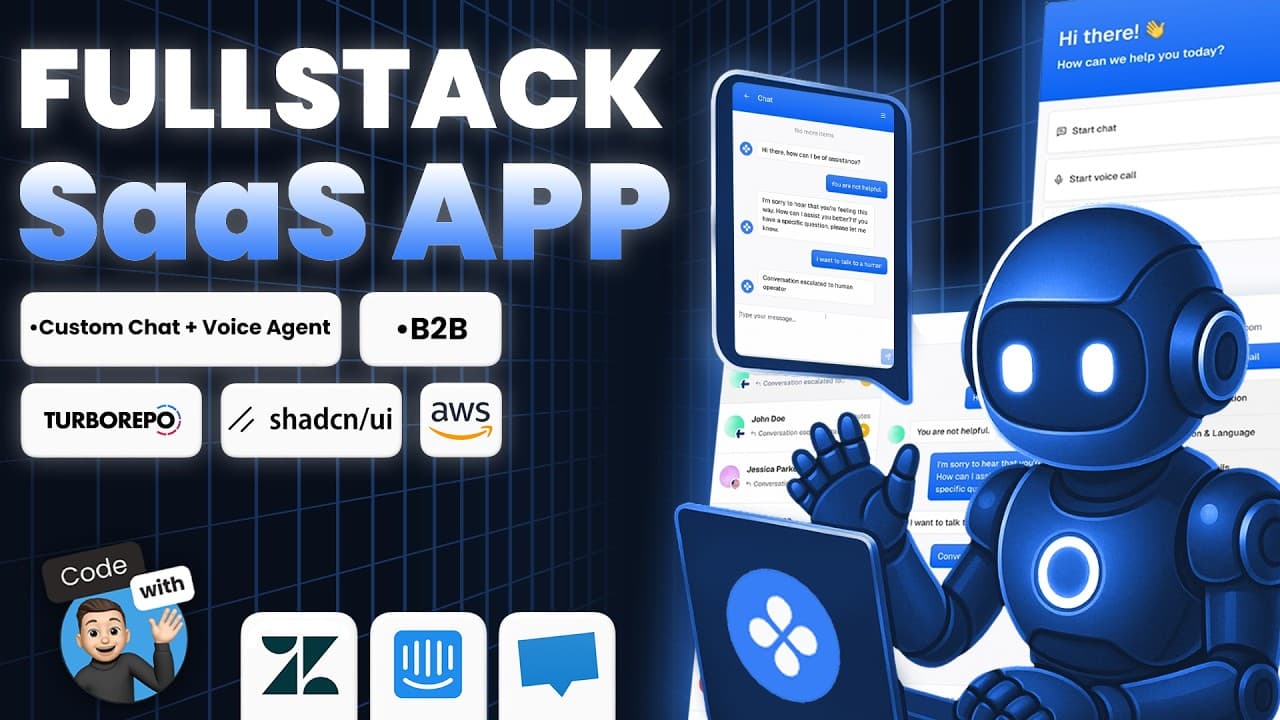
The video shows how to assemble an end-to-end AI support platform using Convex Rag for document embeddings, retrieval augmented generation, and AI search. It covers secure per tenant credentials, billing, a three-app Turbo repo, and integration with VAPI, AWS, Clerk, and Sentry. The walkthrough emphasizes embedding content from documentation and learning materials to ground AI answers in user content.
Transcript
What if your support platform could talk to your users, carry full conversations over voice or chat, detect frustration, escalate when needed, and resolve issues automatically? What if the AI could learn your product by reading your documentation? No fine-tuning, just real answers grounded in your content. That's exactly what we're building. This i... Read More
Key Insights
- The platform uses document embeddings and retrieval augmented generation to provide grounded AI responses.
- The system architecture includes three separate apps within a Turbo repo: an operator dashboard, a chat widget, and a developer toolkit.
- Embedding content is guided by an extraction workflow that converts uploaded files to text for indexing and querying.
- Convex Rag is introduced as a component used for building embeddings and retrieval pipelines.
- The setup includes securing per-tenant credentials and managing access with AWS Secrets Manager.
- Sentry provides full stack error tracking, real-time alerts, and session replays across front end and back end.
- Clerk handles authentication, team management, and subscription billing within the ecosystem.
- The video emphasizes implementing escalation logic to hand off to humans when AI cannot resolve a conversation.
Install to Summarize YouTube Videos and Get Transcripts
Explore YouTube Video Summarizer or Get YouTube Transcript Extractor
Questions & Answers
Q: What is the core idea of building a B2B SaaS AI support platform in this video
The core idea is to build a production grade AI support platform that can converse with users, detect frustration, escalate when needed, and resolve issues automatically by grounding answers in the user content and documentation. The system uses Convex, Vappy, Clerk, and AWS to support multiple LLM providers and runs inside a Turborepo with three apps.
Q: How are embeddings generated in this tutorial
Embeddings are generated using a Convex Rag component as part of the retrieval augmented generation pipeline. The process includes handling file uploads, guessing mime types, extracting text content from documents, and then turning that content into embeddings that can be queried to provide accurate, contextual responses.
Q: What apps are included in the Turbo repository
The Turbo repository contains three apps: an operator dashboard for human oversight, a chat widget for customer conversations, and a developer toolkit for embedding the experience into other apps. This structure supports a complete end to end workflow from AI assistance to human handoffs and embedding capabilities.
Q: What roles do Convex and Rag play in the embedding workflow
Convex provides the backend actions and storage for files, while Rag delivers the retrieval augmented generation capabilities. Rag is used to build a searchable embedding index from uploaded documents, enabling AI responses that reference the user supplied content rather than generic knowledge.
Q: Which services manage authentication and billing
Authentication is managed by Clerk, while billing is also handled through Clerk with support for subscriptions. The solution integrates with AWS Secrets Manager to securely store credentials, and uses Clerk for team management and access control within the AI support platform.
Q: What is the purpose of the escalation mechanism
The escalation mechanism changes a conversation status to escalated when an operator intervenes in an unresolved discussion. This prevents the AI from continuing to respond and ensures the human agent can take over, maintaining a clear handoff path and improving customer experience.
Q: How does the video suggest handling error tracking
The tutorial uses Sentry for full stack error tracking, real time alerts, and session replays. This setup provides deep visibility across both front end and back end, helping to diagnose issues quickly during development and in production.
Q: What is the role of embeddings in knowledge base and search
Embeddings turn content from documents into a numerical representation that can be efficiently queried. This enables the knowledge base to support advanced search and retrieval, allowing the AI to fetch relevant document passages to ground its responses and improve accuracy in customer interactions.
Summary & Key Takeaways
-
The video demonstrates a multi-app Turbo repo architecture including an operator dashboard, a chat widget, and a developer toolkit for embedding the experience anywhere.
-
It explains how to generate document embeddings using a retrieval augmented generation component and how to handle text extraction from uploaded files.
-
It covers secure credential management with AWS Secrets Manager, authentication with Clerk, and billing via Clerk for a B2B SaaS product.
Read in Other Languages (beta)
Share This Summary 📚
Summarize YouTube Videos and Get Video Transcripts with 1-Click
Try YouTube Summary with ChatGPT & Claude or YouTube Transcript Generator
Explore More Summaries from Code With Antonio 📚
Summarize YouTube Videos and Get Video Transcripts with 1-Click
Try YouTube Summary with ChatGPT & Claude or YouTube Transcript Generator