How to Start Google Ads for E-Commerce Growth
TL;DR
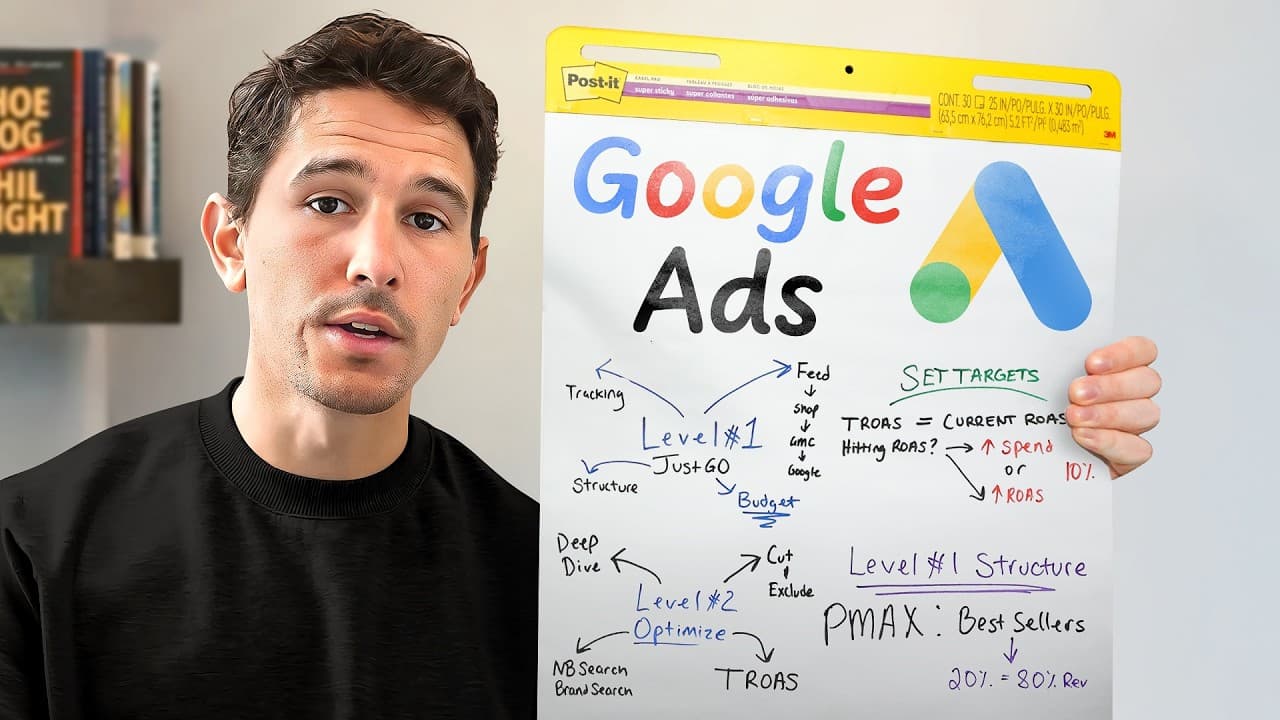
Start Google Ads by verifying conversion tracking, connecting the product feed through Merchant Center, and launching one simple Performance Max campaign focused on bestsellers. Use a budget you can afford to lose, wait at least two weeks before analyzing results, exclude irrelevant search terms, and set an initial target ROAS equal to the account’s actual return from the previous 14–30 days.
Transcript
if you can just get these three things right you are going to be 100% set up to absolutely crush it this year in Google Ads in this video I'll be condensing down what I've learned from scaling over 100 six seven eight and even 9 figure e-commerce brands that have collectively spent over $500 million to drive over a billion dollars in revenue across... Read More
Key Insights
- Accurate conversion tracking is the first non-negotiable foundation for Google Ads. Native integrations can establish tracking, but advertisers should still test several purchases, add products to carts, and inspect every important event with a pixel tag helper rather than assuming that the integration works correctly.
- Google Merchant Center is where an e-commerce product feed is hosted before products are imported into Google Ads. Connecting the store to Merchant Center and Merchant Center to the ad account enables product-based advertising and avoids being limited largely to search ads.
- One Performance Max campaign is sufficient for an advertiser beginning with approximately $50, $100, or $150 per day. A simple structure prevents a limited budget from being divided too thinly across numerous campaigns, products, angles, asset groups, and creative variations.
- A focused product selection produces greater signal density during the campaign’s initial learning period. The campaign should feature the top 20% of the catalog that generates 80% of sales, or a single expected flagship product when the business has not yet accumulated sales data.
- An appropriate starting budget is an amount the advertiser can afford to lose. Google’s algorithm requires time to identify likely purchasers, so early performance may only approach break-even before improving as the campaign gathers information and the advertiser increases spending responsibly.
- Launching the campaign is necessary to verify how products and advertisements appear in the live environment. Advertisers should search for their products, inspect the feed, click listings if useful, and compare their presence with competitors instead of stopping after completing the technical configuration.
- A detailed account review should begin after at least two weeks of data collection. The advertiser should document spending, search terms, ads, purchases, cart additions, and clicks in a single ledger, with the initial analysis potentially requiring approximately 2–6 hours depending on data volume.
- The initial target ROAS should equal the campaign’s demonstrated ROAS from the preceding 14–30 days. If the account produced a 2.5 ROAS, the first target should be 2.5, or 250%, rather than an aspirational figure unsupported by historical performance.
Install to Summarize YouTube Videos and Get Transcripts
Explore YouTube Video Summarizer or Get YouTube Transcript Extractor
Questions & Answers
Q: How should a beginner start Google Ads for an e-commerce store?
A beginner should first create the account and establish accurate conversion tracking through the e-commerce platform’s native integration. Next, the beginner should connect the product catalog to Google Merchant Center and link Merchant Center with Google Ads. The initial structure can remain limited to one Performance Max campaign featuring only bestsellers or a likely flagship product, supported by an affordable budget.
Q: How do you verify Google Ads conversion tracking?
Conversion tracking should be verified with practical tests rather than accepted as correct immediately after connecting an integration. Use a pixel tag helper, complete three or four test purchases, add products to the cart, and inspect every event that matters to the business. The goal described is to have tracking fire with 99% accuracy before campaign data is trusted for optimization.
Q: Why is Google Merchant Center important for e-commerce advertising?
Google Merchant Center hosts the product feed that allows inventory from Shopify or another e-commerce store to be imported into Google Ads. Without that connection, the advertiser may be restricted to search ads or unable to use products that depend on a shopping feed. The recommended chain connects the store to Merchant Center and then connects Merchant Center to the Google Ads account.
Q: What Google Ads campaign should a new advertiser launch first?
A new advertiser spending approximately $50 to $150 per day can begin with one Performance Max campaign. The campaign should not contain a large assortment of products, marketing angles, or creative assets. Keeping the setup simple prevents the budget from being distributed too thinly and gives Google a concentrated collection of signals from a small number of commercially important products.
Q: Which products should be included in a first Performance Max campaign?
The first Performance Max campaign should feature the top 20% of the catalog that produces 80% of sales. If the business has just started and lacks sales history, it should use the product believed to be its flagship offer. Avoid loading 100, 200, or 300 products because a smaller catalog creates denser initial signals for Google’s learning process.
Q: How much should a beginner budget for Google Ads?
The starting budget should be an amount the advertiser is genuinely comfortable losing while the campaign warms up and gathers data. The transcript mentions starting examples of $50, $100, or $150 per day, but it does not prescribe one universal amount. The central rule is affordability because the algorithm requires time to identify the people most likely to purchase the advertised products.
Q: How should Google Ads be optimized after launch?
After at least two weeks, the advertiser should conduct a detailed review of where money was spent, which search terms received spending, and which ads generated purchases, cart additions, and clicks. Findings should be written in a single ledger for complete review. Irrelevant search terms should then be excluded, and branded or non-branded search campaigns may be added as the budget grows.
Q: How should an initial target ROAS be selected?
The first target ROAS should match the account’s actual ROAS over the preceding 14–30 days, not an imaginary performance goal. For example, an account that achieved a 2.5 ROAS during the previous 30 days should initially use a target of 2.5, expressed as 250%. Setting a much higher unsupported target does not force the campaign to produce that desired return.
Summary & Key Takeaways
-
The recommended starting foundation consists of accurate conversion tracking, a connected Merchant Center product feed, and one uncomplicated Performance Max campaign. Tracking should be tested through several purchases, cart additions, and other important events. Native integrations can connect an e-commerce platform to Merchant Center and then connect Merchant Center to Google Ads.
-
A new campaign should concentrate on the top 20% of products responsible for 80% of sales, or on a likely flagship product when no sales history exists. Keeping the catalog narrow helps Google collect denser signals. The initial daily budget should be affordable to lose while the system gathers data and learns.
-
After at least two weeks, advertisers should review spending, search terms, ads, purchases, cart additions, and clicks in detail. Irrelevant search terms should be excluded, and additional branded or non-branded search campaigns can then capture demand. An initial target ROAS should match actual performance from the preceding 14–30 days.
Read in Other Languages (beta)
Share This Summary 📚
Summarize YouTube Videos and Get Video Transcripts with 1-Click
Try YouTube Summary with ChatGPT & Claude or YouTube Transcript Generator
Explore More Summaries from Sam Piliero 📚


Summarize YouTube Videos and Get Video Transcripts with 1-Click
Try YouTube Summary with ChatGPT & Claude or YouTube Transcript Generator