How to Exclude Existing Customers from Advantage Plus Ads
TL;DR
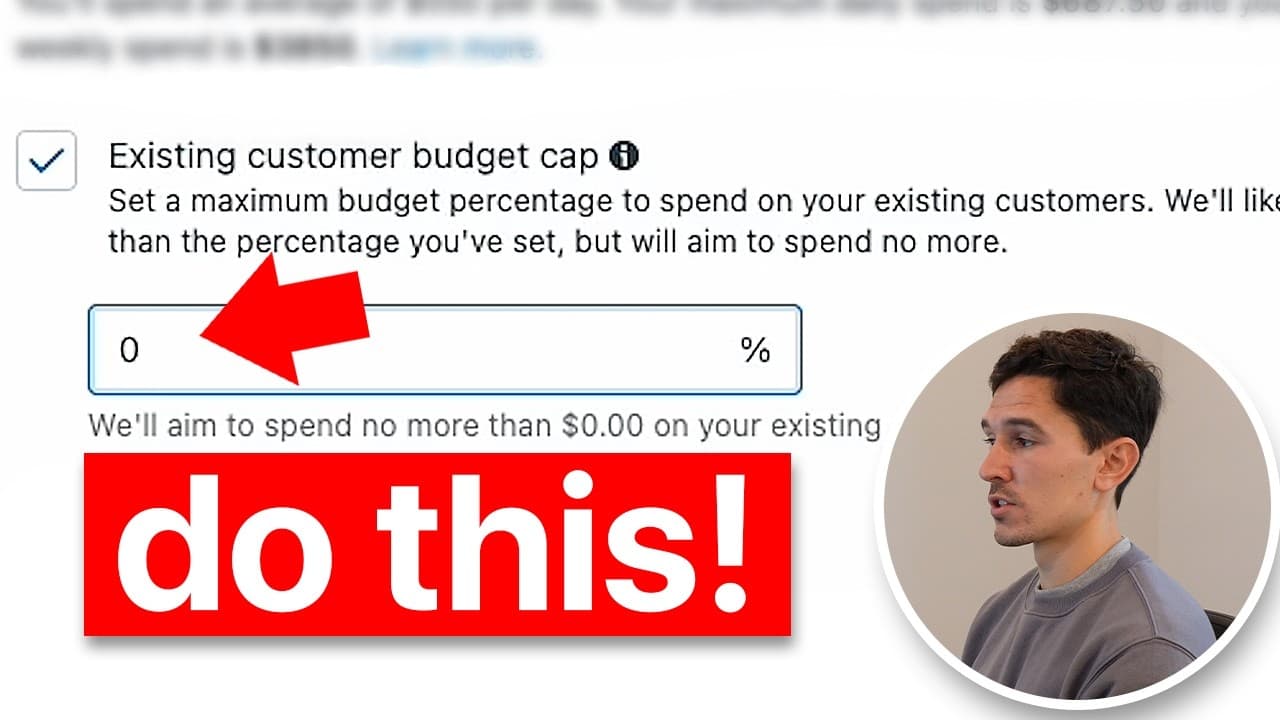
You create an engaged audience and an existing customers audience, then exclude them at the campaign level using a budget cap. Start by adding audience segments in Advertiser settings, build site visitor and purchase audiences with defined time windows, and then apply a 0% or similar cap to avoid spending on existing customers. Finally, use the breakdown tool to compare audience performance across campaigns.
Transcript
in this video I'm going to show you exactly how to exclude audiences from your Advantage Plus campaign and also see the breakdowns of those audiences and how they perform within your entire meta account so the first thing you need to do is actually get into your campaign manager once you get into here go on the left side and click Advertiser settin... Read More
Key Insights
- Audience segments are managed in Advertiser settings and are the basis for exclusions.
- Engaged audiences are defined by your own criteria, such as site visitors over a chosen period.
- Existing customers must be non overlapping with engaged audiences to avoid data bleed.
- Create a site visitors audience with a 30 day window for broad engagement signals.
- Create an all-time purchasers audience using the 180 day purchase event from your data sources.
- Import CRM lists to ensure all-time purchasers are recognized as a distinct audience.
- Set a budget cap for existing customers to 0% if you want to exclude them completely.
- Use the breakdown tool to analyze spend by new, engaged, and existing audiences for each campaign.
- More videos from this channel:
- More from this channel: Sam Piliero
Install to Summarize YouTube Videos and Get Transcripts
Explore YouTube Video Summarizer or Get YouTube Transcript Extractor
Questions & Answers
Q: What is the first step to exclude audiences in Advantage Plus campaigns?
The first step is to go into Advertiser settings and select Audience Segments. This is where you create and manage the different audience groups you will later exclude or analyze, such as engaged audiences and existing customer audiences. This setup is essential for accurate exclusion and performance insights.
Q: How should you define an engaged audience according to the video?
An engaged audience is defined by the marketer according to their own criteria rather than Facebook defaults. Examples include site visitors over the last 30 days or engagers on platforms like Facebook or Instagram. The key is to set a source you control and name the audience clearly, such as site visitors 30 days, so its performance can be tracked.
Q: What event should be used to create a 180 day existing customers audience?
To create an existing customers audience, change the event to purchase and set the lookback period to 180 days. This captures all-time purchasers within the maximum historical window Facebook allows, providing a solid pool of customers to exclude or analyze in conjunction with other audiences.
Q: Why is it important to avoid overlap between engaged and existing audiences?
Overlap between engaged and existing audiences can distort campaign performance. If both audiences include the same users, it becomes difficult to tell which audience is driving ROAS or spend, and a campaign may appear more effective than it truly is. Keeping them separate ensures clearer attribution and optimization ideas.
Q: How do you add CRM customer lists for all-time purchasers?
You import CRM lists through available integrations so your all-time purchaser data updates automatically. After creating the 180 day purchase audience, you port your CRM data into the account and label it clearly, such as ads not suppressed all time. This ensures that all-time purchasers are a distinct audience for exclusion and analysis.
Q: What is the effect of setting the existing customer budget cap to 0%?
Setting the existing customer budget cap to 0% tells Meta to spend none of the campaign budget on existing customers. This effectively excludes them from the campaign, allowing you to focus spend on new and engaged audiences and observe how each cohort performs without existing customer bias.
Q: How can you verify the impact of audience exclusions on performance?
You can verify impact by using the breakdown feature and selecting audience segments. This lets you view spend per campaign by new, engaged, and existing audiences, helping you understand if a campaign is performing well due to effective targeting or simply because it’s overspending on an audience type.
Q: What additional step helps you gain competitive advantage after excluding audiences?
After setting up the audiences and exclusions, you can view updated performance data in Meta’s breakdown by audience segments. This enables deeper insights into how different audiences behave across campaigns, helping you adjust strategies and leverage data to improve ROAS and efficiency in future campaigns.
Summary & Key Takeaways
-
This video guides you through creating audience segments in Advertiser settings, including engaged audiences and existing customer lists, and shows how to apply exclusions in Advantage Plus campaigns. It emphasizes avoiding overlap between audiences to accurately gauge campaign performance and ROAS.
-
The instructor explains how to build audiences from website data (site visitors 30 days) and 180 day purchase data, then import CRM lists for all-time purchasers. The key is to set a budget cap for existing customers to control spend and enable clearer insights.
-
A practical tip is to use the audience breakdown feature to see spend by new, engaged, and existing audiences, which helps diagnose why a single campaign may look successful due to audience bias rather than overall effectiveness.
Read in Other Languages (beta)
Share This Summary 📚
Summarize YouTube Videos and Get Video Transcripts with 1-Click
Try YouTube Summary with ChatGPT & Claude or YouTube Transcript Generator
Explore More Summaries from Sam Piliero 📚





Summarize YouTube Videos and Get Video Transcripts with 1-Click
Try YouTube Summary with ChatGPT & Claude or YouTube Transcript Generator