How to build AI cinematic scenes in Blender with Astra
TL;DR
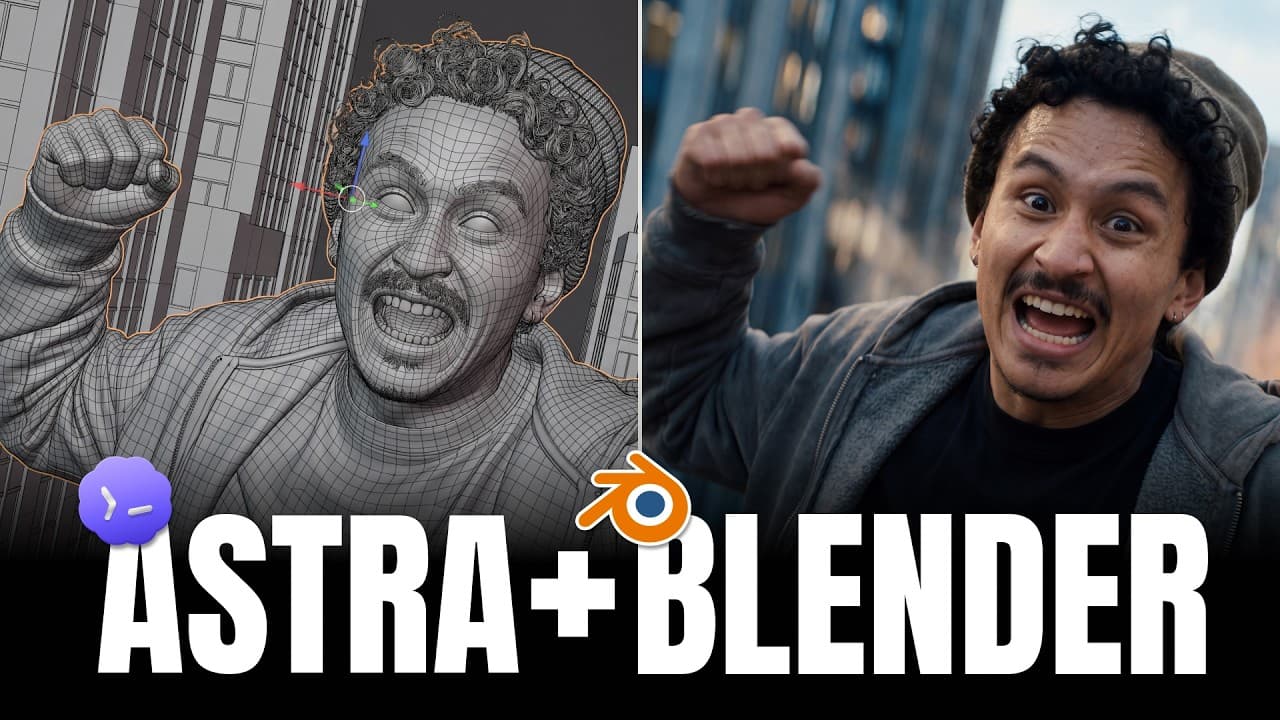
You can generate blocking in Blender using Astra and Higgsfield and turn it into finished cinematic shots without advanced skills. The workflow combines blocking in browser tools, character and location prompts, and live previews to refine camera paths before rendering. This approach reduces manual work while delivering high quality results.
Transcript
Hi, I'm Adil. Today we're building five scenes like these without building the 3D setups by hand. I'll give Astra the direction, review the blocking it creates, and use Kixfield to generate the finished videos. We'll work in Blender and try a browserbased workflow in 3D dutu. And no, you don't need any complex software skills to do any of this. I'l... Read More
Key Insights
- Blocking is generated in Blender by Astra from prompts, providing an editable camera path and motion that can be tweaked after planning.
- Higgsfield plugins connect Astra, Blender, and the rendering pipeline to turn blocking into finished video without hand crafting each frame.
- 3D Jutsu enables browser based scene building, letting you create locations, characters, and camera routes before rendering begins.
- The infinite loop scene uses a sequence that starts and ends in a way that feels seamless when replayed, with level matching across shots.
- The impossible mirror shot shows a camera passing through a mirror by designing a mirrored room and synchronized movement, enabling a one shot illusion.
- Concert scenes manage complex choreography and large numbers of dancers by blocking formations first and then generating the sequence with prompts.
- The workflow emphasizes using layout references and prompts for character sheets to maintain consistency across shots.
- You don’t need a high end PC or advanced Blender skills; the system handles heavy lifting through prompts and automated generation.
Install to Summarize YouTube Videos and Get Transcripts
Explore YouTube Video Summarizer or Get YouTube Transcript Extractor
Questions & Answers
Q: What is the main workflow to build a scene with Astra and Higgsfield in Blender?
The main workflow starts with outlining the shot in Astra via prompts to generate an editable camera path and blocking. This blocking is then refined inside Blender using the Higgsfield plugin, which connects Astra with Blender to turn the blocking into a finished video. The process emphasizes iterative tweaks and live previews to ensure the timing and movement feel natural, without manual frame by frame setup.
Q: How does the infinite loop scene achieve seamless looping?
The infinite loop is built by planning the start and end frames so that they align perfectly when replayed. Astra generates the block and the camera motion, then the ending is adjusted to pull back into a larger copy of the scene, creating a loop where each replay exits at a consistent point. The method ensures the first and last frames match closely despite different camera positions.
Q: What role does 3D Jutsu play in this workflow?
3D Jutsu is used to build and adjust scenes inside the browser. It lets you assemble blocking, locations, and camera paths without leaving the browser, then hand off the blocking to Higgsfield and Astra to generate the finished video. This enables rapid iteration, reduces software complexity, and makes it possible to preview a continuous shot before rendering.
Q: How are large dance sequences handled in the concert scene?
Large dance sequences are managed through blocking formations first, using boxes to mark dancers and defined ring layouts. The prompt then guides Astra to generate the sequence, characters, and location, while motion and camera moves follow the blocking. This approach keeps choreography coherent and scalable, even with many performers.
Q: What is the purpose of using layout references in this workflow?
Layout references ensure consistency of the opening and closing frames across scenes. By exporting a blocking frame as a reference and sending it to the tool for layout, the team can maintain a coherent visual language and seamless transitions, which is essential for building convincing loops or mirrored shots.
Q: Can this process produce finished shots without advanced Blender skills?
Yes, the workflow is designed so you do not need advanced Blender skills. Astra handles the blocking and scene composition, while Higgsfield generates the final video from prompts. The browser based tools, prompts, and automated pipelines minimize the manual setup and technical barriers to produce high quality cinematic scenes.
Q: What are the key benefits of connecting Astra, Blender, and Higgsfield?
A key benefit is that blocking is created in a controlled, editable environment and then immediately turned into a finished shot without manual retiming or complex shading. The integration enables rapid iteration, scalable scene complexity, and consistent camera movement across different locations, all while keeping the process accessible to users with limited Blender experience.
Q: What final tips help ensure a successful continuous shot generation?
Start with a strong base image or layout for both the opening and ending frames to ensure seamless transitions. Use Astra to define an editable camera path, then refine in Blender with Higgsfield, testing different versions to select the best. Keep prompts clear and structured for characters, locations, and timing to maintain consistency throughout the continuous shot.
Summary & Key Takeaways
-
The method centers on planning camera movement and blocking first, using Astra to create an editable path in Blender and Higgsfield to generate the final video. The process emphasizes browser based blocking and prompt driven character and location creation. The result is a seamless, high quality shot without complex manual setup.
-
The workflow blends multiple tools including 3D Jutsu for browser based scene construction and CS2.5 style prompts for character sheets and locations. It highlights how blocking, layout references, and timing are built before generation, enabling iterative refinements.
-
The video demonstrates five cinematic scenes built from a single chat workflow, showing how to connect Astra, Blender, Higgsfield MCP, and seedance 2.5 to produce continuous shots with minimal manual intervention.
Read in Other Languages (beta)
Share This Summary 📚
Summarize YouTube Videos and Get Video Transcripts with 1-Click
Try YouTube Summary with ChatGPT & Claude or YouTube Transcript Generator
Explore More Summaries from Higgsfield AI 📚


Summarize YouTube Videos and Get Video Transcripts with 1-Click
Try YouTube Summary with ChatGPT & Claude or YouTube Transcript Generator