How Was a $1,000,000 Christmas Ad Made in One Night With Nano Banana Pro and Kling 2.6?
TL;DR
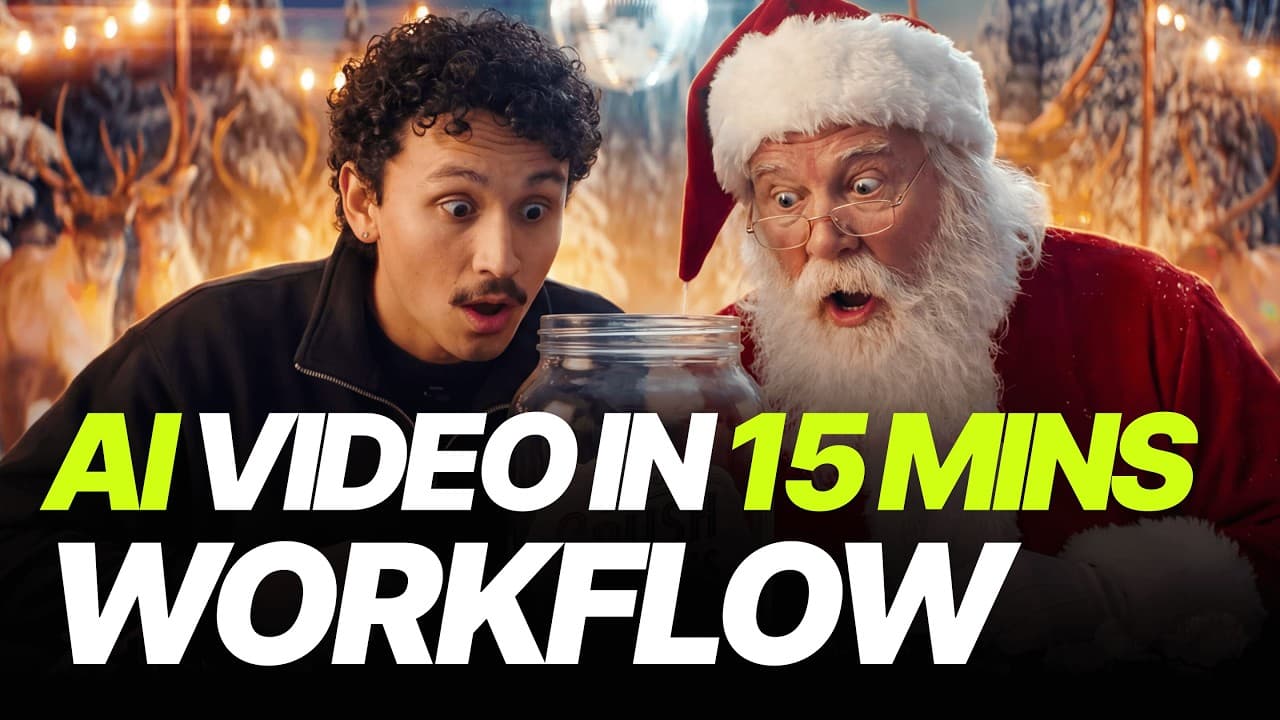
A cinematic Christmas commercial can be created from home in one night by generating controlled keyframes with Nano Banana Pro, animating them through image-to-video with Kling 2.6, and shaping the results with deliberate camera movement. The workflow develops a Crush Candies story about an angry Santa discovering that his missing reindeer are partying without him. Read on for the exact creative sequence, prompting choices, and consistency techniques.
Transcript
Look, you're making videos just like everybody else. And honestly, that's why you aren't getting any views. What you're about to see now is the new standard. It's the bare minimum to get into the top leagues today. In the real world, to get an ad looking like this, a client would have to drop a minimum of $50,000. We're talking a crew of 30 people,... Read More
Key Insights
- Production scale is contrasted: The creator compares the AI workflow with a conventional advertisement that would require a client to spend at least $50,000. That traditional version is also described as needing 30 crew members, expensive equipment, and at least one month of production, while the demonstrated commercial was produced at home during a single night.
- The concept begins with associations: Rather than starting from an elaborate plot, the creator reduces Christmas to two immediate ideas, Santa and candies. That pairing supplies the first image prompt and leaves room for the narrative to emerge from generated details. The workflow treats brainstorming as an exploratory process rather than requiring every scene to be predetermined.
- The models are deliberately stress tested: The creator explicitly avoids the safer process of building a storyboard and refining prompts through Gemini. Nano Banana Pro is instead asked to reason from short instructions with no extensive preparation. This choice tests whether the model can carry visual ideas forward while allowing unexpected outputs to influence the developing commercial.
- Multiple outputs improve selection: Four images are requested simultaneously in 4K for the opening Santa shot. The reason is practical, a wider group of results makes it possible to cherry-pick the strongest composition rather than depending on a single generation. The selected image succeeds through its jar design, lighting, background helpers, and visible anamorphic flare.
- Aspect ratio shapes composition: A 21:9 format is recommended for Nano Banana Pro because it frames images more cinematically by default. The creator connects that result to cinematic shots being represented in training data at that aspect ratio. This setting is combined with terms such as "anamorphic shot" to push the generated camera style toward the desired commercial look.
- Simple prompts can preserve control: The edits are expressed directly, such as removing the reindeer while retaining the rigs or changing the candy label to Crush Candies. The surrounding image remains stable after both requests. According to the creator, Nano Banana Pro's language model performs much of the interpretation, so extremely long or complicated prompts are unnecessary.
- Text rendering enables product creation: The original jar design is retained while its label is changed to the invented product name Crush Candies. The creator specifically highlights Nano Banana Pro's ability to handle the text correctly. This makes the generated prop function as an identifiable commercial product without rebuilding the entire shot or changing its established visual design.
- Emotion is revised before animation: Once the reindeer disappear, Santa's original happiness no longer fits the story. The image is edited so Santa looks angry, no longer holds the jar, and has his hands lowered. Establishing that emotional pose in the source frame gives Kling 2.6 a clear starting point for the subsequent yelling performance.
- Camera movement supports the reaction: The Santa animation combines angry yelling with a dolly-in instead of relying only on character motion. The creator says filmmakers should think deliberately about camera movement because it emphasizes a reaction. Kling follows the request and adds a slight focus lag that the creator considers natural for an anamorphic shot.
- Image-to-video protects continuity: The creator recommends image-to-video when consistency matters because the source frame anchors the style and character appearance. Without that control, the video model could hallucinate a completely different Santa. The approach separates visual development in Nano Banana Pro from movement generation in Kling 2.6 while keeping the two stages connected.
- Unplanned details drive the narrative: The story grows from experimentation, first with missing reindeer and then with the idea that they are attending a party without Santa. The creator encourages treating generations like a creative game because surprising results can suggest the next scene. The workflow therefore combines intentional prompting with responsive decisions based on what each output contains.
- Enhancement assists motion prompting: Kling generally requires more detailed prompts, but Hicksfield's enhancer analyzes both the initial instruction and the source picture. It then adds details suited to improving the output. For the DJ scene, the basic direction covers dancing, spinning the disc, and a camera pullback, while a slow-looking result remains adjustable by speeding it up during editing.
Install to Summarize YouTube Videos and Get Transcripts
Explore YouTube Video Summarizer or Get YouTube Transcript Extractor
Questions & Answers
Q: How was a $1,000,000 Christmas ad made with Nano Banana Pro and Kling 2.6?
The creator first used Nano Banana Pro to generate and edit cinematic keyframes for a Christmas story involving Santa, Crush Candies, and missing reindeer. Those still images were then animated with Kling 2.6 through image-to-video prompts describing performances and camera moves. The source images kept Santa and the reindeer scenes visually controlled while Kling supplied actions such as yelling, dancing, and a camera pullback. The workflow was completed at home in one night rather than with the cited conventional setup of 30 people and at least a month of production.
Q: What was the workflow for creating the opening Santa scene?
The process began with a short prompt for Santa Claus holding a jar of candies in an anamorphic commercial shot. Four results were generated at once in 4K so the creator could choose the best image. The chosen frame had strong lighting, an attractive jar, background helpers, and an anamorphic flare. Nano Banana Pro was then used to remove the reindeer, rename the product Crush Candies, and change Santa from happy to angry before animation.
Q: Why did the creator use a 21:9 aspect ratio?
The creator recommends 21:9 because it frames the generated composition more cinematically by default. The stated explanation is that many cinematic shots were represented in training data at that aspect ratio. The ratio works alongside prompt terms such as "anamorphic shot" to establish the intended camera style. It therefore influences the visual foundation before any movement is generated.
Q: How were consistent characters maintained during animation?
The creator used image-to-video, feeding an established keyframe into Kling 2.6 instead of asking the model to invent the whole scene independently. This provides control over the existing style and appearance. The stated reason is to prevent the animation from hallucinating a completely different Santa. Nano Banana Pro handles controlled still-image development first, then Kling adds motion to that visual reference.
Q: How was Santa's anger communicated cinematically?
Santa's source image was first edited so he looked angry, held no candy jar, and had his hands lowered. Kling 2.6 was then prompted to make him yell angrily. A dolly-in was added because the inward camera movement emphasizes his reaction and supports the story beat. The resulting clip also contained a slight focus lag that the creator considered natural for the anamorphic look.
Q: How was the reindeer party scene developed?
The first party prompt used an over-the-shoulder shot with Santa facing reindeer, a DJ, snacks, and animals wearing sunglasses. Because that result was not appealing or intriguing enough, the creator moved to a close-up of the DJ. The revised image showed dancing reindeer, headphones, properly positioned hooves, and the DJ mixer reflected in the glasses. Kling then animated the DJ dancing and spinning the disc while the camera pulled back.
Q: What does Hicksfield's prompt enhancer do in the workflow?
The enhancer supports Kling when a short motion prompt needs more detail. It analyzes the initial prompt together with the supplied picture, then adds details suited to improving the generated output. In the DJ example, the core instruction asks for dancing, disc spinning, and a camera pullback. This allows the creator to begin simply even though Kling typically benefits from more detailed prompting.
Q: Why was the commercial generated without audio?
The Santa animation was generated without audio because the creator planned to add music across the full clip later. This keeps the generation focused on the visual performance and camera movement. The party animation could then be paired with a song whose beat matched the DJ's movement. If the motion felt slightly slow, the creator identified speeding up the footage during editing as an easy correction.
Summary & Key Takeaways
-
Choosing the Christmas concept: The creator begins by arguing that ordinary videos struggle for views and that stronger production is now the minimum for competing at the top level. A comparable real-world advertisement is described as requiring at least $50,000, a crew of 30 people, expensive equipment, and a month of production. By contrast, this commercial was made at home in one night using Nano Banana Pro and Kling 2.6. Christmas becomes the theme because of the creator's childhood memories of iconic holiday commercials.
-
Generating the opening image: Instead of preparing a storyboard or refining prompts with Gemini, the creator deliberately stress tests Nano Banana Pro with a simple idea combining Santa and candies. The first prompt requests Santa Claus holding a candy jar in an anamorphic commercial shot. Four 4K results are generated at once so the strongest option can be selected. The creator recommends cinematic keywords such as "anamorphic shot" and a 21:9 aspect ratio, which produces a more cinematic composition by default.
-
Developing the product story: The selected image includes Santa, helpers, a convincing jar, strong lighting, and an anamorphic flare. The creator then invents a story in which Santa panics because he cannot find his reindeer. An image edit removes the reindeer while preserving the rigs and the rest of the scene. The candy product receives the straightforward name Crush Candies, and Nano Banana Pro changes the text without altering the surrounding image. Santa is then made angry, with the jar removed and his hands lowered.
-
Animating Santa's reaction: The angry Santa keyframe is transferred to Kling 2.6 with a prompt asking him to yell while the camera performs a dolly-in. The camera movement is chosen to emphasize his emotional reaction. The clip is generated without audio because music will be added across the commercial later. Using image-to-video preserves control over the established visual style and reduces the risk of producing a completely different Santa. The result includes the requested movement and a natural-looking focus lag associated with the anamorphic presentation.
-
Revealing the reindeer party: The reason for Santa's anger becomes a party attended by his missing reindeer. Nano Banana Pro first creates an over-the-shoulder view with a DJ, snacks, sunglasses, and reindeer, but the creator finds it insufficiently appealing. A closer DJ shot produces sharper details, including correctly positioned hooves, headphones, and the mixer reflected in the glasses. Kling then animates the DJ dancing and spinning a disc as the camera pulls back. Hicksfield's enhancer expands the initial prompt, and the slightly slow result can be accelerated during editing.
Read in Other Languages (beta)
Share This Summary 📚
Summarize YouTube Videos and Get Video Transcripts with 1-Click
Try YouTube Summary with ChatGPT & Claude or YouTube Transcript Generator
Explore More Summaries from Higgsfield AI 📚
Summarize YouTube Videos and Get Video Transcripts with 1-Click
Try YouTube Summary with ChatGPT & Claude or YouTube Transcript Generator