How to Build an AI CFO for Continuous Monitoring
TL;DR
Build the system by separating financial analysis from executive judgment: QuickBooks supplies live operational data, Quadratic converts it into auditable dashboards and alerts, and a reusable Claude skill turns those findings into management recommendations. The resulting workflow monitors receivables, collections, concentration, forecasts, and cash flow concerns, then produces an on-demand HTML CFO review from the latest available data.
Transcript
Most finance teams are sitting on everything they need to monitor the business continuously. The data is already there. The accounting system is already live and the employees are already updating it every day, but none of that translates into real-time financial awareness because the analysis layer does not exist. Someone still has to go in, they'... Read More
Key Insights
- The AI CFO is an executive interpretation layer, not an accounting engine. It begins after calculations and analysis are complete, reading KPI summaries, receivables dashboards, risk rankings, and alerts to determine what matters, what risks exist, and what management should do next.
- The separation between analysis and judgment mirrors the described finance-team workflow. Analysts gather data and prepare reports, while the CFO connects related issues, evaluates business impact, prioritizes material risks, and turns those findings into decisions rather than simply repeating financial metrics.
- Every AI CFO finding must answer three questions: why the issue matters, what risk it creates, and what management should do next. This required structure keeps the resulting commentary focused on consequences and action instead of producing an unprioritized list of numbers.
- QuickBooks is the operational source of truth because employees already maintain customer, invoice, payment, and accounting records through their daily work. Its continuously changing data gives the monitoring system current information without requiring a finance employee to prepare a separate manual export.
- Quadratic provides an auditable analysis layer because its formulas, transformations, and processing steps remain visible within the workbook. Finance users can trace reported values back to the logic that produced them rather than relying only on an AI-generated answer with no visible verification path.
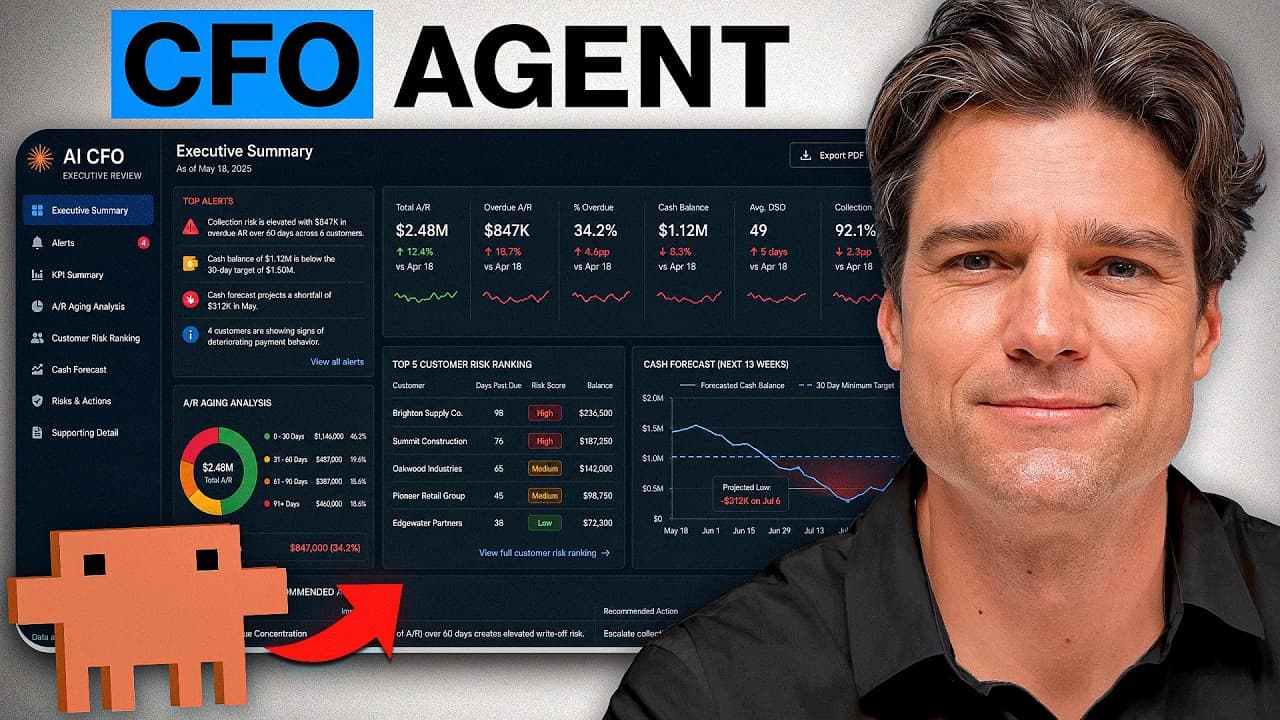
- The AI CFO Command Center contains six analytical areas: executive KPIs, accounts receivable aging, customer risk rankings, collection forecasts, overdue invoice monitoring, and CFO alerts. Together, they cover financial performance, expected cash inflows, collection priorities, concentration exposure, and conditions requiring management attention.
- The alerts engine works by evaluating refreshed financial data against predefined thresholds on every run. When conditions such as high customer concentration or excessive invoice aging cross a limit, it creates an alert containing severity, business impact, and a recommended management action.
- The final HTML dashboard follows an executive review sequence. It begins with alerts and an executive summary, continues through KPIs, aging, customer risk, and collection forecasts, and concludes with business risks and recommended actions, moving leadership from urgent conditions toward specific decisions.
Install to Summarize YouTube Videos and Get Transcripts
Explore YouTube Video Summarizer or Get YouTube Transcript Extractor
Questions & Answers
Q: How do you build an AI CFO in Claude?
Start by creating a reusable Claude skill that defines the AI CFO as an executive decision layer. Instruct it to consume completed financial outputs such as KPI summaries, receivables dashboards, risk rankings, and alerts. Exclude bookkeeping, reconciliations, invoice processing, and accounting calculations. Require every finding to explain why it matters, identify the resulting risk, and recommend what management should do next.
Q: What roles do QuickBooks, Quadratic, and Claude play?
QuickBooks holds the live operational records, including customers, invoices, payments, and other daily accounting activity. Quadratic pulls that source data into an analytical workbook, recalculates dashboards, and monitors defined financial conditions. Claude then reads the resulting analysis through the Quadratic connector and applies the saved AI CFO framework to produce an executive review with prioritized recommendations.
Q: Why should financial analysis be separated from CFO judgment?
Separating the two responsibilities creates a workflow similar to the finance-team structure described in the transcript. The analyst layer gathers source data, performs calculations, and creates reports. The CFO layer interprets those reports, connects related issues, identifies material movements, ranks risks, and recommends action. Giving each layer a clear role helps prevent the executive output from becoming another list of unexplained metrics.
Q: What dashboards should an AI finance analyst create?
The described command center uses six analytical tabs. They include an executive KPI summary, an accounts receivable aging dashboard, a customer risk ranking, a collection forecast, an overdue invoice monitor, and a CFO alerts engine. These tabs track revenue, collections, outstanding receivables, top customers, aging balances, expected cash inflows, individual invoices requiring action, and threshold-based business risks.
Q: How does the accounts receivable monitoring system work?
Quadratic first creates a raw-data tab that pulls connected QuickBooks information and serves as the workbook's single source. The analytical tabs reference this layer so they remain synchronized. Outstanding balances are assigned to current, 30, 60, 90, and 90-plus day aging buckets, while separate views rank customer risk and identify the individual overdue invoices that require collection action.
Q: How does the CFO alerts engine identify financial risks?
The alerts engine checks refreshed workbook data against predefined thresholds each time the analysis runs. It raises a flag when conditions such as customer concentration or invoice aging exceed the selected limits. Each alert includes its severity, the expected business impact, and a recommended action, allowing the workbook to surface emerging concerns without waiting for a manual monthly review.
Q: Why is Quadratic useful for auditable finance analysis?
Quadratic performs the AI-assisted analysis inside the workbook, where formulas, transformations, and processing steps remain visible. That visibility creates a verification layer because a reviewer can trace a reported number back to the logic that generated it. It also connects directly to sources such as QuickBooks, reducing the need to move financial data through manually prepared export files.
Q: How should an AI CFO dashboard present its findings?
The dashboard should present information in the order leadership is likely to review it. The described HTML output starts with alerts and an executive summary, then shows the KPI summary, receivables aging, customer risk rankings, and collection forecast. It closes with major business risks and recommended actions, ensuring that urgent issues appear first and the review ends with clear management priorities.
Summary & Key Takeaways
-
The workflow begins with a reusable AI CFO skill in Claude. Its role excludes bookkeeping, reconciliations, invoice processing, and accounting calculations. Instead, it interprets completed analytical outputs, connects related financial issues, prioritizes material risks, and recommends management actions through a structured executive review presented as a self-contained HTML dashboard.
-
QuickBooks serves as the operational source of truth for customers, invoices, payments, and daily accounting activity. Quadratic connects directly to that live information, creates a raw-data layer, and builds dynamic analyses whose formulas and transformations remain visible. Automatic refreshing keeps every analytical tab synchronized with changes in the accounting system.
-
The AI CFO Command Center contains six analytical tabs covering executive KPIs, receivables aging, customer risk, collection forecasting, overdue invoices, and automated alerts. Claude accesses these outputs through a Quadratic connector, applies the saved CFO decision framework, and converts the latest findings into prioritized risks and recommended actions for leadership.
-
The alerts engine changes the workbook from a descriptive report into an active monitoring system. It evaluates refreshed data against defined thresholds, flags conditions such as excessive customer concentration or aging invoices, assigns severity, explains the business impact, and attaches a recommended response for management to consider.
Read in Other Languages (beta)
Share This Summary 📚
Summarize YouTube Videos and Get Video Transcripts with 1-Click
Try YouTube Summary with ChatGPT & Claude or YouTube Transcript Generator
Explore More Summaries from Luke Finance 📚




Summarize YouTube Videos and Get Video Transcripts with 1-Click
Try YouTube Summary with ChatGPT & Claude or YouTube Transcript Generator