How to Build an AI Finance Team With Claude
TL;DR
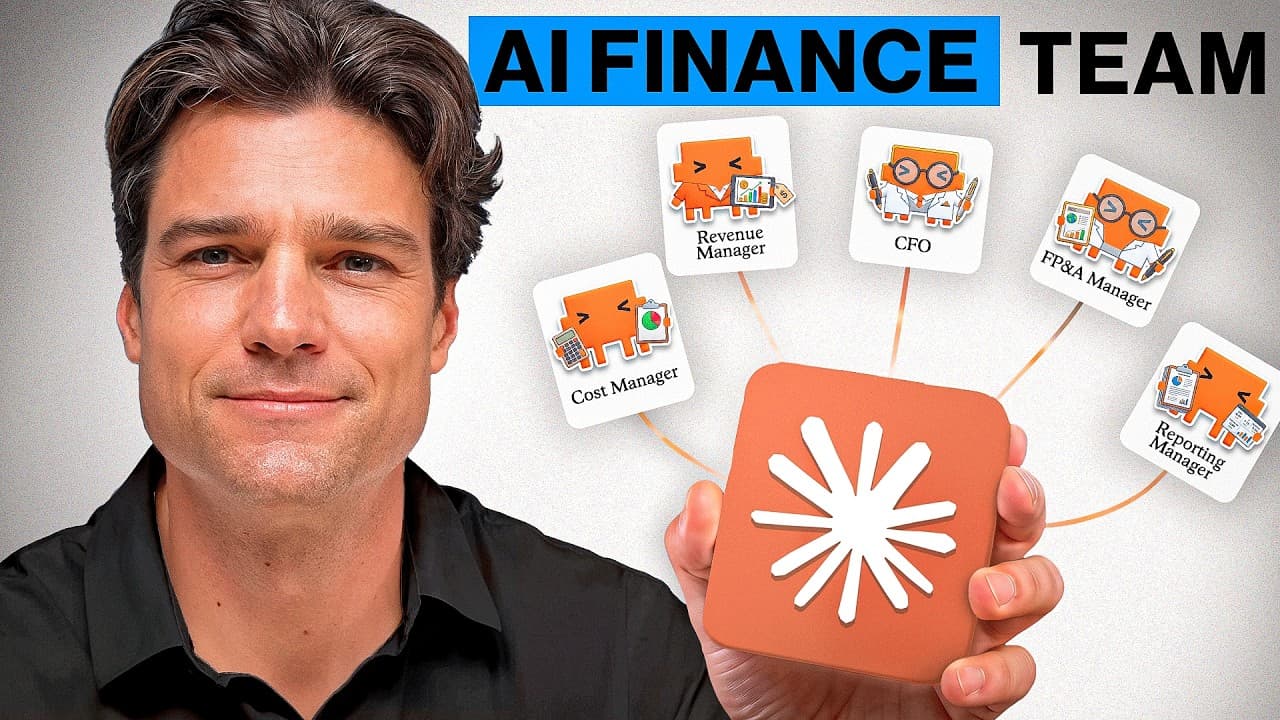
Build four reusable Claude Skills for revenue, cost, FP&A, and CFO reporting, then connect them through ordered handoffs and dependency checks. A shared output folder lets each manager consume prior reports, while common KPI definitions, validation scripts, templates, and strict stop rules keep the final board report, presentation, action list, and dashboard consistent and traceable.
Transcript
Building an AI financing that runs your entire month end sounds like a developer project, but it's not. It gets built through prompting and once it exists, it handles the full cycle for you. Most finance professionals using Claude already have single tasks running well. And this is the level above that where a set of specialists cover the whole mon... Read More
Key Insights
- The project structure is the coordination system for the AI finance team. Separate manager input folders prevent responsibilities from overlapping, shared documents standardize companywide definitions, and one outputs folder provides an agreed location where completed reports become inputs for downstream managers.
- A Claude Skill is a saved instruction package for one specific role. It defines when the role activates, what outcome it produces, which files it uses, and which rules it follows, allowing the same finance workflow to persist beyond a single conversation.
- The revenue manager uses transaction-level sales as its source of truth. Customer performance, product performance, and monthly pricing changes provide supporting context, while the skill infers the reporting period and writes a repeatable metric script from the supplied business files.
- The cost manager keeps overlapping data sources independent to prevent double counting. Payroll, procurement, general ledger, and manufacturing files can describe related spending, so forcing them into one reconciled cost figure could count the same expenditure more than once.
- The FP&A manager connects planning analysis with operational explanations. It combines its budget, actual, rolling forecast, and cash flow data with the cost operation report, allowing reported variances to be connected to manufacturing inefficiencies, overtime, and approval backlogs.
- Optional dependencies preserve standalone usefulness. The FP&A skill uses the cost report when available, but if that report is missing, it continues with planning data and records the missing dependency rather than failing the entire analysis.
- The CFO reporting manager is a consolidation layer rather than another analytical opinion. It reads the revenue, cost, and FP&A reports, follows the supplied Word and PowerPoint templates, and cannot introduce figures that do not trace back to those specialist reports.
- Dependency validation protects the completeness of executive reporting. The CFO skill stops when any required upstream report is absent because a package that silently omits an analytical area can appear complete while giving senior leadership an incomplete account of performance.
- More videos from this channel:
- More from this channel: Luke Finance
Install to Summarize YouTube Videos and Get Transcripts
Explore YouTube Video Summarizer or Get YouTube Transcript Extractor
Questions & Answers
Q: How do you structure files for an AI finance team?
Create one project folder containing separate input folders for each specialist manager, a shared folder for companywide references, and one outputs folder for completed work. Revenue, cost, and FP&A should receive only the files relevant to their responsibilities. The CFO reporting manager receives templates instead of raw financial data. The outputs folder then acts as the handoff location between managers.
Q: How do you create a reusable finance manager in Claude?
Create each manager as a Claude Skill with a clearly named business responsibility, its relevant input folder, shared reference documents, expected output, activation conditions, workflow, and exclusions. Ask Claude to inspect the actual files, infer their relationships, identify the reporting period, and list its assumptions for review. Confirm the scope and handoff rules before saving the skill to the library.
Q: What source files does the revenue manager use?
The revenue manager uses transaction-level sales as its source of truth, supported by customer performance, product performance, and every price change made during the month. It also reads shared KPI definitions so calculations and metric names match company standards. Its role remains limited to revenue analysis, with cost, FP&A, and executive reporting reserved for later specialist managers.
Q: How does the cost manager avoid double counting expenses?
The cost manager treats payroll, procurement, general ledger, and manufacturing data as independent sources when those files overlap. It does not force them into a single reconciled cost figure because doing so could count the same spend more than once. Instead, it analyzes departmental budget variance, payroll, manufacturing efficiency, and inventory control through a dedicated workflow and calculation script.
Q: How does the FP&A manager use the cost report?
The FP&A manager reads its own planning data, including budget versus actual, a rolling forecast, and a cash flow forecast. It also checks the current month’s outputs folder for the completed cost operation report. When available, that report supplies operational explanations for financial variances, such as manufacturing inefficiencies, overtime, and approval backlogs, rather than merely showing the size of each variance.
Q: What happens if the FP&A cost dependency is missing?
The FP&A skill continues using its planning data when the cost operation report is unavailable, then records the missing dependency in its output. This fallback keeps the skill useful as a standalone review instead of making it dependent on the entire team workflow. Claude tests both paths before packaging the skill, one with the cost report present and one without it.
Q: Why does the CFO reporting manager stop when a report is missing?
The CFO reporting manager requires the revenue analysis, cost operation report, and FP&A management review before producing executive deliverables. If any required report is missing, it stops and identifies the gap. A partial package could look complete while silently excluding an important analytical area, so stopping is safer than presenting senior leadership with an incomplete board report or presentation.
Q: What deliverables does the AI finance workflow produce?
The completed workflow produces a board-ready CFO report, a PowerPoint presentation, an action list, and an interactive dashboard. The CFO reporting manager consolidates the three specialist reports according to supplied Word and PowerPoint templates. Its dashboard is self-contained and opens without external libraries, while every figure in the executive package must trace back to one of the upstream specialist reports.
Summary & Key Takeaways
-
The project uses one company folder with separate input directories for revenue, cost, FP&A, and CFO reporting, plus shared reference documents and a central outputs folder. Each specialist receives only its relevant sources, while companywide KPI definitions establish consistent metric names and calculations across the complete month-end reporting process.
-
Each manager is created as a reusable Claude Skill with defined activation conditions, responsibilities, source files, workflow, calculation rules, exclusions, and output names. Claude studies the actual workbooks, infers file relationships and reporting periods, writes calculation scripts, validates assumptions, and presents the completed skill for review before it is saved.
-
The managers operate in sequence through structured handoffs. FP&A can incorporate the cost report but still run when that optional dependency is absent. CFO reporting requires all three specialist reports, introduces no new figures, and consolidates traceable findings into a board report, presentation, action list, and self-contained interactive dashboard.
Read in Other Languages (beta)
Share This Summary 📚
Summarize YouTube Videos and Get Video Transcripts with 1-Click
Try YouTube Summary with ChatGPT & Claude or YouTube Transcript Generator
Explore More Summaries from Luke Finance 📚


Summarize YouTube Videos and Get Video Transcripts with 1-Click
Try YouTube Summary with ChatGPT & Claude or YouTube Transcript Generator