How to Build N8N Workflows With Claude Code and MCP
TL;DR
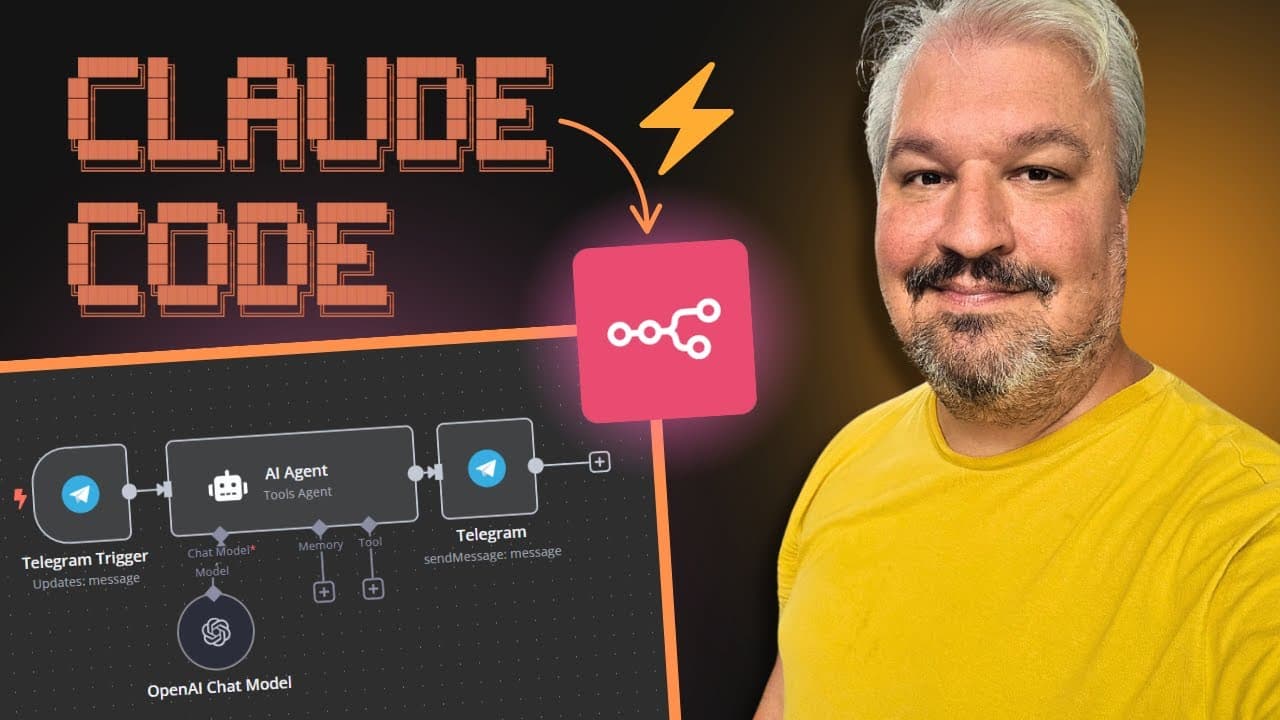
Claude Code can build N8N workflows without you touching the canvas by using the n8n-mcp server to work through the N8N API or Playwright MCP to operate the browser. Setup requires an MCP.json file, an instance URL without a trailing slash, and an N8N API key. Detailed instructions in claude.md help prevent messy, loosely connected nodes. Read on for the setup, Windows configuration, prompting strategy, and demonstrated workflow.
Transcript
What if I told you you can use claude code to build your N8 workflows from scratch without you ever touching the canvas? I just discovered two MCP servers that make this possible. I've seen people use Claude code for things other than coding. And a very popular use case seems to be generating NN automations using Claude code and MCP servers. So in ... Read More
Key Insights
- Two MCP servers enable Claude Code to build N8N workflows without opening the canvas: the n8n-mcp server by Czlonkowski, which edits workflows directly inside your N8N instance, and Microsoft's Playwright MCP server, which uses the browser like a human would.
- The n8n-mcp server gives the agent tools including documentation, a list of available nodes, and node search, letting it create, validate, and change workflows programmatically through the N8N API.
- Setup requires copying the full configuration into an MCP.json file in your project folder, adding your N8N instance URL without a trailing slash, and generating an API key under Settings then N8N API.
- Windows users without WSL must change the command from 'npx' to 'cmd' and add '/c' followed by 'npx' and 'n8n mcp' in the args, while Linux, Mac, and WSL users can use the default configuration.
- Detailed, specific prompting is critical: the developer's default prompt produced a messy, loosely connected workflow, so the creator rewrote it to propose a workflow first and ask clarifying questions about trigger type and model before building.
- GPT5 mini was introduced after Claude Code was trained, so the agent may question whether you meant GPT-4o mini, which is why confirming the exact model in your reply matters when building the chatbot.
- The agent can edit existing workflows quickly, changing an AI agent's system message to make it 'Luna, a friendly customer support agent' in under five seconds through the n8n-mcp server.
- Hosting options differ in cost: N8N's official cloud runs about €20 per month billed annually, while Hostinger deploys N8N instances from $5 per month (KVM1) and handles the VPS setup automatically when you select N8N as the application.
Install to Summarize YouTube Videos and Get Transcripts
Explore YouTube Video Summarizer or Get YouTube Transcript Extractor
Questions & Answers
Q: How can Claude Code build N8N workflows without touching the canvas?
Claude Code can connect to the n8n-mcp server, which creates and changes workflows directly within an N8N instance through its API. It can alternatively use the Playwright MCP server to operate the browser and edit workflows as a person would.
Q: Which MCP servers can Claude Code use to build N8N workflows?
The demonstrated options are the N8N MCP server by Romworld and the Playwright MCP server. The first works directly within the N8N instance, while the second uses the browser to create and change workflows.
Q: How do you configure the n8n-mcp server for Claude Code?
Copy the repository’s full configuration into a file named MCP.json in the project folder. Add the N8N instance URL without any slash at the end, then add an API key created under Settings and N8N API.
Q: How do you configure n8n-mcp on Windows without WSL?
Change the command from “npx” to “cmd.” Under args, add “/c,” followed by “npx” and “n8n mcp”; the default configuration works for Linux, Mac, and Windows with WSL.
Q: How can you confirm that the N8N MCP server is connected?
Run Claude Code and allow it to use the MCP file it automatically detects. Enter “/mcp” in Claude Code, and the N8N MCP server should appear with a connected status.
Q: What tools does the N8N MCP server give Claude Code?
The server provides tools for documentation, viewing the list of available nodes, and searching for nodes. In the demonstration, Claude Code also connected to the N8N API, created a workflow in the actual instance, and validated it.
Q: Why did Claude Code initially create a poor N8N workflow?
The first request initially produced a JSON structure instead of a workflow in the actual N8N instance. After being told to create it in the instance, Claude produced a messy workflow with loosely connected nodes, showing that the MCP server needs very specific instructions upfront.
Q: How can prompting improve N8N workflows created by Claude Code?
Place detailed instructions for using the MCP server in a claude.md file so Claude Code loads them into a new conversation. The rewritten prompt first proposed a workflow and requested feedback about choices such as a chat, manual, or webhook trigger and whether the intended model was GPT5 mini or GPT-4o mini.
Summary & Key Takeaways
-
Claude Code, or alternatively Claude Desktop, can build N8N workflows from scratch using two MCP servers. The first is the n8n-mcp server, which lets the agent create and change workflows directly within your N8N instance. The second is Microsoft's Playwright MCP server, which drives a browser to build workflows the same way a person would.
-
Configuration involves copying the full config into an MCP.json file in your project folder, adding your N8N instance URL without trailing slashes, and creating an API key under Settings then N8N API. After running Claude, the /mcp command confirms the server is connected, exposing tools for documentation, node lists, and node search.
-
The default developer prompt produced a messy workflow, so the creator rewrote it to ask clarifying questions first, yielding far better results. The workflow, a chatbot with a chat trigger, OpenAI GPT5 mini, simple memory, and SerpAPI, was created in the actual instance and tested successfully after selecting credentials.
Read in Other Languages (beta)
Share This Summary 📚
Summarize YouTube Videos and Get Video Transcripts with 1-Click
Try YouTube Summary with ChatGPT & Claude or YouTube Transcript Generator
Explore More Summaries from Leon van Zyl 📚
Summarize YouTube Videos and Get Video Transcripts with 1-Click
Try YouTube Summary with ChatGPT & Claude or YouTube Transcript Generator