How to Add Cinematic 4K AI VFX to Real Footage
TL;DR
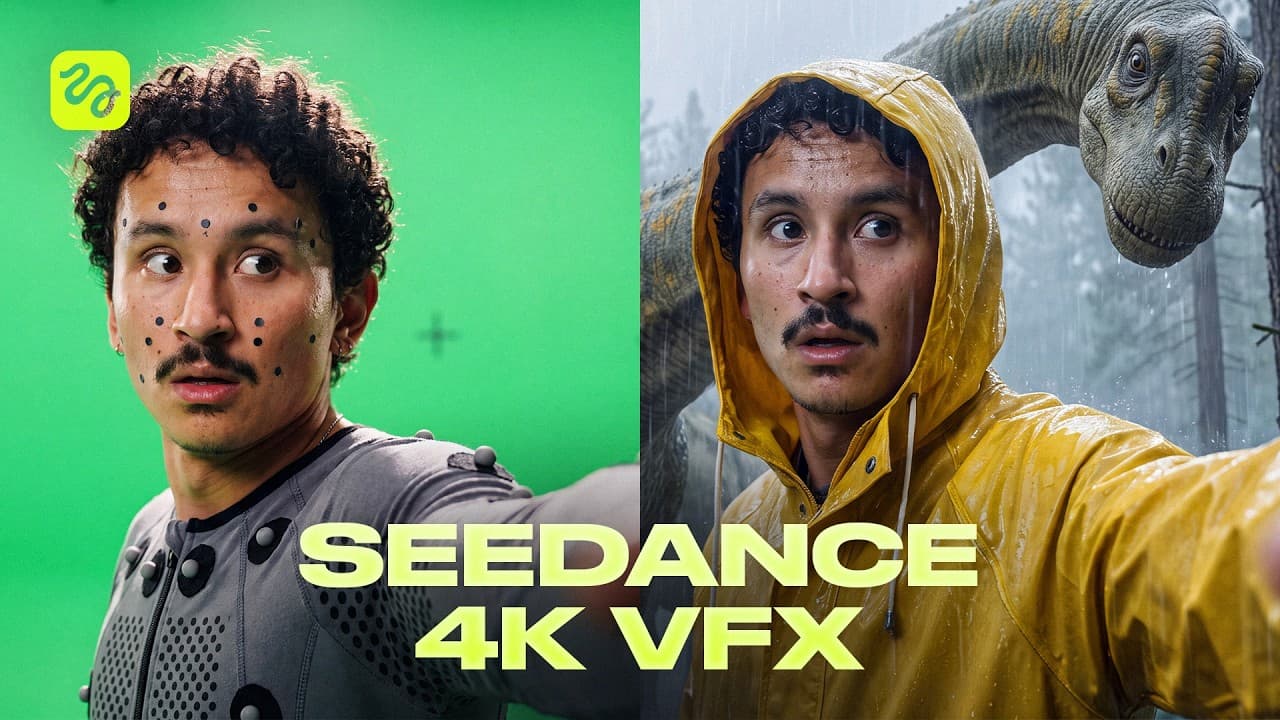
Upload real footage, specify one targeted change, and use a detailed prompt that protects the original subject, performance, lighting context, and camera movement. Seedance 2.0 in 4K inside Higgsfield can then replace environments, transform selected elements, or build cinematic scenes while preserving key details, matching generated lighting, and avoiding manual masking or compositing.
Transcript
This is real footage. And this is the same shot mixed with Cance 2.0 in 4K. And there's so much more I can do with it. I can put something behind me that definitely should not be there. Insane, right? set my own head on fire and just keep talking and change the entire world around me full wide while I'm driving through it or transform myself right ... Read More
Key Insights
- A preservation-focused prompt is the foundation of the workflow. It explicitly identifies the face, expressions, gestures, clothing, props, performance, camera framing, and motion that must remain unchanged, while isolating the environment or object that Seedance is permitted to modify.
- Environment swapping works by retaining the recorded subject and replacing the surrounding world. In the walking example, the background changes to a desert at sunset when the subject snaps his fingers, while his face, walk, rings, gestures, and handheld camera movement remain protected.
- Generated lighting is integrated with the altered environment. During the driving examples, neon light moves across the car and lava creates an upward glow beneath the subject's chin, allowing the new surroundings to influence the retained footage without a separate manual color-grading step.
- Element-level transformations can target a limited region of the frame. The burning-hair example preserves the face, expression, car, and golden-hour light while adding flames, orange illumination on the shirt, and reflections on the car without requiring frame-by-frame masks.
- Smooth body morphing depends on precise timing and strict preservation instructions. The hand transformation begins when a specified line is spoken, affects only the right arm, and allows the subject to continue talking naturally while the face, performance, voice, and camera remain locked.
- Reference images are useful when the intended visual is easier to show than describe. A lizard image generated with GPT Image 2.0 guides the appearance of giant lizards climbing a building, while the prompt also requests a zoom-out reveal and retained lip synchronization.
- Handheld footage is a demanding test because camera angle, shake, motion, and parallax continuously change. The cinematic examples preserve those recorded movements while rebuilding the setting into a flying biplane scene, collapsing jungle temple, rainy dinosaur forest, or storm-tossed ship.
- Planning the original performance around the intended effect improves cinematic results. The creator shoots each action with the final scene in mind, such as using monkey bars for a chasm sequence or walking down stairs for a ship scene, then prompts the system to reconstruct the surrounding world.
- More videos from this channel:
- More from this channel: Higgsfield AI
Install to Summarize YouTube Videos and Get Transcripts
Explore YouTube Video Summarizer or Get YouTube Transcript Extractor
Questions & Answers
Q: How do you add 4K AI VFX to real footage?
Upload the original clip, describe one specific visual change, and create a prompt that separates editable content from protected content. The prompt should preserve the subject's face, performance, gestures, clothing, props, timing, framing, and camera motion. Run the clip and prompt through Seedance 2.0 in 4K inside Higgsfield, then review whether only the requested environment or element changed.
Q: How do you replace a background without a green screen?
Provide the raw clip and request a new environment while explicitly locking everything that must remain original. In the walking demonstration, the prompt preserves the subject, his walk, rings, gestures, and handheld camera movement, then replaces the background with a desert at sunset at a specified moment. Seedance also relights the retained subject to fit the generated surroundings.
Q: How does Seedance handle moving camera footage?
Seedance uses the source clip's movement as part of the preserved shot structure. For a driving clip, the prompt locks the subject, car, seat belt, rig framing, and driving motion while replacing only the exterior environment. The generated world moves at the appropriate pace, and its changing neon or lava light is reflected across the retained subject and vehicle.
Q: How can you change one object or body part in a video?
Write a narrowly scoped request that names the exact element, desired transformation, and activation time. The hand-morph example changes only the right hand when the subject says a particular line, while protecting his face, voice, performance, and camera. This constrained approach prevents the model from unnecessarily redesigning the rest of the frame during the transformation.
Q: How can AI create realistic fire effects without masking?
The fire example starts with an ordinary car clip and a request to set the subject's full head of curls on fire. The generated prompt preserves his face, expression, vehicle, and golden-hour lighting while adding flames. Seedance also produces an orange glow on his shirt and a reflection on the car, with no manually masked frames.
Q: When should you use a reference image for AI VFX?
Use a reference image when you already know the exact appearance you want and showing it is clearer than describing it. For the building scene, the creator supplies a lizard image made with GPT Image 2.0 alongside the footage. The prompt uses that visual reference to add giant lizards and also specifies a tight opening followed by a zoom-out reveal.
Q: Why is handheld AI VFX more difficult than steady footage?
Handheld footage continuously changes the viewing angle, parallax, framing, and camera shake, so every generated object and environment must remain aligned throughout the shot. Steady footage gives the system a relatively stable frame, but handheld cinematic scenes require effects, creatures, shadows, and backgrounds to track the original camera motion without visibly separating from the recorded performance.
Q: How should footage be planned for cinematic AI effects?
Record the physical performance with the intended generated scene already in mind. The creator uses a grounded handheld move for a flying biplane scene, monkey bars for a collapsing temple over a chasm, and a staircase for a ship attacked by a kraken. Matching the recorded movement to the imagined action gives the prompt a useful performance and camera foundation.
Summary & Key Takeaways
-
The workflow begins by uploading raw footage and asking for one clearly defined change. A custom prompting skill analyzes the clip as frames, identifies details that must remain unchanged, and produces a structured prompt that preserves the subject, gestures, clothing, objects, timing, performance, and original camera movement.
-
Environment replacement is presented as the simplest technique. Seedance can retain a walking or driving subject while changing the surroundings to a desert, neon city, lava landscape, or clouds. The generated environment follows camera motion and can cast corresponding light onto the subject, vehicle, clothing, and other retained elements.
-
More advanced examples alter selected body parts, insert creatures, and reconstruct complete cinematic settings around handheld footage. The demonstrations include burning hair, a transformed hand, building-sized lizards, dinosaurs, a flying biplane, a jungle temple, and a kraken attack, all generated from ordinary camera clips in 4K.
Read in Other Languages (beta)
Share This Summary 📚
Summarize YouTube Videos and Get Video Transcripts with 1-Click
Try YouTube Summary with ChatGPT & Claude or YouTube Transcript Generator
Explore More Summaries from Higgsfield AI 📚



Summarize YouTube Videos and Get Video Transcripts with 1-Click
Try YouTube Summary with ChatGPT & Claude or YouTube Transcript Generator