How to build an inbox agent without code for Gmail
TL;DR
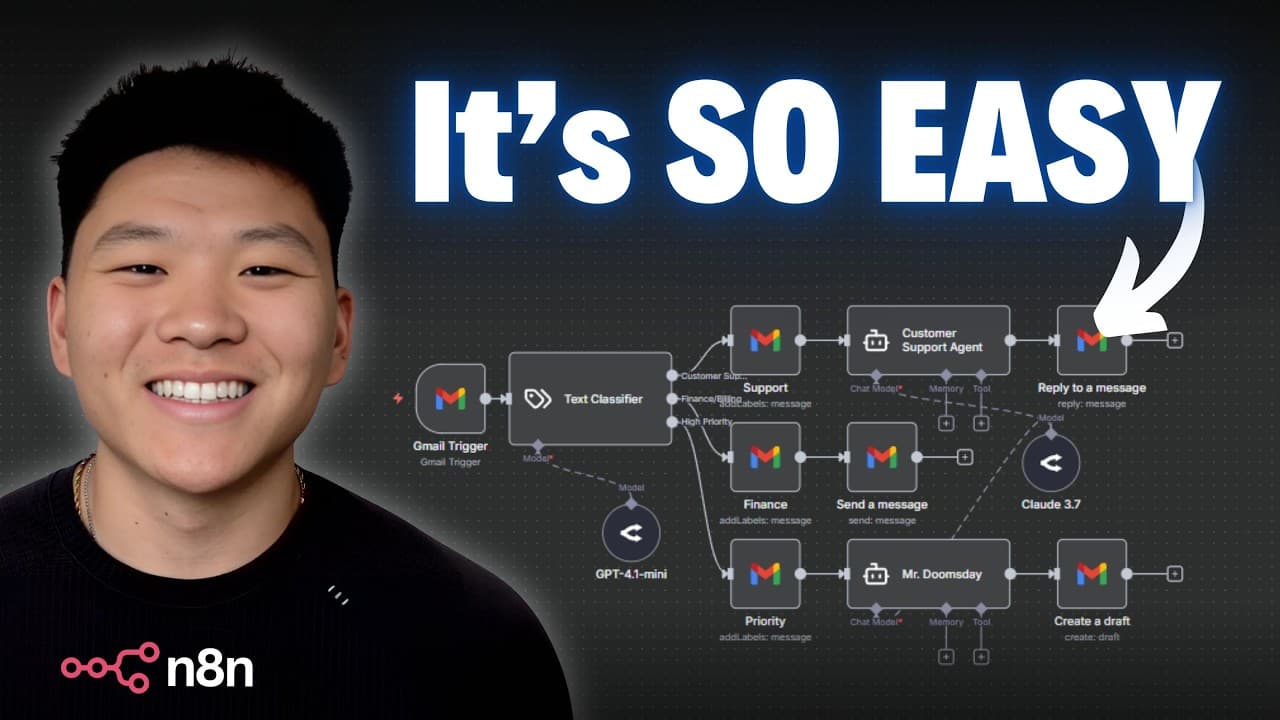
The video shows you how to create an inbox agent with no code by wiring a Gmail trigger, an AI classifier, and action branches in n8n. It explains wireframing first, then building end to end, including labeling, drafting replies, or notifying based on email type. You can start with a 14 day free trial and scale to a full inbox manager.
Transcript
By the end of this video, you'll have your own inbox agent that is classifying and labeling all of your incoming emails. We're going to build all of this together step by step with no code so that you guys will understand how you can actually start to scale up this system to become a full inbox manager. So, I don't want to waste any time. Let's get... Read More
Key Insights
- A clear wireframe is essential before building any automation
- Gmail is used as the trigger to start the workflow
- An AI classifier reads email subject and body to categorize
- Four categories are used for routing: customer support, finance and billing, high priority, promotion
- The workflow can label emails automatically based on category
- Drafts or replies can be generated by AI within Gmail
- Open Router connects to different AI models for processing
- The video demonstrates end to end testing with a sample email
- More videos from this channel:
- More from this channel: Nate Herk | AI Automation
Install to Summarize YouTube Videos and Get Transcripts
Explore YouTube Video Summarizer or Get YouTube Transcript Extractor
Questions & Answers
Q: What is the first step to build the inbox agent without code
The first step is to wireframe the system so all steps are mapped out before building. This visual diagram defines how Gmail triggers lead to an AI classifier, which then pushes the email into one of several branches for actions such as labeling, drafting a reply, or notifying a human. Wiring in this order helps ensure a smooth end to end flow.
Q: How does the Gmail trigger start the workflow
The Gmail trigger monitors the inbox for new messages and then passes data like the sender, time, subject, and body into the rest of the workflow. This trigger is configured to fetch test events and to pull in sample emails so you can verify the data structure and ensure the subsequent AI classifier receives the correct inputs.
Q: What data from the email is fed into the AI classifier
The subject and the body of the email are fed into the AI classifier. The workflow demonstrates how to map these inputs as variables, like subject and text, so the classifier can analyze the content and decide how to categorize the email into predefined groups such as customer support, finance and billing, high priority, or promotion.
Q: How many categories are used for classification and why
Four categories are used: customer support, finance and billing, high priority, and promotion. This structure provides clear, actionable branches for the next steps, such as labeling and responding. It helps demonstrate how different types of emails can trigger different automated outcomes in the inbox agent.
Q: What actions can be automated after classification
After classification, actions can include labeling the email into the appropriate folder, drafting a reply, sending an automatic reply, or notifying a human. The video emphasizes choosing actions per category, so the system can scale from labeling to more complex responses while staying under full user control.
Q: What is the role of the wireframe in building the system
The wireframe serves as the blueprint that outlines the process flow before any automation is built. It defines triggers, classifiers, and action branches, ensuring everyone agrees on how the system should operate. This planning step reduces rework and clarifies expected outcomes for each category.
Q: What tools are used in this no code inbox agent build
The build uses three tools: n8n for creating the workflow, Gmail as the input source, and Open Router to connect to different AI models. These tools together enable a no code approach that can classify and label emails and perform actions such as drafting responses or sending notifications.
Q: How is testing performed during the build
Testing is done by fetching a test event from Gmail to simulate an incoming email, adjusting the subject and body, and then pinning the data so it remains available during workflow testing. This helps verify that the AI classifier receives correct inputs and that the subsequent actions trigger as expected.
Summary & Key Takeaways
-
This summary describes a no code approach to building an inbox agent that classifies and labels emails, and can draft replies or notify based on categories. The process starts with wireframing, then connects Gmail to an AI classifier, and finally configures actions for each category. It emphasizes planning before building.
-
The tutorial uses three tools: NitN for the workflow, Gmail for email input, and Open Router to connect AI models. It guides setting up a Gmail trigger, pulling subject and body data, and using a text classifier to categorize emails into four groups, then routing actions accordingly.
-
Key takeaways include planning the workflow, wiring Gmail to an AI classifier, and configuring category based actions such as labeling, drafting, or notifying for different email types.
Read in Other Languages (beta)
Share This Summary 📚
Summarize YouTube Videos and Get Video Transcripts with 1-Click
Try YouTube Summary with ChatGPT & Claude or YouTube Transcript Generator
Explore More Summaries from Nate Herk | AI Automation 📚






Summarize YouTube Videos and Get Video Transcripts with 1-Click
Try YouTube Summary with ChatGPT & Claude or YouTube Transcript Generator