How to build a RAG system with n8n and Supabase
TL;DR
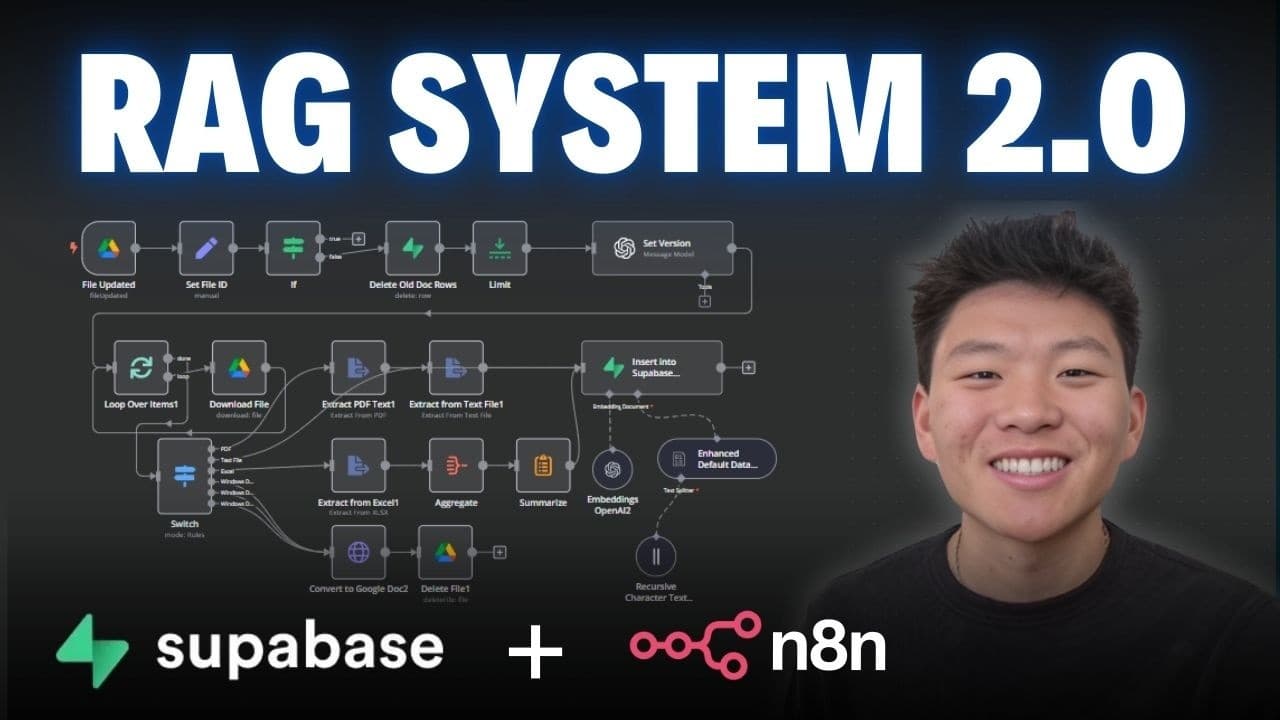
The system watches a Google Drive folder for new or updated files, classifies each file by type, extracts text, and uploads it to a vector database with metadata. Updates remove old records, bump the version, and re-upload the revised data to preserve history. This creates a dynamic knowledge base for AI queries.
Transcript
all right guys super excited to share this new rag system with you today it uses a combination of n8n superbase and postgress for memory and it is the best one that I've shown yet on this channel so it's going to be watching a Google drive folder and then when you upload a file it's automatically going to figure out what type of file it is the resp... Read More
Key Insights
- The RAG system uses a folder watcher to trigger processing when new files are added, ensuring immediate indexing.
- The pipeline dynamically determines the file type and converts it to a suitable text or data format to extract meaningful content for indexing.
- Metadata is rich and includes file ID, name, creation and modification times, folder path, and version to enable precise retrieval and updates.
- Updates to a file trigger deletion of the old record and reupload with an incremented version, preserving an audit trail.
- A vector database stores the extracted text with its associated metadata, enabling fast similarity search during queries.
- Postgres is used as memory for chat history and features a memory indexed by IDs to support contextual queries.
- The workflow demonstrates end to end integration between Google Drive, n8n, Supabase, and a vector store to support AI chat with internal documents.
- The creator positions this setup as a scalable approach for knowledge bases and AI assisted data retrieval.
- More videos from this channel:
- More from this channel: Nate Herk | AI Automation
Install to Summarize YouTube Videos and Get Transcripts
Explore YouTube Video Summarizer or Get YouTube Transcript Extractor
Questions & Answers
Q: How does the RAG system detect when a file is created or updated and trigger processing?
The system sets up two triggers: one watches for files created in the designated folder and the other monitors for file updates. When a new file is detected, the workflow downloads it, identifies the type, extracts text, and stores it in the vector database with metadata. When a file is updated, the system deletes the previous record, increments the version, and reuploads the updated content with the new metadata, ensuring the knowledge base stays current.
Q: What metadata is stored alongside each vector in the database and why?
Each vector includes metadata such as file ID, name, creation time, last modified time, folder path, file extension, and the version number. This metadata enables precise retrieval, traceability, and version control, allowing the system to replace or update specific entries without losing context or history, and it supports accurate auditing of content changes.
Q: What happens after a file is processed for a Google Doc in this workflow?
For a Google Doc, the workflow converts the document into a text format, extracts the text, and then pushes it into the vector database with associated metadata. This allows the content to be queried efficiently later, while maintaining a link to the original document through its file ID and metadata.
Q: How is version history maintained when a file is updated?
When a file update is detected, the system deletes the existing record corresponding to the previous version, increments the version label from V1 to V2 to V3 and so on, and reuploads the updated content with the new version metadata. This preserves a continuous version history in the vector store and metadata, enabling traceable evolution of documents.
Q: What role does Supabase play in this RAG setup?
Supabase acts as the primary data store for document metadata and manages the memory for the chat interactions. It stores entries related to documents, their IDs, and versioned metadata, and integrates with the vector database to support retrieval augmented responses. It helps maintain state and context across interactions.
Q: How does the system handle different file types like PDFs or Word documents?
The workflow includes a routing logic that detects file types and converts them into suitable text or data formats before extraction. For PDFs it extracts text, for Word and Windows docs it converts appropriately, and the extracted content is then indexed with metadata in the vector store to support effective querying.
Q: What is the practical benefit of this RAG pipeline for AI knowledge bases?
The practical benefit is a scalable, automated way to build and maintain a live knowledge base where documents are indexed, updated, and versioned with rich metadata. This enables fast and accurate retrieval for AI queries, maintains revision history, and reduces manual effort in keeping content synchronized with source files.
Q: Where can a viewer obtain the workflow demonstrated in the video?
Viewers can download the workflow from the Free Skool Community described in the video notes. The creator also mentions a paid Skool community for deeper topics and encourages joining for access to additional resources, live calls, and a classroom on Vector databases.
Summary & Key Takeaways
-
A retrieval augmented generation workflow is built using n8n, Supabase, and Postgres to manage and index files automatically. The process detects file types, extracts content, and stores it with rich metadata for fast retrieval. It also tracks updates to replace existing records with new versions.
-
The video demonstrates a practical end to end pipeline including watching for file creation, handling different formats, and updating vector database content while maintaining version history in metadata.
-
The author invites viewers to download the workflow from the community resources and offers a paid deep dive for further learning and hands on practice.
Read in Other Languages (beta)
Share This Summary 📚
Summarize YouTube Videos and Get Video Transcripts with 1-Click
Try YouTube Summary with ChatGPT & Claude or YouTube Transcript Generator
Explore More Summaries from Nate Herk | AI Automation 📚






Summarize YouTube Videos and Get Video Transcripts with 1-Click
Try YouTube Summary with ChatGPT & Claude or YouTube Transcript Generator