How to self host MCP in n8n and connect servers
TL;DR
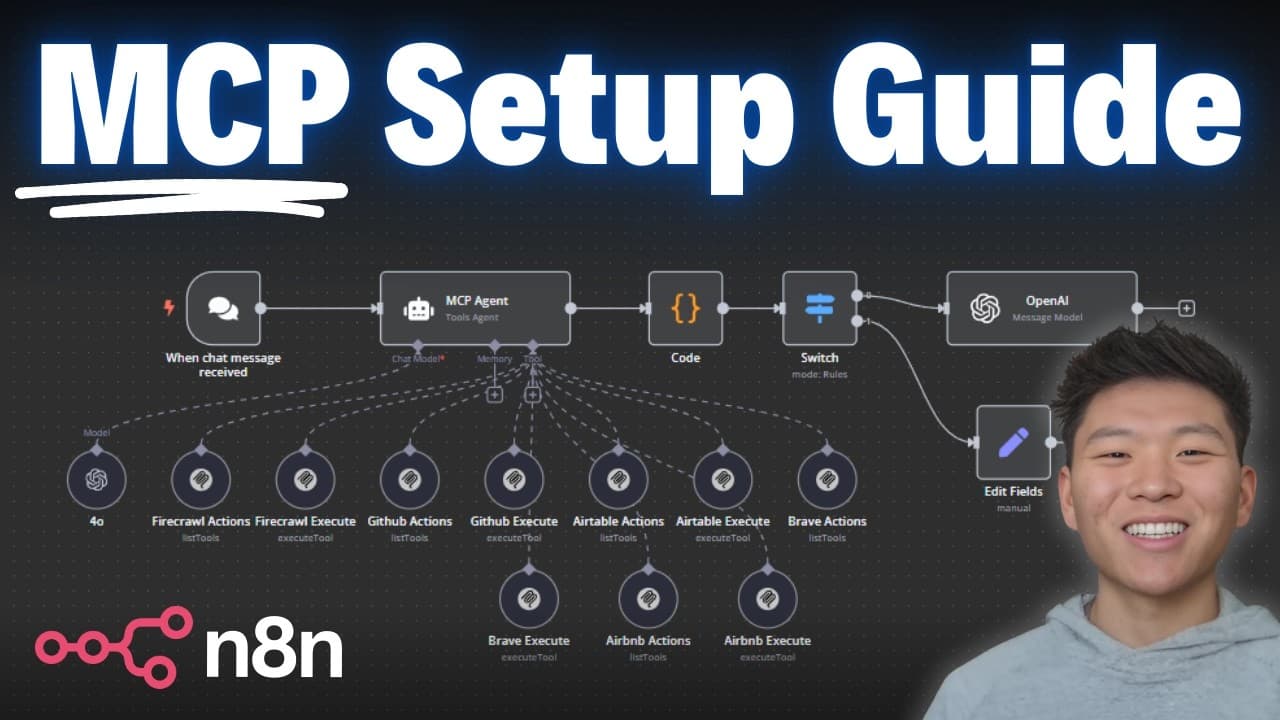
The video demonstrates self hosting MCP in n8n and connecting MCP servers without using a terminal. It covers spinning up a self hosted instance, installing the MCP community node, and configuring credentials to run tools, with notes on limitations and common issues. The walkthrough includes an Airbnb example and Brave Search usage.
Transcript
today we're going to be going through the full setup of connecting mCP servers to NN I'm going to walk through how you self-host your NN I'm going to walk through how you can install the community node and then how to actually set up the community node the best part is you don't have to open up a terminal or a shell and type in any install commands... Read More
Key Insights
- MCP self hosting in n8n is achieved by using a cloud deployment so you do not need local terminal access. The process involves spinning up the service, selecting a plan, and enabling a community node for MCP integration. This setup streamlines installation and updates.
- The MCP community node is installed from a GitHub repository and appears as a node in n8n. After installation you can access functions like list available tools and execute tools, enabling interaction with MCP servers.
- Connecting to an MCP server requires creating a credential with the proper command from the MCP server documentation. Once saved, you can test and pull tools that the MCP server exposes, such as a search tool or listing tools.
- An Airbnb MCP server example demonstrates how to supply the required npx command and arguments via credentials, enabling tool execution without terminal access. This illustrates how to bridge external services into n8n workflows.
- A second example with Brave Search shows additional MCP tools being exposed and usable within n8n, highlighting the flexibility to connect multiple MCP servers for different tasks.
- The video mentions current limitations of MCP nodes, including some constraints in the community node environment. These limitations can affect performance and capability when scaling MCP agents and workflows.
- Users should expect potential issues around account activation times, credit balances, and service provisioning, which the video covers through a step by step sign up and deployment flow.
- The workflow emphasizes the importance of choosing appropriate service plans and backups, as resource needs may increase with multiple MCP servers running concurrently, impacting stability and cost.
- More videos from this channel:
- More from this channel: Nate Herk | AI Automation
Install to Summarize YouTube Videos and Get Transcripts
Explore YouTube Video Summarizer or Get YouTube Transcript Extractor
Questions & Answers
Q: How do you begin self hosting MCP in n8n and what do you need to set up first?
To begin self hosting MCP in n8n you first need a cloud hosting setup and access to n8n with the MCP community node. The video guides you through signing up, adding a payment method or credits, and creating a new service for nadn, selecting a region and plan. After service creation you access the NN environment via a provided link, complete onboarding questions, and reach the NN dashboard ready for MCP configuration. This creates the base environment to install the MCP community node and begin integrating MCP servers.
Q: What is required to install the MCP community node in n8n?
Installing the MCP community node requires navigating to the MCP settings within the NN self hosted instance, locating the community nodes section, and using the install package command with the provided line from the GitHub repository. The node appears in the list of nodes as MCP client, enabling you to access functions like listing tools and executing tools. This process does not require terminal access on your machine, as the install runs through the web interface.
Q: How do you connect to an MCP server using a credential in n8n?
Connecting to an MCP server in n8n involves creating a new credential and pasting the install command and arguments from the MCP server documentation into the credential fields. You then save the credential and test it. Once the credential is saved, you can select the MCP server in a node, choose a tool, and configure the tool parameters to execute. This enables interactive use of MCP tools without manual terminal work.
Q: What is an Airbnb MCP example and why is it used in the video?
The Airbnb MCP example demonstrates how to connect to an MCP server by using a command that requires an open robots text skip parameter, via npx and arguments. It shows how to fill in the required arguments step by step in the credential, enabling the MCP tools such as Airbnb search and listing details to be executed from within an n8n workflow. It highlights practical, non terminal based integration of a real MCP server.
Q: How does the Brave Search MCP example differ from the Airbnb example in the video?
The Brave Search MCP example showcases another MCP server workflow where different tools and schemas are exposed for execution. It reinforces that multiple MCP servers can be connected and used in parallel, expanding the types of queries that an n8n workflow can perform. This example underlines the flexibility to switch between MCP sources depending on the task, while maintaining credential based access.
Q: What are the current limitations of the MCP community node as discussed in the video?
The video discusses current limitations related to the MCP community node environment that may affect scalability and performance. These include potential constraints on features, tool access, and integration complexity with self hosted setups. The speaker emphasizes understanding these limitations when planning larger deployments or multiple agents.
Q: What common issues might you encounter when using MCP servers with n8n, and how are they addressed?
Common issues include account activation times after signing up, credit balance handling before deployment, and provisioning delays for new services. The video guides you through checking activation status, adding credits, and waiting for service provisioning. It also highlights potential crashes or instability if resources are insufficient, recommending plan upgrades and monitoring to maintain performance.
Q: What is the recommended approach to scaling MCP agents with MT servers according to the video?
The recommended approach is to start with a smaller service plan and then upgrade as needed when running multiple MCP servers. The video explains how resource intensity can impact stability and performance, so monitoring CPU, RAM, and storage usage is important. By selecting scalable cloud options and adjusting the plan, you can accommodate growth while maintaining control over costs and reliability.
Summary & Key Takeaways
-
The video explains self hosting MCP with n8n and how to install the MCP community node, including steps to deploy on a cloud provider and configure settings for a working setup.
-
It walks through creating and verifying credentials for MCP servers, testing connections to different MCP servers, and running tools within the MCP ecosystem from n8n.
-
It concludes with discussions of current limitations and common issues that may arise when using MCP community nodes and how to address them.
Read in Other Languages (beta)
Share This Summary 📚
Summarize YouTube Videos and Get Video Transcripts with 1-Click
Try YouTube Summary with ChatGPT & Claude or YouTube Transcript Generator
Explore More Summaries from Nate Herk | AI Automation 📚






Summarize YouTube Videos and Get Video Transcripts with 1-Click
Try YouTube Summary with ChatGPT & Claude or YouTube Transcript Generator