How to Build a No Code AI Agent with n8n Email
TL;DR
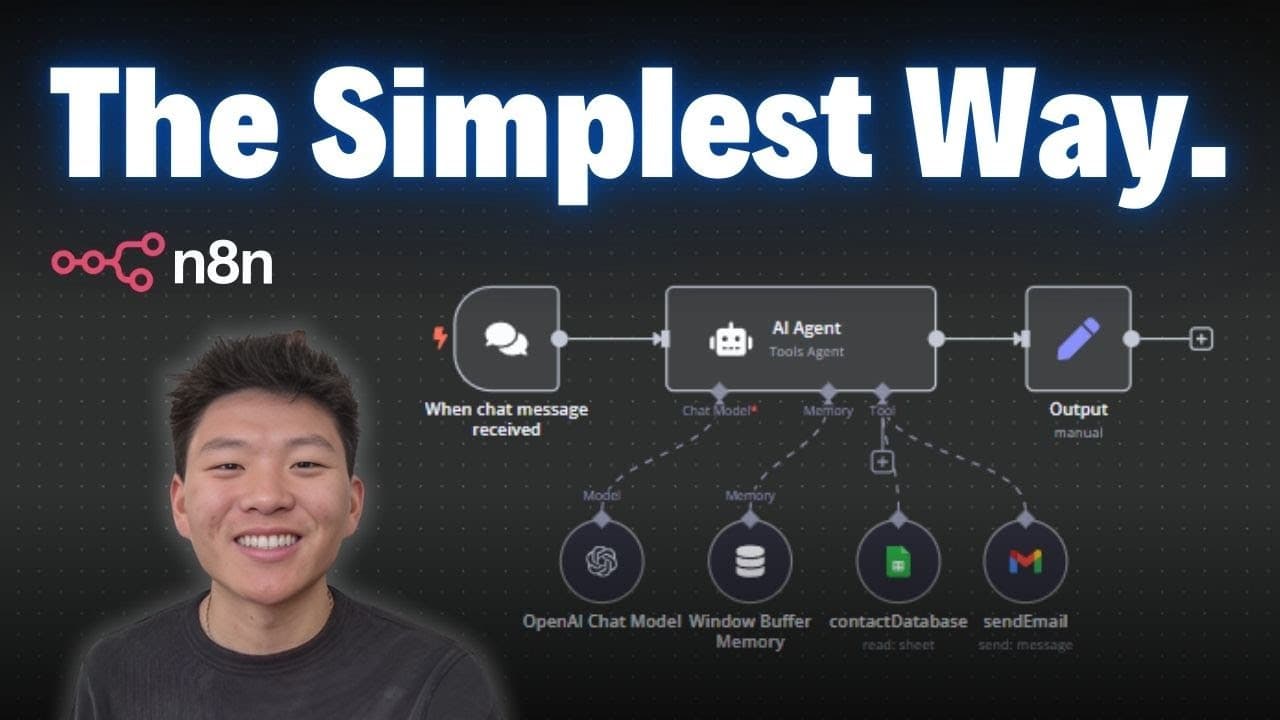
You can create an email sending AI agent in minutes using no coding by wiring a brain, memory and tools in n8n. The setup uses a chat trigger, a memory buffer, and a Gmail tool to send messages, all controlled by a system prompt and testing steps.
Transcript
today I'm going to be walking through the simplest way to understand what an AI agent is the different components how they actually take action and do things and then I'm going to show you guys how to build a super simple one in minutes there's a lot of information out there on the internet about AI agents so I'm going to try to break it down for y... Read More
Key Insights
- The brain of an AI agent is a large language model such as GPT and is essential for understanding and generating responses.
- Memory stores conversation history to maintain context and improve subsequent actions by the agent.
- System prompts define the agent’s role and constraints, guiding how it uses tools and responds to input.
- Tools extend the agent’s capabilities beyond conversation to perform real actions like sending emails.
- The user message is the input that the agent processes to decide what actions to take.
- A running history is maintained through a memory buffer so prior interactions influence future outputs.
- Dynamic task parameters are achieved by using expressions and keys to fill tool fields at runtime.
- Testing and debugging steps are shown to ensure the agent performs the intended actions reliably.
- More videos from this channel:
- More from this channel: Nate Herk | AI Automation
Install to Summarize YouTube Videos and Get Transcripts
Explore YouTube Video Summarizer or Get YouTube Transcript Extractor
Questions & Answers
Q: What is the basic structure of an AI agent in this video
The AI agent is built from three core parts: brain, memory, and tools. The brain is a large language model that provides understanding and response generation. Memory stores the conversation history to maintain context across interactions. Tools perform actions like sending emails, and the agent decides when to invoke them based on the input and system prompts.
Q: How do you enable memory for the agent
Memory is enabled by adding a memory module, specifically a window buffer memory, which references the chat trigger session. The buffer stores a set number of past messages, preserving context for future responses. This makes the agent remember user information like names and preferences within a session.
Q: What is the role of the system prompt in this setup
The system prompt defines the agent’s role, allowed tools, and how it should act. It remains constant across interactions and guides the agent in choosing appropriate actions. By contrast, user messages vary, and the system prompt provides the rules the agent must follow during its decision process.
Q: What steps are shown to add the brain to the agent
The steps include selecting a chat model, creating and saving OpenAI credentials, and choosing a model like GPT. Once the brain is added, the agent can process input. Credentials ensure the agent can access the API, and the chosen model determines its language capabilities and responses.
Q: How is the Gmail tool configured for sending emails
The Gmail tool is added as a tool, credentials are connected, and the email type is set to text. The recipient and message fields are configured as expressions so they are filled dynamically from the user input. This enables the agent to send personalized emails based on context.
Q: Why is a dynamic email recipient important
A dynamic recipient allows the agent to adapt to different user requests without hardcoding email addresses. By using expressions tied to the user query, the agent can extract the correct recipient from input data, enabling scalable and flexible automation for various contacts.
Q: What testing steps are demonstrated for the Email Agent
The video demonstrates running a test by sending a sample message through the agent, observing the brain, memory, and tool outputs, and verifying that the Gmail tool sends an email as expected. This includes checking the agent’s log and ensuring the program flow works end to end.
Q: What is the overall takeaway about building AI agents without code
The main takeaway is that you can assemble a working AI agent using no code by combining a brain, memory, and tools in a visual workflow like n8n. With careful prompts, memory setup, and dynamic tool config, a practical automation such as sending emails is achievable in minutes. The approach emphasizes accessibility and rapid prototyping.
Summary & Key Takeaways
-
This video explains the components of an AI agent, including brain, memory, and tools, and shows how they interact to take action in a no code environment.
-
The tutorial walks through adding a chat model, enabling memory with a window buffer, and configuring a Gmail tool to send emails, all within the n8n interface.
-
A practical end-to-end test is demonstrated, including connecting credentials, crafting prompts, and validating the email sending workflow.
Read in Other Languages (beta)
Share This Summary 📚
Summarize YouTube Videos and Get Video Transcripts with 1-Click
Try YouTube Summary with ChatGPT & Claude or YouTube Transcript Generator
Explore More Summaries from Nate Herk | AI Automation 📚






Summarize YouTube Videos and Get Video Transcripts with 1-Click
Try YouTube Summary with ChatGPT & Claude or YouTube Transcript Generator