How to Secure n8n Webhooks with Authentication
TL;DR
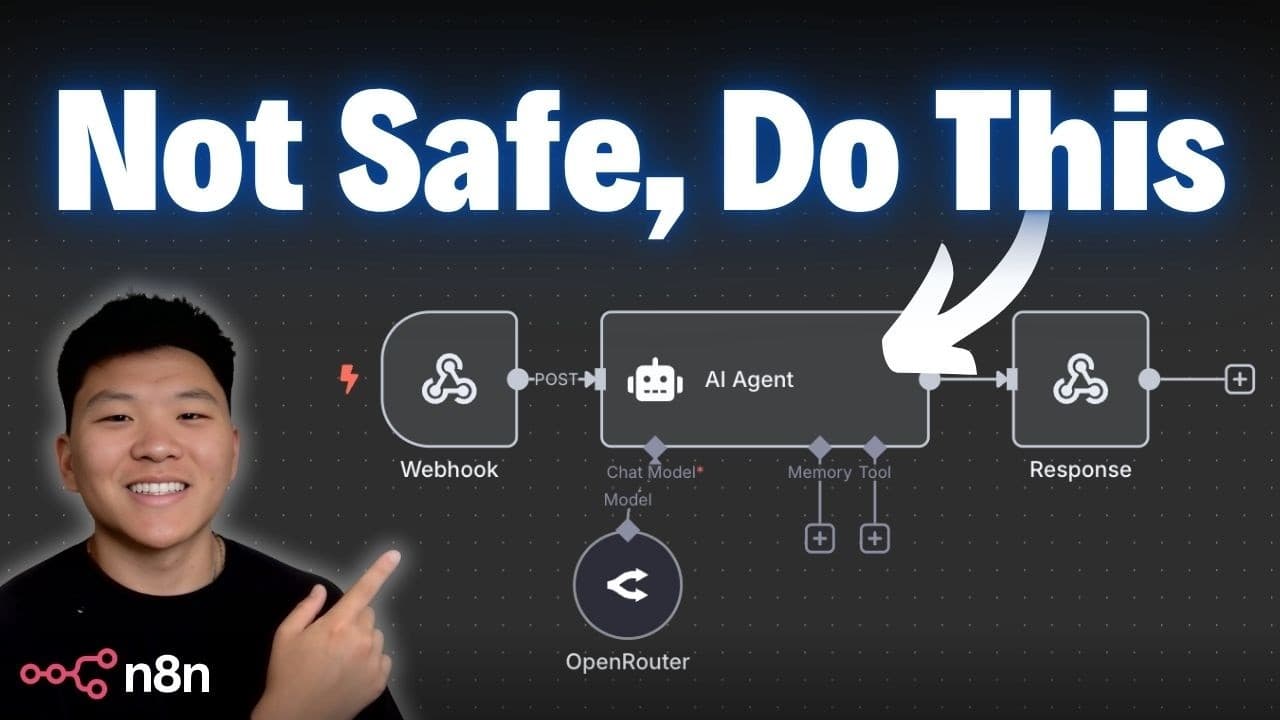
An unprotected n8n webhook lets anyone who finds its production URL trigger your workflow, run up AI model costs, and reach connected databases or CRMs. n8n offers three authentication options: Header Auth (one key and value), Basic Auth (a username and password), and JWT Auth, which also carries a payload of user details. You can use that payload to route each request by role.
Transcript
If you're not protecting your web hooks, you're putting yourself at risk for waking up to a $500 bill or leaking your sensitive information, stuff like that. So, today I'm going to talk about the three methods of setting up web hook authentication. It's going to be super simple. I'm going to show you an example of each one and talk about when to us... Read More
Key Insights
- An active n8n webhook production URL is reachable by anyone who has it. Anyone can then trigger the workflow, and an attacker could message an AI agent many times and make you pay for every request sent to OpenAI or OpenRouter.
- Unprotected webhooks also risk exposing sensitive data, because the connected agent may have tools that reach databases, knowledge bases, or a CRM. An attacker could reach those systems through the public endpoint.
- Using a hard-to-guess webhook path is a sensible first layer of protection, but it is not enough by itself. Authentication is what blocks people who obtain the public webhook URL.
- Header Auth works like an API key. You define a header name and value in n8n, and requests without that exact header are rejected with an 'authorization data is wrong' message.
- Basic Auth uses a username and password instead of a single key and value. Its main advantage is that many legacy systems and platforms already support it, which makes them easy to connect.
- Header Auth is more universal and customizable than Basic Auth because almost any tool making a request can send custom headers. That makes it a flexible default for most integrations.
- JWT Auth (JSON Web Token) checks a signed token against a shared secret and also captures a payload such as name, email, or admin status. n8n then shows that payload in the webhook data.
- The JWT payload lets workflows make access decisions. They can send admins to an agent with admin permissions and other users to a restricted agent, track who uses the service and when, and limit tokens to a set time window.
Install to Summarize YouTube Videos and Get Transcripts
Explore YouTube Video Summarizer or Get YouTube Transcript Extractor
Questions & Answers
Q: Why should I add authentication to an n8n webhook?
An active n8n webhook production URL can be reached by anyone who has it, so anyone can start your workflow. An attacker could message your AI agent over and over and make you pay for every request sent to OpenAI, OpenRouter, or another chat model. If the agent has tools that reach databases, knowledge bases, or a CRM, sensitive information could leak as well.
Q: What authentication methods does the n8n webhook node support?
The n8n webhook node offers three authentication methods besides the default of none. Header Auth requires a specific header name and value. Basic Auth requires a username and password. JWT Auth checks a signed JSON Web Token and also captures a payload of user details. Each one rejects requests that lack valid credentials, so the workflow does not run and does not spend money on AI calls.
Q: How do I set up Header Auth on an n8n webhook?
Open the webhook node, set authentication to Header Auth, and create a new credential with a header name and a value. In the video, the name is 'key' and the value is a simple test string. After saving, any request without that exact header gets an 'authorization data is wrong' response. Adding the matching header in a tool like Postman lets the request through to the workflow.
Q: What is the difference between Header Auth and Basic Auth in n8n?
Both work like key-value credentials. Header Auth uses one custom header key and value, and Basic Auth uses a username and password. Basic Auth is useful because many platforms and legacy systems already support it, which makes them easy to connect. Header Auth is more universal and customizable, since nearly any tool making a request can send custom headers.
Q: How do I test n8n webhook authentication with Postman?
Set the n8n workflow to listen on the test URL, then send a POST request to that URL from Postman with a JSON body such as a message field. With no credentials, n8n rejects the request. For Header Auth, add the key and value under headers. For Basic Auth, pick Basic in the authorization tab. For JWT, pick Bearer Token and paste the full token.
Q: How do I set up JWT authentication on an n8n webhook?
Create a token at jwt.io with the HS256 algorithm, a payload such as name and admin status, and a secret. In the n8n webhook node, choose JWT Auth, create a credential with key type passphrase and algorithm HS256, and paste the same secret. Then send the generated token as a bearer token in Postman, and n8n will accept and process the request.
Q: What can I do with the JWT payload in an n8n workflow?
n8n captures the decoded JWT payload in the webhook data, so you can see who made each request. You can route requests by role, for example sending admins to an agent with admin access and everyone else to a restricted agent. You can also track which employees use the service, how often, and when, and look them up by email in your own systems.
Q: When should I use JWT instead of Header Auth or Basic Auth?
Use JWT when you need more than a yes-or-no access check. JWT tokens carry a payload with user details such as email or admin status, which lets the workflow give different access to different users, track sessions and usage, and limit tokens so they only work for a set period. Header Auth and Basic Auth are simpler and fit cases where one shared credential is enough.
Summary & Key Takeaways
-
Leaving an n8n webhook without authentication means anyone with the production URL can trigger the workflow. This can create large AI model bills from repeated requests, and it can expose sensitive data through tools connected to databases, knowledge bases, or CRMs. A hard-to-guess path helps, but authentication is the real protection.
-
Header Auth and Basic Auth are the two simplest options. Header Auth requires a specific header key and value, much like an API key, and Basic Auth requires a username and password. Postman tests show that requests without the right credentials are rejected and correct ones get the agent's reply.
-
JWT Auth uses a secret and the HS256 algorithm, set up in n8n with a passphrase key type. Tokens generated at jwt.io are sent as bearer tokens. The decoded payload appears in the webhook data, so workflows can route users by role, track usage, and limit access by time.
Read in Other Languages (beta)
Share This Summary 📚
Summarize YouTube Videos and Get Video Transcripts with 1-Click
Try YouTube Summary with ChatGPT & Claude or YouTube Transcript Generator
Explore More Summaries from Nate Herk | AI Automation 📚



Summarize YouTube Videos and Get Video Transcripts with 1-Click
Try YouTube Summary with ChatGPT & Claude or YouTube Transcript Generator