How to Build an Azure Databricks End-to-End Project From Scratch in 2025
TL;DR
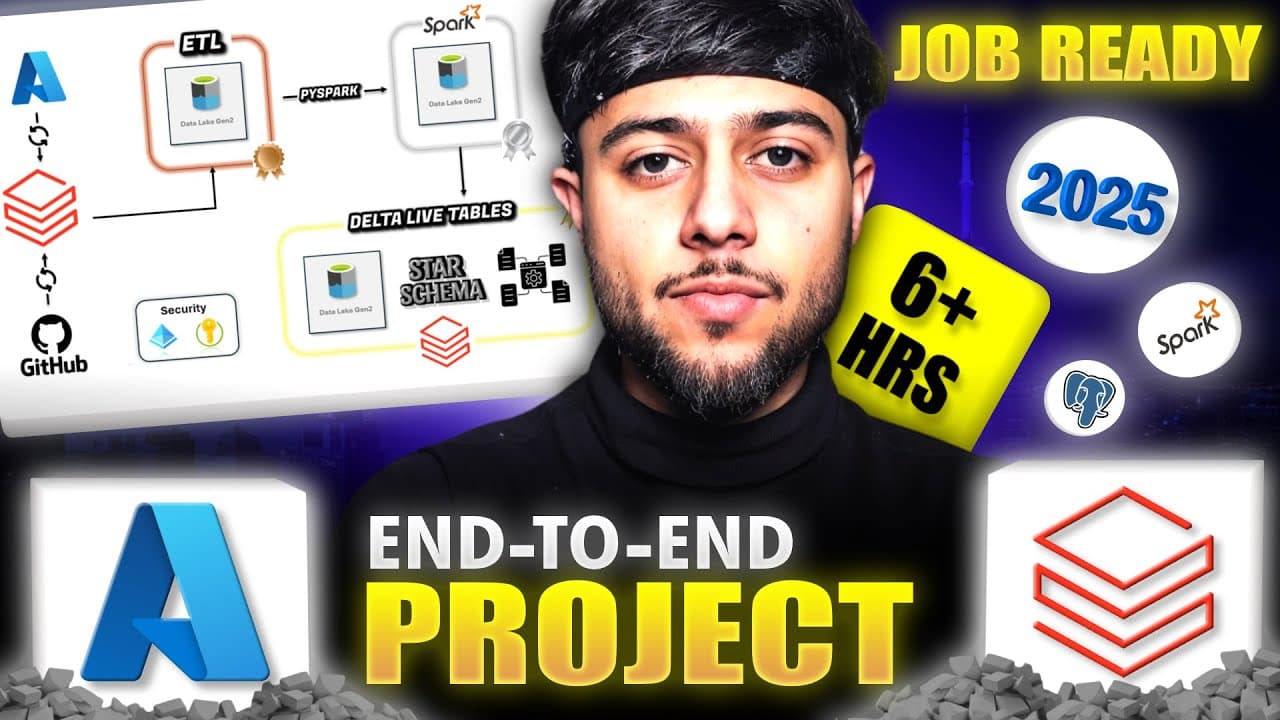
Build a real-world Azure Databricks project by organizing data into bronze, silver, and gold layers, then creating complete ETL pipelines and workflows. The project covers incremental loading with Spark Structured Streaming, PySpark and Python OOP, Unity Catalog, star schema modeling, Type 1 and Type 2 slowly changing dimensions, Delta Live Tables, and Power BI connectivity. Read on to understand how the full architecture fits together.
Transcript
This is the only Azure datab bricks end to end project you need in 2025 to crack the interviews and master Azure datab bricks technology. Really? But why should we trust you? Because this project will tell you how to incrementally load the data using spark streaming and ingest pipelines. Then it will demonstrate all the pispark functions including ... Read More
Key Insights
- Azure Databricks is crucial for mastering data engineering in 2025.
- Incremental data loading is achieved using Spark Streaming and ingest pipelines.
- PySpark functions and Python OOP concepts are essential for data manipulation.
- Unity Catalog is a critical data governance solution in Databricks.
- Delta Live Tables are highly in-demand for managing real-time data.
- ETL pipelines in Databricks can be built end-to-end for seamless data workflows.
- Star schema and slowly changing dimensions are part of advanced data modeling.
- Real-world projects require administrative tasks and security configurations.
Install to Summarize YouTube Videos and Get Transcripts
Explore YouTube Video Summarizer or Get YouTube Transcript Extractor
Questions & Answers
Q: How do you build an Azure Databricks end-to-end project from scratch in 2025?
Build the project with a medallion architecture that distributes data across bronze, silver, and gold layers. The walkthrough starts with incremental ingestion, transforms and stores data in the silver layer, builds a star schema and slowly changing dimensions in the gold layer, and finishes with ETL workflows and a Power BI connection.
Q: How does the project incrementally load data in Azure Databricks?
The bronze layer uses Spark Structured Streaming to process incrementally arriving data. It applies idempotency and an exactly-once criterion so that previously processed data does not need to be processed again, and it also covers automated ingestion pipelines.
Q: What is Unity Catalog used for in this Azure Databricks project?
Unity Catalog is used as the project's data-governance solution when working with data stored in the data lake. The silver layer also uses functions in Unity Catalog to make code reusable, while the project includes related administrative and security tasks.
Q: What happens in the bronze, silver, and gold layers?
The bronze layer handles incremental loading, Spark Structured Streaming, idempotency, automated ingestion pipelines, and columnar Parquet files. The silver layer applies PySpark functions and Python OOP concepts, uses reusable Unity Catalog functions, and stores data in Delta format. The gold layer creates dimension and fact tables, Type 1 and Type 2 slowly changing dimensions, and Delta Live Tables.
Q: How are PySpark and Python OOP used in the silver layer?
The silver layer demonstrates multiple PySpark functions for transforming the data. It also integrates Python object-oriented concepts, including classes, with PySpark code and uses Unity Catalog functions for code reusability.
Q: How does the project build a star schema and slowly changing dimensions?
The gold layer creates a star schema with dimension tables and a fact table. Slowly changing dimension Type 1 is built line by line in code, while Type 2 is created with Delta Live Tables.
Q: What does the project teach about Delta Live Tables?
Delta Live Tables is taught as part of the gold-layer implementation. It is specifically used to create the Type 2 slowly changing dimension and provide an end-to-end understanding of that layer.
Q: What are the prerequisites for the Azure Databricks project?
You need a laptop or PC with a stable or nearly stable internet connection and enthusiasm to learn the complete Databricks solution. A Databricks account and attached cloud storage are also required, but the walkthrough says both accounts will be created for free.
Summary & Key Takeaways
-
The video provides a comprehensive guide to mastering Azure Databricks, focusing on real-time data engineering projects. It covers incremental data loading using Spark Streaming and PySpark functions, essential for data manipulation and building ETL pipelines. The video also introduces Delta Live Tables and Unity Catalog for effective data governance, offering a complete understanding of Databricks to excel in data engineering interviews.
-
Key features of Azure Databricks include incremental data loading, data governance with Unity Catalog, and real-time data management using Delta Live Tables. The video emphasizes the importance of mastering PySpark functions and building ETL pipelines for efficient data workflows. It also highlights the significance of star schema and slowly changing dimensions in advanced data modeling.
-
The video is designed to help viewers become proficient in Azure Databricks, covering essential topics such as Spark Streaming, PySpark, and Delta Live Tables. It provides insights into building real-world data engineering projects, focusing on data governance, ETL pipelines, and advanced data modeling techniques. The video aims to equip viewers with the skills needed to succeed in data engineering roles.
Read in Other Languages (beta)
Share This Summary 📚
Summarize YouTube Videos and Get Video Transcripts with 1-Click
Try YouTube Summary with ChatGPT & Claude or YouTube Transcript Generator
Explore More Summaries from Ansh Lamba 📚


Summarize YouTube Videos and Get Video Transcripts with 1-Click
Try YouTube Summary with ChatGPT & Claude or YouTube Transcript Generator