How to Build Productivity Tools with ChatGPT Sites
TL;DR
ChatGPT Sites can turn a short, plain-English prompt into a hosted website or private dashboard, often in about 10 minutes. Describe what the site should accomplish and who will use it, then preview and publish it with either private access or a public URL. Sites can support persistent data, forms, recurring updates, and personalized information from automated workflows.
Transcript
This is a live website with a real URL that I created with ChatGBT sites. I just typed one paragraph into ChatGBT and 10 minutes later I had a fully built out site with free hosting. But most people miss what's so incredible about ChatGpt sites. Not only can you make sites like this, which have a working booking form that saves data, but you can al... Read More
Key Insights
- ChatGPT Sites can create hosted websites, private dashboards, booking forms, and shared tools from plain-English prompts. The resulting site can have a real URL, persistent data, and access controls, allowing it to serve as more than a static page or temporary prototype.
- The basic creation workflow is to select Sites from the prompt box, describe the desired site, wait for generation, and open the preview. The process works in the web and desktop apps and within both Chat and ChatGPT Work, according to the demonstration.
- Short prompts perform well when they clearly identify the site's purpose and intended user. The creator recommends emphasizing what the site should do and who it is for instead of prescribing extensive implementation details or specifying every aspect of its appearance.
- Publishing is handled through the site's sharing controls. A creator can keep a site private or make it available to anyone on the internet, then copy the OpenAI-hosted URL without completing a separate hosting setup or deployment process.
- A daily dashboard can consolidate calendar events, tasks, important emails, drafted replies, current video work, inbox details, and weather. When updated every morning and bookmarked on a phone, it provides relevant information without requiring the user to open the original chat or a computer.
- An email triage dashboard can summarize recurring inbox automation before the user opens Gmail. The demonstrated workflow reviews email every hour, drafts replies without sending them, labels suspected junk, reports completed actions, and surfaces informational messages that the user may not need to read personally.
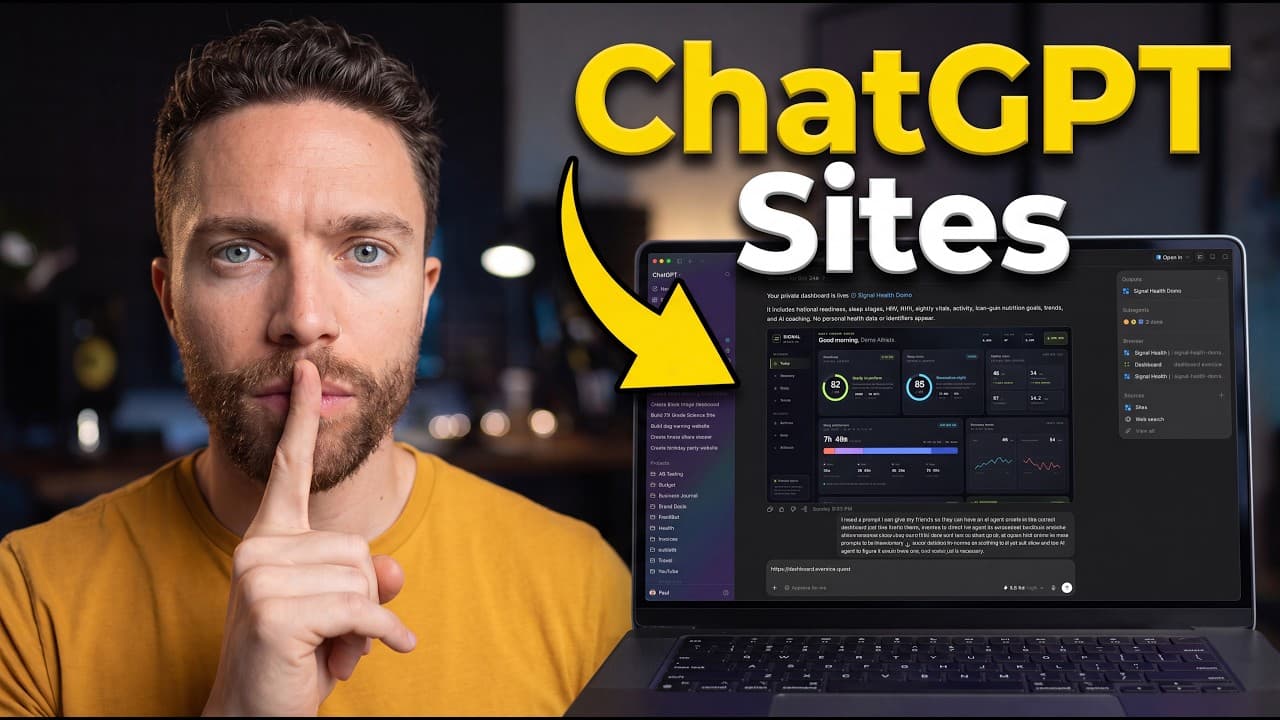
- A health dashboard can reorganize Fitbit information into a preferred layout. The example displays readiness, sleep, nightly vitals, recovery trends, fueling information, and AI suggestions, using fitness data that ChatGPT can access through a connected Fitbit dashboard in its built-in browser.
- A business site can be produced from a prompt containing services, prices, availability, and a request form. The example is a public dog-walking website created in about 10 minutes, illustrating how ChatGPT Sites can combine business information with an interactive form for prospective customers.
Install to Summarize YouTube Videos and Get Transcripts
Explore YouTube Video Summarizer or Get YouTube Transcript Extractor
Questions & Answers
Q: How do you create a website with ChatGPT Sites?
Type the at symbol in the ChatGPT prompt box, search for Sites, select it, and describe the website in plain English. After ChatGPT finishes building it, open the preview to inspect the result. The demonstrated class website took about 13 minutes, while the creator says roughly 10 minutes is generally average, although generation time varies by site.
Q: How do you publish a ChatGPT Site with a public URL?
Open the sharing menu after reviewing the generated site, choose who should have access, and select anyone on the internet if the site is intended to be public. Click publish, copy the provided link, and test it in a browser. The resulting URL is hosted by OpenAI, so the demonstrated workflow requires no additional hosting setup.
Q: What should a good ChatGPT Sites prompt include?
A useful prompt should state what the site needs to accomplish and identify the people who will use it. The creator reports that shorter prompts perform well and recommends focusing less on implementation details or exact appearance. ChatGPT can then adapt the site's design and usability around the stated goal and intended audience.
Q: How can ChatGPT Sites create a daily productivity dashboard?
A private site can display the output of a recurring daily routine, including calendar events, tasks, important emails, drafted replies, current work, inbox information, and weather. The demonstrated dashboard updates every morning and is bookmarked on the creator's phone. This makes the report accessible from another device without opening the original chat or using a computer.
Q: How does an email triage dashboard work with ChatGPT Work?
The demonstrated automation reviews the email inbox every hour, drafts replies, applies labels to messages it considers junk, and completes relevant follow-up actions. It does not send the drafted replies. A separate dashboard summarizes reviewed messages, drafts, completed actions, and informational emails, giving the user context before opening Gmail and examining the prepared responses.
Q: How can ChatGPT Sites display Fitbit health data?
The example dashboard presents a readiness score, sleep score, nightly vitals, sleep details, recovery trends, fueling information, and AI suggestions. Fitbit users can open dashboard.exercise.quest in ChatGPT's built-in browser, connect with Fitbit, and log in to their Google Health account. ChatGPT can then see the available fitness data while updating the dashboard each morning.
Q: Can ChatGPT Sites create a business website with a form?
Yes. The demonstrated business example was created from one prompt for a dog-walking service. The prompt supplied the services, prices, availability, and a request for a form that visitors could complete. ChatGPT produced a publicly accessible site in about 10 minutes, showing that a generated site can combine business details with an interactive customer form.
Q: Can a ChatGPT Site be private and viewed on a phone?
Yes. The sharing controls allow a site to remain accessible only to its creator instead of being published for everyone on the internet. The creator uses this setting for a personal daily dashboard, bookmarks its URL on a phone, and opens it there after the dashboard updates each morning. This avoids needing to access the dashboard from a computer.
Summary & Key Takeaways
-
ChatGPT Sites creates functional websites from plain-English instructions inside the web or desktop app. A user selects Sites from the prompt box, describes the desired outcome and audience, waits for the build, and reviews the result in the preview panel. The demonstrated class site took about 13 minutes to generate.
-
Publishing removes much of the setup normally associated with putting an AI-generated site online. The sharing menu lets the creator limit access to themselves or allow anyone on the internet to visit. OpenAI hosts the resulting URL, and later changes can be requested directly through ChatGPT without rebuilding everything manually.
-
Private dashboards are a central productivity use case because they make automated information accessible from any device. Examples include a daily briefing, email triage overview, and Fitbit-based health dashboard. Public uses include a business website with a form, while the description also identifies chore tracking and birthday sites as practical examples.
Read in Other Languages (beta)
Share This Summary 📚
Summarize YouTube Videos and Get Video Transcripts with 1-Click
Try YouTube Summary with ChatGPT & Claude or YouTube Transcript Generator
Explore More Summaries from Paul J Lipsky 📚



Summarize YouTube Videos and Get Video Transcripts with 1-Click
Try YouTube Summary with ChatGPT & Claude or YouTube Transcript Generator