How to use Krish AI Chatbot for data help
TL;DR
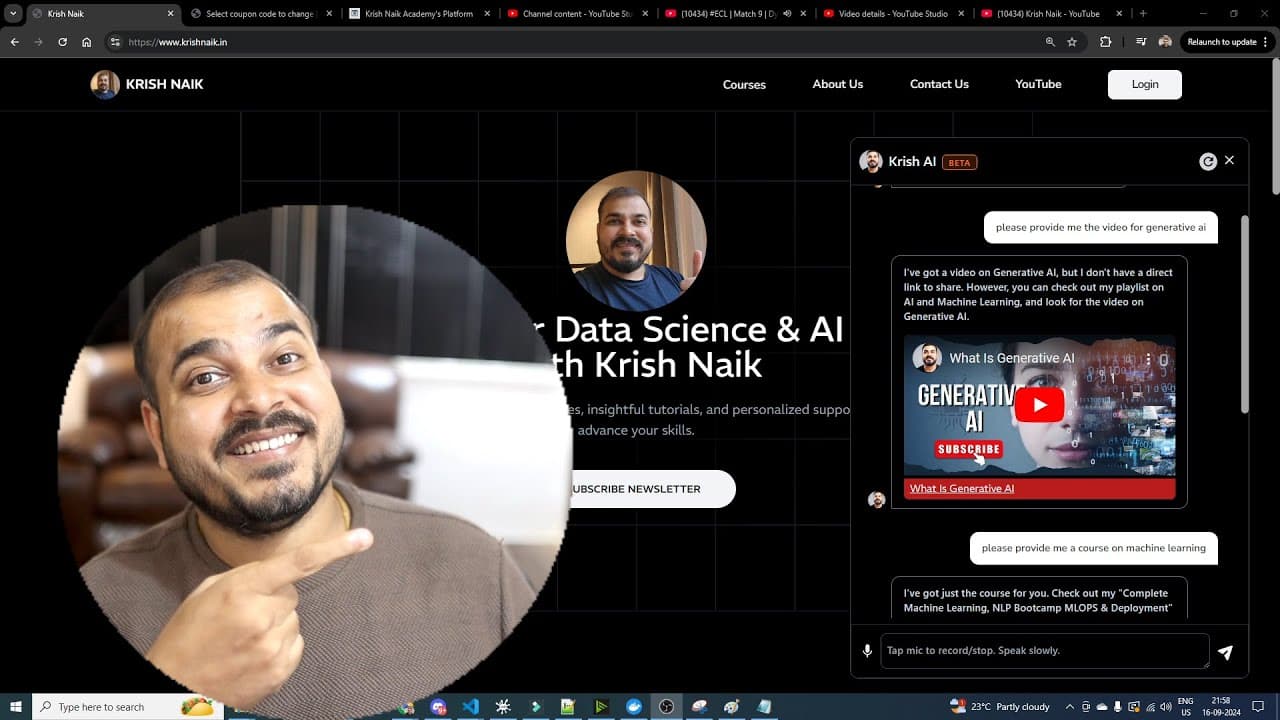
Krish AI Chatbot lets users login to interact with a data science focused assistant that links to YouTube videos and Udemy courses from the creator. It is designed to provide expert guidance, video links, course information, and future features like live sessions and interview practice, while acknowledging ongoing development and team contributions.
Transcript
hello all my name is krishn and uh welcome to my YouTube channel so guys I'm super excited to introduce you to my new amazing website that is Krish n.n in this particular video I'll be talking about what all features have been already developed and what all things you can actually explore from it and as we go ahead you know I have lot of plans of c... Read More
Key Insights
- Krish AI Chatbot is a web based assistant that provides expert guidance and video links from the creator’s YouTube channel and Udemy courses.
- The chatbot requires users to login and is designed to deliver information such as course details and video links in response to data science related questions.
- Future features include resume help, interview preparation, live sessions, and broader product development planned by the creator and team.
- The website backend is built with Next.js and uses open source LLMs and vector databases for data handling and recall of content.
- The creator plans to fine tune the chatbot over time and progressively add more data sources, courses, and live class offerings.
- The team behind the project is small but growing, with mentions of specific team members and a co founder who helps drive development.
- Video links and Udemy course promotions are embedded in the description, encouraging users to explore and subscribe for updates.
- The overall aim is to create a guided, interactive assistant that can answer questions, provide links to relevant materials, and improve through user feedback.
- More videos from this channel:
- More from this channel: Krish Naik
Install to Summarize YouTube Videos and Get Transcripts
Explore YouTube Video Summarizer or Get YouTube Transcript Extractor
Questions & Answers
Q: How can a user access the Krish AI Chatbot and what is required to start using it?
To access Krish AI Chatbot, a user must log in on the website first. After login, the chatbot becomes available for interaction and can answer questions related to data science, providing video links and course information from the creator’s content. The login step is emphasized as essential for accessing features and personalized responses.
Q: What kinds of content can the chatbot provide links to besides videos?
Besides video links, the chatbot can provide links to Udemy courses and course related information. The system is designed to fetch information from the creator’s YouTube channel and Udemy catalog, including course details and potentially future content like blogs and live sessions. The emphasis is on delivering contextual resources alongside video content.
Q: What future features are mentioned for the Krish AI Chatbot?
The video mentions plans to add features such as resume help, interview sessions, detailed live classes, and more integrated tools for guidance. There is an intention to extend the bot’s capabilities to handle problem statements, provide interview prep, and connect users with live sessions, indicating a broader product roadmap.
Q: Who is developing and supporting the Krish AI Chatbot according to the video?
The speaker describes a small team including a co founder and named teammates who are actively building and refining the website and chatbot. The speaker provides leadership as CEO and founder while crediting teammates for implementing features and contributing to the project architecture, signaling a collaborative development effort.
Q: What is the stated goal behind building the Krish AI Chatbot?
The goal is to create an expert guided chatbot that not only answers questions but also provides relevant video links and course materials. The creator aims to deliver practical guidance for data science topics, assist with course access, and progressively integrate more features and live interactions while refining the user experience.
Q: How does the video describe the data sources used by the chatbot?
The chatbot is described as using open source large language models and a vector database approach, with possible use of platforms like Pinecone or Astra DB. It is designed to index content from the creator’s videos and Udemy courses so that queries yield organized, retrievable responses tied to specific resources.
Q: What is the navigation flow for users who want to explore courses through the chatbot?
Users are guided to login, then can query the chatbot for topics such as machine learning or generative AI. The bot will return information and links to relevant Udemy courses that are promoted in the description, enabling a connected discovery experience between video content and course offerings.
Q: What should users expect regarding updates and maintenance of the chatbot?
Users should expect ongoing refinement and expansion as indicated by the creator, who mentions fine tuning the model, adding more data sources, improving data recall, and incorporating feedback from users. This implies a roadmap with iterative updates and incremental feature introductions over time.
Summary & Key Takeaways
-
The video introduces a web based chatbot called Krish AI that integrates with the creator's YouTube channel and Udemy courses to answer data science related queries.
-
It explains the login requirement, how the bot delivers video links, and plans for features like resumes, interview practice, and live sessions.
-
The creator emphasizes slow development, future plans, and credits the team while inviting feedback and ongoing improvements.
Read in Other Languages (beta)
Share This Summary 📚
Summarize YouTube Videos and Get Video Transcripts with 1-Click
Try YouTube Summary with ChatGPT & Claude or YouTube Transcript Generator
Explore More Summaries from Krish Naik 📚
Summarize YouTube Videos and Get Video Transcripts with 1-Click
Try YouTube Summary with ChatGPT & Claude or YouTube Transcript Generator