How to build an Excel dashboard from SQL data
TL;DR
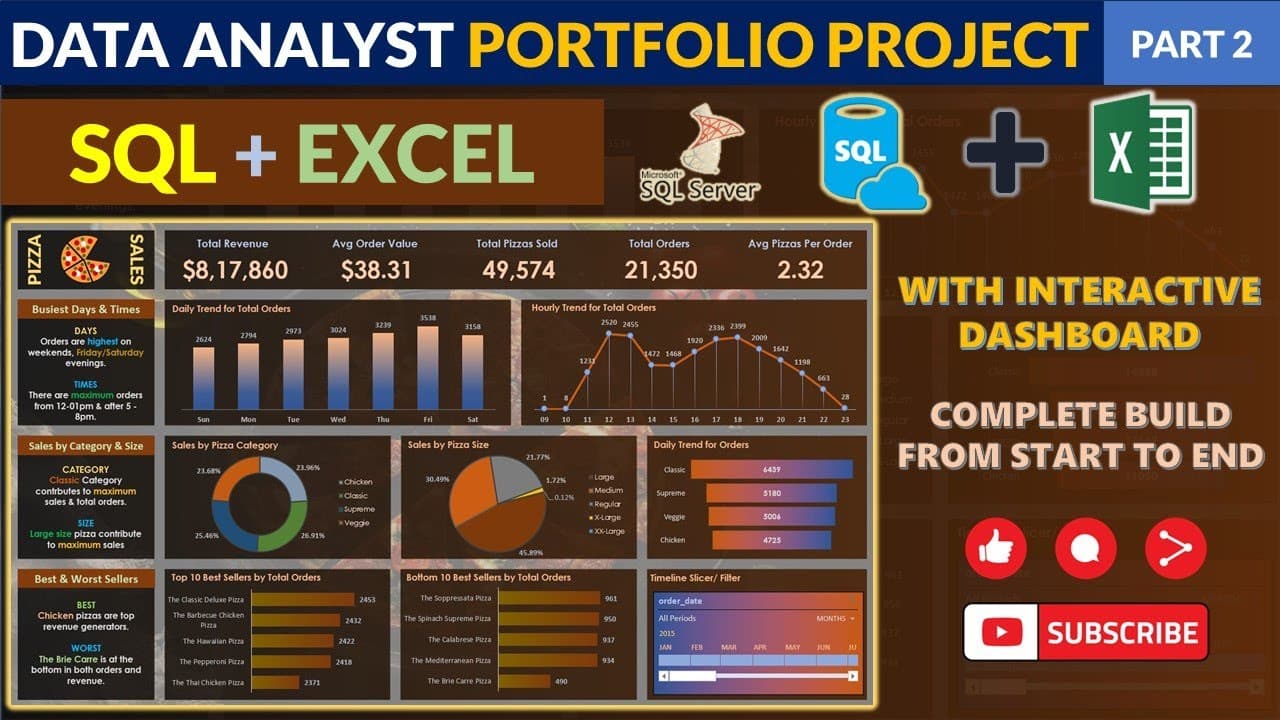
The video shows how to import data from a SQL Server database into Excel, load it as a table, and clean and transform fields for analysis. It then guides creating a KPI dashboard with a pivot table, calculating totals, averages, and setting up slicers for interactive insights.
Transcript
so we will start with our second part of video where we will be creating a dashboard for our pizza sales with our requirement which we have and we will create an interactive dashboard which I shown you at the start of the video so we have taken a new worksheet over here so this is the new worksheet which I have taken for Excel and now what I will d... Read More
Key Insights
- Importing data from SQL Server or a flat file brings the dataset into a new Excel worksheet through the Get Data option, enabling a live connection or a static import based on user choice.
- Data loading creates a Power Query workspace where you can transform and clean data before loading it into a table, ensuring data integrity for analysis.
- The pizza size column is standardized by replacing abbreviations with full descriptors like medium, large, small, and regular, enabling consistent labeling across the dataset.
- After cleaning, a new day column is generated by extracting the day name from the order date using a text function, which helps in daily trend analysis.
- Pivot tables are used to compute KPI metrics such as total revenue by summarizing the total price field, providing a baseline for further calculations.
- A second KPI metric is the average order value, computed by dividing total revenue by the number of orders, which is derived from the pivot data structure.
- Slicers are mentioned as a way to connect controls to the KPI view, enabling interactive filtering of the dashboard by date, size, and other dimensions.
- Workbook organization is emphasized by creating a dedicated KPI sheet and naming tables clearly to simplify slicer connections and dashboard maintenance.
Install to Summarize YouTube Videos and Get Transcripts
Explore YouTube Video Summarizer or Get YouTube Transcript Extractor
Questions & Answers
Q: How do you start building the dashboard in Excel from SQL data
To begin, open Excel and use the Get Data option under the Data tab to connect to a SQL Server or to a flat file if a server is not available. You then select the database and table you want to import, choose Load or Transform Data to clean or shape the data in Power Query, and finally load it into a worksheet as a table for analysis.
Q: What if My Excel version lacks the Get Data feature
If your Excel version does not show Get Data, upgrade to a version newer than 2016 or 19 as suggested in the tutorial, then retry the Get Data path to connect to SQL Server or the flat file. This ensures you have the proper Power Query and data connection capabilities required to build the dashboard.
Q: How is the data cleaned for the dashboard
Data cleaning involves standardizing the pizza size column by replacing single letters with full descriptors and correcting mixed formats, such as converting x large to X hyphen large and regularizing abbreviations. This step ensures consistency for reliable analysis and visualization.
Q: How is the day extracted from order dates
A new column is added to extract the day name from the order date using a text function that formats the date as the full day name, such as Monday or Tuesday. This creates a usable field for daily trend analysis and time-based slicing.
Q: What is the purpose of creating a KPI sheet
The KPI sheet serves as a dedicated workspace to collect the key metrics calculated from the data, such as total revenue and average order value, making it easier to design and connect visual elements like charts and slicers without disrupting the raw data.
Q: How is total revenue calculated in the dashboard
Total revenue is calculated by summing the total price field in the data, typically added to the Values area of a pivot table. This aggregation provides a foundational metric for evaluating overall performance and can be drilled into by date, product size, or other dimensions.
Q: How is the average order value computed
Average order value is computed by dividing the total revenue by the total number of orders, which is derived from the dataset or the pivot structure. This metric offers insight into customer purchase behavior and helps benchmark performance over time.
Q: What role do slicers play in the dashboard
Slicers provide interactivity by filtering the pivot table data in real time based on user selections such as date, size, or other dimensions. They connect to the KPI view and help users explore different scenarios and trends without altering the underlying data.
Summary & Key Takeaways
-
A practical end to end workflow is demonstrated, starting from connecting to a SQL Server database or using a flat file, to loading the data into Excel and preparing it for analysis.
-
Data cleaning and transformation are covered, including renaming size descriptors and extracting the day from order dates, ensuring the dataset is analysis ready.
-
The session finishes with building a KPI dashboard using a pivot table to summarize total revenue and other metrics, plus guidance on visualization and interactivity.
Read in Other Languages (beta)
Share This Summary 📚
Summarize YouTube Videos and Get Video Transcripts with 1-Click
Try YouTube Summary with ChatGPT & Claude or YouTube Transcript Generator
Explore More Summaries from Data Tutorials 📚






Summarize YouTube Videos and Get Video Transcripts with 1-Click
Try YouTube Summary with ChatGPT & Claude or YouTube Transcript Generator