How to Create a Data Analyst Dashboard with SQL and Excel?
TL;DR
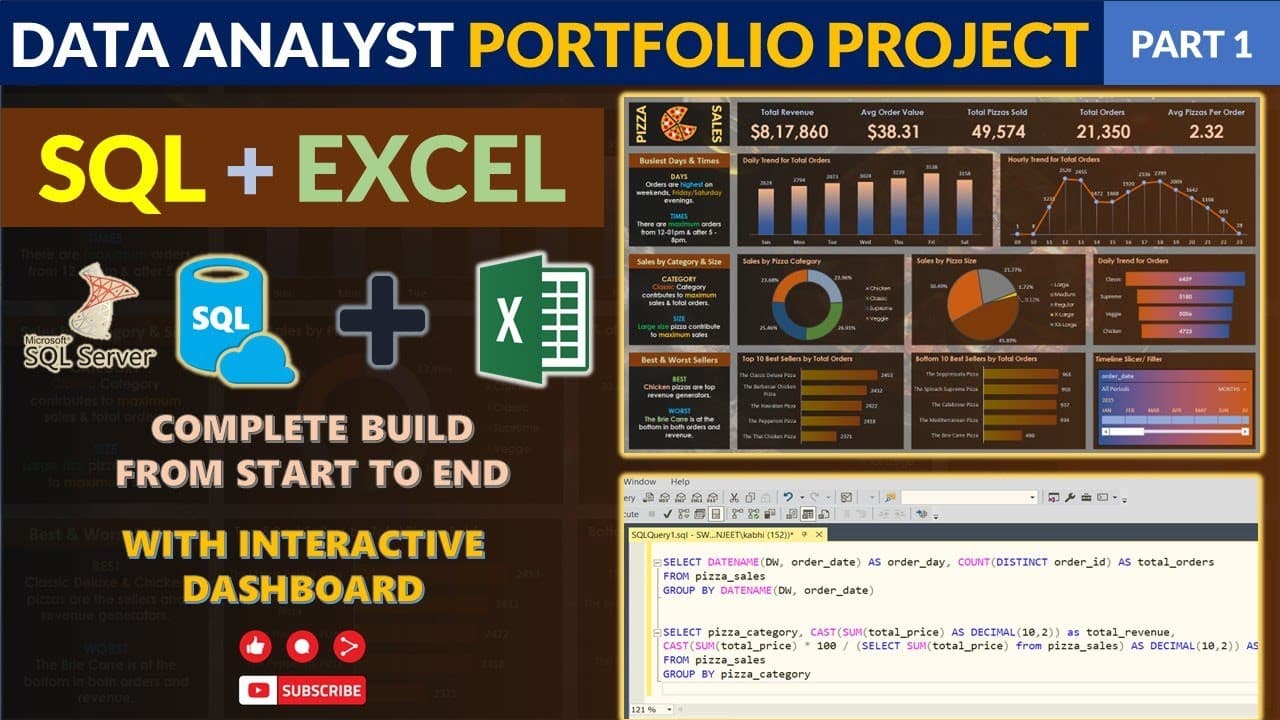
To create a data analyst dashboard using SQL and Excel, start by importing your data into MS SQL Server and writing SQL queries to validate it. Then, connect Excel to SQL Server, design your dashboard using pivot tables and charts, and ensure accuracy by cross-referencing values with SQL results. Key analytics include total revenue, average order value, and trends in sales.
Transcript
Read and summarize the transcript of this video on Glasp Reader (beta).
Key Insights
- The project involves using MS SQL Server and Excel to create a data analyst portfolio project, focusing on data validation and dashboard creation.
- The client requires various problem statements to be addressed, including the creation of a dashboard in Excel and validation of data using SQL queries.
- The project emphasizes the importance of cross-checking dashboard values with SQL queries to ensure data accuracy and provide reliable insights.
- An interactive dashboard is created in Excel using filters, allowing users to view data by different time periods, such as quarters and months.
- Key performance indicators (KPIs) are analyzed, including total revenue, average order value, total pizzas sold, and average pizzas per order.
- The project demonstrates the use of SQL queries to calculate daily and hourly trends, percentage of sales by category and size, and identify best and worst-selling pizzas.
- The video provides a step-by-step guide on importing data into MS SQL Server, creating databases, writing queries, and connecting Excel to SQL Server.
- The project is designed for beginners and aims to help viewers understand the workflow of a data analysis project, including data cleaning, processing, and visualization.
Install to Summarize YouTube Videos and Get Transcripts
Explore YouTube Video Summarizer or Get YouTube Transcript Extractor
Questions & Answers
Q: What software is used in the project?
The project uses MS SQL Server and Excel. MS SQL Server is used for data validation and writing SQL queries, while Excel is used for creating an interactive dashboard. The video also demonstrates how to connect Excel to MS SQL Server for data visualization.
Q: What is the purpose of the project?
The project's purpose is to create a data analyst portfolio project that demonstrates the ability to validate data using SQL queries and create an interactive dashboard in Excel. It aims to provide reliable insights by cross-checking dashboard values with SQL query results.
Q: How are key performance indicators analyzed?
Key performance indicators such as total revenue, average order value, total pizzas sold, and average pizzas per order are analyzed using SQL queries. These KPIs provide insights into business performance and help determine if the business is on the right track.
Q: What insights can be gained from the dashboard?
The interactive dashboard allows users to view data by different time periods, such as quarters and months, and gain insights into daily and hourly trends, percentage sales by category and size, and identify best and worst-selling pizzas. This information is useful for business decision-making.
Q: How is data validation performed?
Data validation is performed by writing SQL queries to cross-check the values displayed on the Excel dashboard. The project emphasizes the importance of ensuring data accuracy by comparing SQL query results with dashboard values to provide reliable insights.
Q: What is the significance of using filters in the dashboard?
Filters in the dashboard allow users to view data by different time periods, such as quarters and months, providing flexibility and enabling users to gain insights into specific time frames. This feature enhances the interactivity and usability of the dashboard.
Q: What steps are involved in the project?
The project involves several steps, including importing data into MS SQL Server, creating databases, writing SQL queries, connecting Excel to SQL Server, and creating an interactive dashboard. It also covers data cleaning, processing, and visualization to ensure accurate and reliable insights.
Q: Who is the target audience for the project?
The project is designed for beginners, intermediates, freshers, college students, and recent graduates who are looking to gain practical experience in data analysis projects. It aims to help viewers understand the workflow of a data analysis project and develop skills in SQL and Excel.
Summary & Key Takeaways
-
The video guides viewers through a comprehensive data analyst project using SQL and Excel, focusing on creating an interactive dashboard and validating data accuracy. It covers importing data into MS SQL Server, writing queries, and connecting Excel to SQL Server for data visualization.
-
Key performance indicators such as total revenue, average order value, and total pizzas sold are analyzed. The project emphasizes the importance of cross-checking dashboard values with SQL queries to ensure data accuracy and provide reliable insights.
-
The project involves creating daily and hourly trends, calculating percentage sales by category and size, and identifying best and worst-selling pizzas. It is designed for beginners, providing a step-by-step guide on data cleaning, processing, and visualization.
Read in Other Languages (beta)
Share This Summary 📚
Summarize YouTube Videos and Get Video Transcripts with 1-Click
Try YouTube Summary with ChatGPT & Claude or YouTube Transcript Generator
Explore More Summaries from Data Tutorials 📚



Summarize YouTube Videos and Get Video Transcripts with 1-Click
Try YouTube Summary with ChatGPT & Claude or YouTube Transcript Generator