How to track AI agent actions and costs with n8n
TL;DR
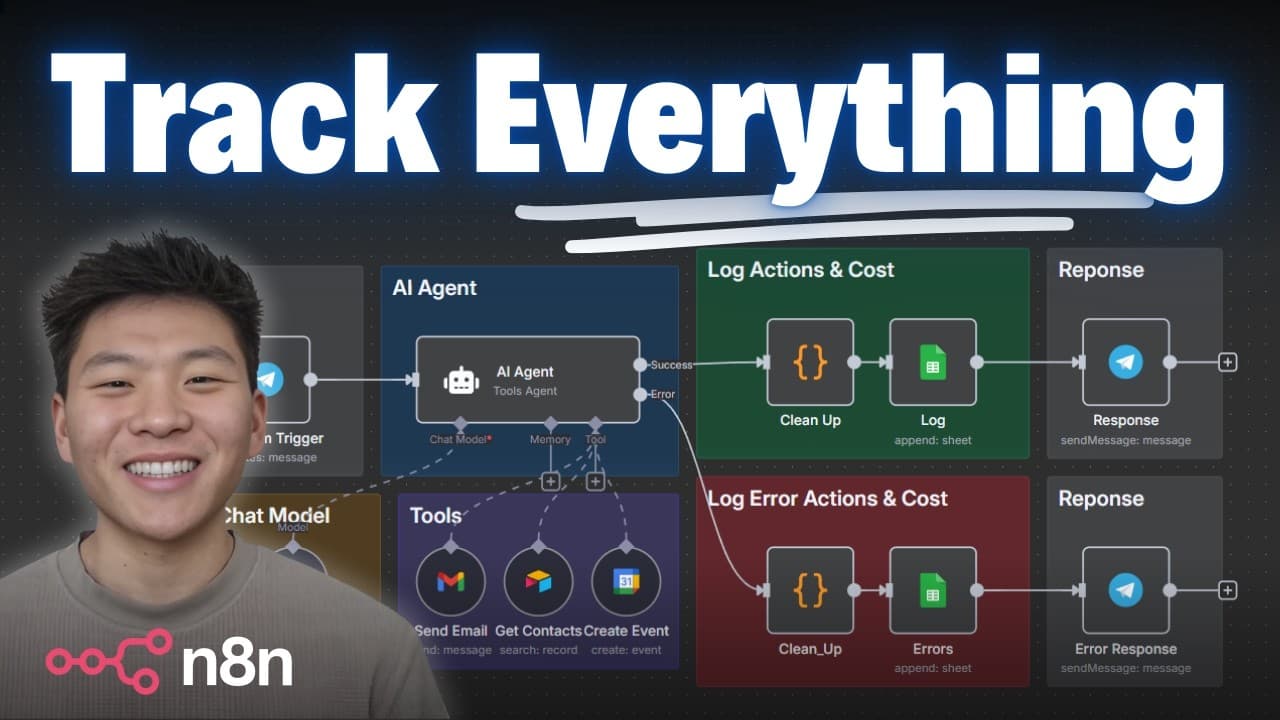
You can log agent runs, actions, tokens, and cost in a Google Sheet using an n8n workflow. The setup captures timestamps, workflow name, inputs, outputs, and per action costs, and includes error handling to separate success and error branches for clear analytics.
Transcript
LLM observability is such a big deal when we're talking about AI agents because unlike traditional software, these systems can be a little bit unpredictable. They can hallucinate and they can become expensive, especially at scale. So, it's important to monitor their usage. So, today I'm going to be showing you guys how to implement this system that... Read More
Key Insights
- The system logs every agent run with a timestamp, workflow name, input, and output to provide a complete run record.
- The action log records each tool call, including the tool name, parameters, and the final result, enabling traceability of the agent’s decisions.
- Tokens consumed per action are captured, along with the model used, to compute and audit costs for each run.
- Cost is calculated by summing token usage across actions, giving a per-run financial footprint that can be analyzed over time.
- Error handling is built into the workflow so that failed runs follow a dedicated error path with clear messaging.
- The observability template can be downloaded and integrated into your own agents, reducing setup friction for users.
- The approach demonstrates how to stringify and pretty print nested data like steps and tokens for clear logging in sheets or databases.
- The system distinguishes between success and error branches even when the agent itself does not fail, enabling more nuanced analytics.
- More videos from this channel:
- More from this channel: Nate Herk | AI Automation
Install to Summarize YouTube Videos and Get Transcripts
Explore YouTube Video Summarizer or Get YouTube Transcript Extractor
Questions & Answers
Q: How does the system log an agent run start and end times?
The system records a time stamp at the start of each run and includes the end result in the log. This enables users to measure run duration, compare performance across different workflows, and correlate timings with events like tool calls or errors. It provides a reliable timeline for debugging and optimization.
Q: What information is stored about each action the agent takes?
Each action is logged with the tool name, the parameters used, and the response received. This creates a traceable sequence of decisions the agent made, allowing you to audit why a particular tool was invoked, how its input affected outcomes, and where bottlenecks or errors occurred.
Q: How are tokens and model used tracked in the logs?
The logs capture the token count per action and the model selected for that action, such as a specific GPT variant. This data supports cost analysis and helps identify which models or prompts are most efficient for different tasks, guiding optimization decisions at scale.
Q: How is cost calculated in the workflow?
Cost is calculated by summing the tokens used across all actions in a run and associating that with the corresponding model. This gives a per-run monetary footprint that can be analyzed over time to detect spikes, optimize prompts, and control expenses.
Q: What happens when the agent run encounters an error?
When an error occurs, the workflow can route the run to an error path while still logging the error message, timestamp, and any partial data. This separation helps diagnose failures without losing context, and it allows continued monitoring of successful runs alongside failed ones.
Q: How can the logging data be used for analytics?
With the data stored in a Google Sheet or similar, you can create pivot tables and charts to compare runs across workflows, months, or agents. You can analyze total costs, average token usage, and success rates to identify areas for improvement and track progress over time.
Q: What is the role of intermediate steps in the agent’s output?
Intermediate steps expose the sequence of actions and tool calls the agent performed, including parameter values and intermediate responses. This detail helps in understanding the reasoning path of the agent, validating prompts, and debugging complex multi-step workflows.
Q: How does the setup handle transitions between success and error branches?
The setup uses distinct branches for success and error outcomes, and can route subsequent logging and analysis accordingly. This ensures that even if a run encounters a tool error, it is recorded in a way that supports separate examination of successful vs failed executions.
Summary & Key Takeaways
-
This video demonstrates a workflow in n8n that records every agent run, the actions taken, tokens used, and the total cost, storing them in a Google Sheet for analysis. It emphasizes observability to catch hallucinations and manage expenses at scale.
-
The tutorial covers logging structure, including timestamps, workflow identifiers, inputs, outputs, and the intermediate steps. It also shows error handling paths and how to view data in logs to diagnose failures and improve prompts.
-
The presenter invites viewers to try the setup, download templates, and join a course and community, while highlighting the importance of measuring tool usage and costs to iterate on agent prompts and workflows.
Read in Other Languages (beta)
Share This Summary 📚
Summarize YouTube Videos and Get Video Transcripts with 1-Click
Try YouTube Summary with ChatGPT & Claude or YouTube Transcript Generator
Explore More Summaries from Nate Herk | AI Automation 📚






Summarize YouTube Videos and Get Video Transcripts with 1-Click
Try YouTube Summary with ChatGPT & Claude or YouTube Transcript Generator