How to Use Java for Loops to Repeat Code
TL;DR
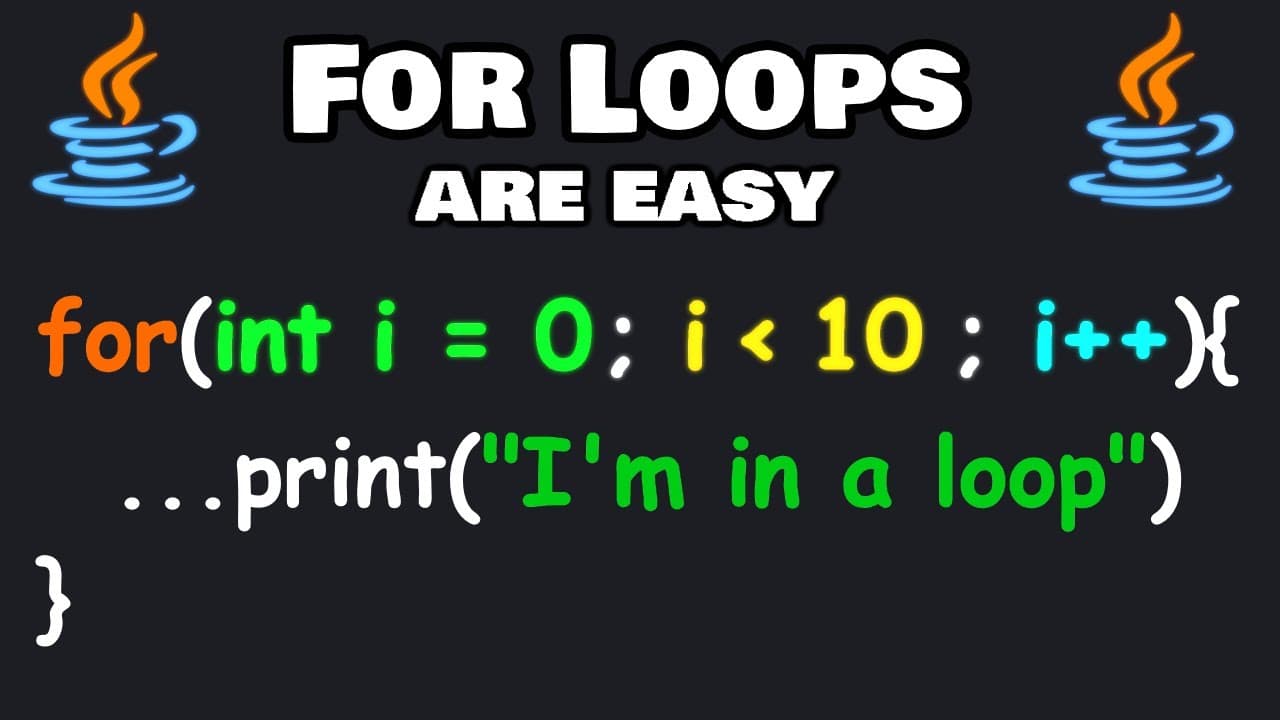
Use a Java for loop to repeat code a specific number of times by defining initialization, a continuation condition, and an update inside parentheses, separated by semicolons. For example, starting with i = 0, continuing while i < 10, and applying i++ produces 10 iterations. The loop can also count backward, use larger steps, accept a limit through Scanner, or run a timed countdown. Read on for each pattern.
Transcript
hi there everybody so in this video I'm going to explain four Loops in Java a four Loop is similar to a while loop however a four Loop executes some code a certain amount of times how a for Loop is different from a while loop a while loop could execute an infinite amount of times until its condition is no longer true so with for Loops we want to do... Read More
Key Insights
- A Java for loop is a structure for repeating code a specific number of times. It is especially suitable when the required number of iterations is limited or known, although its uses overlap with those of a while loop.
- A for loop header contains initialization, condition, and update statements separated by semicolons. Initialization creates the loop control variable, the condition decides whether another iteration runs, and the update changes the counter after each completed iteration.
- The variable i is commonly used as a counter or index in a for loop. Starting i at zero and continuing while i is less than 10 executes the loop 10 times, producing counter values from zero through nine.
- A loop can count from one through 10 by initializing i to one, continuing while i is less than or equal to 10, and incrementing i by one after every iteration. The starting value and condition must work together.
- A for loop can count downward by starting at 10, continuing while i is greater than zero, and using i-- as its update. This configuration executes 10 iterations and produces values from 10 through one.
- The update statement can change the counter by more than one. Adding three from a starting value of one produces 1, 4, 7, and 10, while subtracting three from 10 produces 10, 7, 4, and 1.
- A Scanner can provide a user-selected loop limit. The program reads an integer into a max variable, then uses that value in the loop condition so the requested number controls how many iterations occur.
- A countdown project can pause for 1,000 milliseconds after printing each number by calling the Thread class sleep method. The main method must throw an interrupted exception for this example, and the program prints Happy New Year after leaving the loop.
Install to Summarize YouTube Videos and Get Transcripts
Explore YouTube Video Summarizer or Get YouTube Transcript Extractor
Questions & Answers
Q: How do you create a for loop in Java?
Type the for keyword followed by parentheses and curly braces. Inside the parentheses, add three semicolon-separated statements: initialization such as int i = 0, a condition such as i < 10, and an update such as i++. Put the code to repeat inside the curly braces.
Q: What are the three statements in a Java for loop?
The three statements are initialization, condition, and update. Initialization creates the counter, the condition determines whether the loop continues, and the update changes the counter after each iteration.
Q: When should you use a for loop instead of a while loop in Java?
A for loop is useful when you want to execute code a certain number of times. The transcript contrasts this with a while loop, which can continue indefinitely until its condition is no longer true.
Q: Why does a Java for loop often start at zero?
The counter i is commonly initialized to zero and used as an index or loop control variable. With i < 10 and i++, the loop runs 10 times and produces values from zero through nine.
Q: How do you make a Java for loop count from one to 10?
Initialize the counter with int i = 1, continue while i <= 10, and update it with i++. This configuration executes 10 iterations and produces the values one through 10.
Q: How do you make a Java for loop count downward?
Start the counter at the desired upper value, continue while it remains above zero, and decrement it with i--. Starting at 10 with i > 0 produces the values 10 through one across 10 iterations.
Q: How can user input control a Java for loop?
Create a Scanner and read an integer into a variable such as max. A loop can start with i = 0 and continue while i < max, or start with i = 1 and continue while i <= max when the displayed values should begin at one.
Q: How do you create a timed countdown with a Java for loop?
Set i to a starting value, continue while i is greater than zero, and decrement it after every iteration. Print i and call Thread.sleep with 1,000 milliseconds to pause for about one second between numbers. After the loop ends, print Happy New Year; the demonstrated main method also throws an interrupted exception.
Summary & Key Takeaways
-
A Java for loop repeats a block of code a controlled number of times. Its parentheses contain three semicolon-separated statements: initialization creates a counter, the condition determines whether execution continues, and the update changes the counter after every iteration. The variable i is commonly used as the loop control variable.
-
Starting with i equal to zero and continuing while i is less than 10 produces 10 iterations, with values from zero through nine. Starting at one and using a less-than-or-equal condition produces values from one through 10. The update can increment, decrement, or change the counter by larger steps.
-
A Scanner can collect a maximum iteration count or a countdown starting value from the user. The countdown project initializes i from that starting value, continues while i is greater than zero, and decrements it after each iteration. Thread.sleep pauses execution for 1,000 milliseconds before the program prints Happy New Year.
Read in Other Languages (beta)
Share This Summary 📚
Summarize YouTube Videos and Get Video Transcripts with 1-Click
Try YouTube Summary with ChatGPT & Claude or YouTube Transcript Generator
Explore More Summaries from Bro Code 📚
Summarize YouTube Videos and Get Video Transcripts with 1-Click
Try YouTube Summary with ChatGPT & Claude or YouTube Transcript Generator