How Do You Use f-Strings for String Formatting in Python? (Part 2)
TL;DR
To format a Python string with an f-string, prefix the quoted string with f or F and place variables or other objects inside curly braces, as in f"my name is {name}". Python replaces each braced object with its value at runtime, and you can also call methods such as .upper(), split f-strings across lines, and use different quote styles. Read on for syntax, multiline options, and quote-handling details.
Transcript
foreign let's continue our discussion on string formatting this is part two of string formatting in this presentation we will discuss only one topic let's see the topic the topic that we will understand is f strings so without any further delay let's get started and let's understand what is F string F string is used to format a string so with the h... Read More
Key Insights
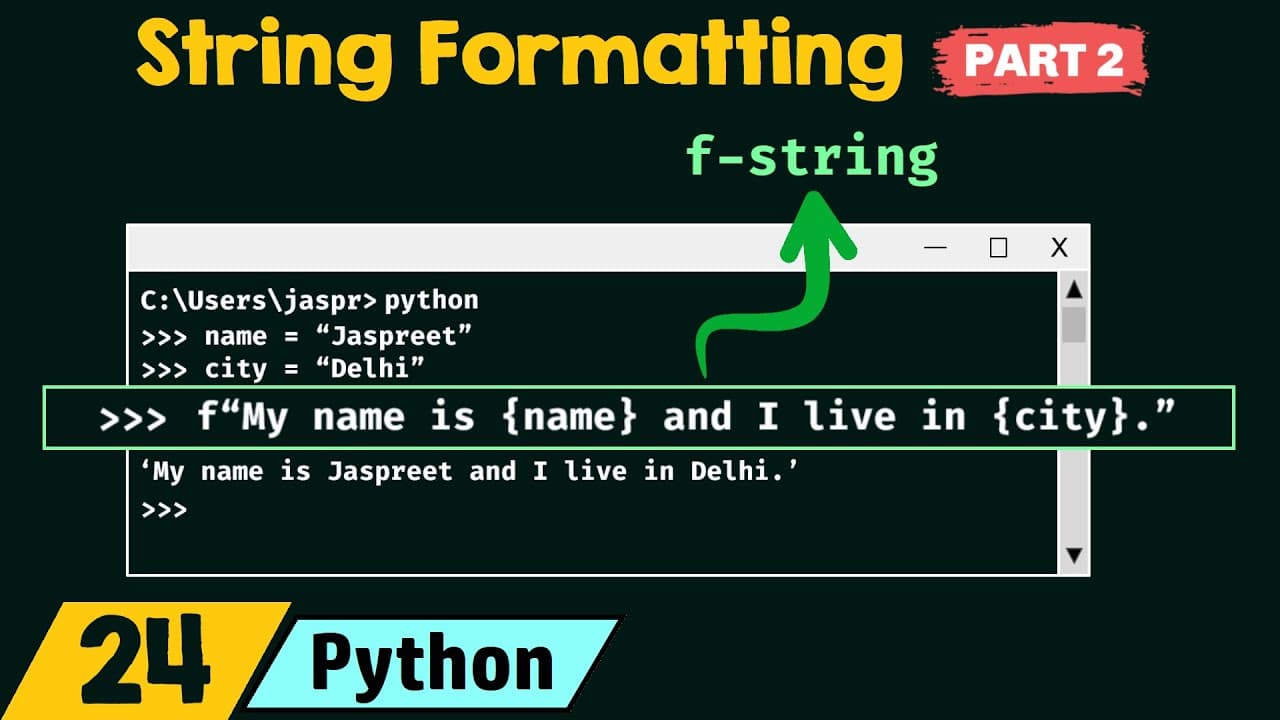
- An f-string is created by typing the letter f before a quoted string, then placing any external object inside curly braces; at runtime the object is replaced by the value it points to, for example f"my name is {name}" yields "my name is jaspreet".
- Both lowercase f and uppercase F work identically as the f-string prefix, and the string itself can be wrapped in single quotes or double quotes with no restriction on which you use.
- String methods can be called directly inside the curly braces; f"my name is {name.upper()}" calls the upper method on the string the variable points to, capitalizing every letter to produce "JUSPREET".
- Multi-line f-strings improve readability and can be written by ending each line with a backslash, so three separate f-string lines join into a single output line when the variable is printed.
- Wrapping multiple f-strings in round brackets is an alternative to backslashes for spreading an f-string across several lines, producing the same combined single-line result.
- Triple quotes let you write multi-line f-strings, but unlike backslashes and round brackets they preserve new lines, tabs, and white spaces, so escape characters like backslash n and backslash t appear in the output.
- Any type of quotation mark is allowed, but if the outer f-string uses double quotes the inner object must use single quotes, and if the outer uses single quotes the inner must use double quotes; Python always displays its result in single quotes.
- A backslash placed in front of a quotation mark escapes it, allowing quote characters to appear inside the string instead of triggering a syntax error such as "invalid syntax".
Install to Summarize YouTube Videos and Get Transcripts
Explore YouTube Video Summarizer or Get YouTube Transcript Extractor
Questions & Answers
Q: How do you create an f-string in Python?
Type f before a quoted string and place external objects such as variables inside curly braces. For example, after assigning values to name and city, f"my name is {name} and I live in {city}" replaces those objects with their values at runtime.
Q: What is an f-string used for in Python?
An f-string is used to format a string by embedding objects directly within it. Python evaluates the objects inside curly braces at runtime and inserts their values into the resulting string.
Q: Can you call a string method inside an f-string?
Yes, a string method can be called inside the curly braces. For example, {name.upper()} and {city.upper()} call the upper method, causing every letter in those included strings to appear in uppercase.
Q: How do you write a multiline f-string in Python?
The presentation gives three approaches: continue each f-string line with a trailing backslash, wrap multiple f-string pieces in round brackets, or use triple quotes. These approaches let you spread the source across multiple lines for readability.
Q: What is different about a triple-quoted multiline f-string?
Triple quotes preserve newlines, tabs, and spaces included in the string. By contrast, the demonstrated backslash and round-bracket approaches combine the pieces into a single-line result.
Q: Which quotation marks can you use with f-strings?
F-strings can use single, double, or triple quotes. When quotes also appear inside the expression or string, the outer and inner quote types should differ, such as double quotes outside and single quotes inside.
Q: How do you include a quotation mark inside an f-string?
Place a backslash before a quotation mark to escape it. This makes the quotation mark part of the string instead of letting it end the string and trigger an invalid-syntax error.
Q: Does the f prefix have to be lowercase in an f-string?
No, both lowercase f and uppercase F work as the prefix. The presentation demonstrates that the capitalized prefix produces the same formatted result as the lowercase version.
Summary & Key Takeaways
-
An f-string formats a string by prefixing it with f or F and enclosing variables or objects in curly braces. Typing f"my name is {name} and I live in {city}" replaces name with "just breathe" and city with "Delhi" at runtime, producing the fully formatted output string.
-
You can call a string method inside the braces, such as {name.upper()}, which capitalizes each letter. f-strings can also be spread across multiple lines for readability using a trailing backslash, by wrapping the pieces in round brackets, or by using triple quotes, though triple quotes preserve newlines, tabs, and spaces.
-
Any quotation marks are allowed, but outer and inner quotes must differ: double outside requires single inside and vice versa. Python always shows results in single quotes. A backslash escapes a quotation mark inside the string, preventing the invalid-syntax error that unescaped inner double quotes would cause.
Read in Other Languages (beta)
Share This Summary 📚
Summarize YouTube Videos and Get Video Transcripts with 1-Click
Try YouTube Summary with ChatGPT & Claude or YouTube Transcript Generator
Explore More Summaries from Neso Academy 📚



Summarize YouTube Videos and Get Video Transcripts with 1-Click
Try YouTube Summary with ChatGPT & Claude or YouTube Transcript Generator