How to use multi-line statements in Python
TL;DR
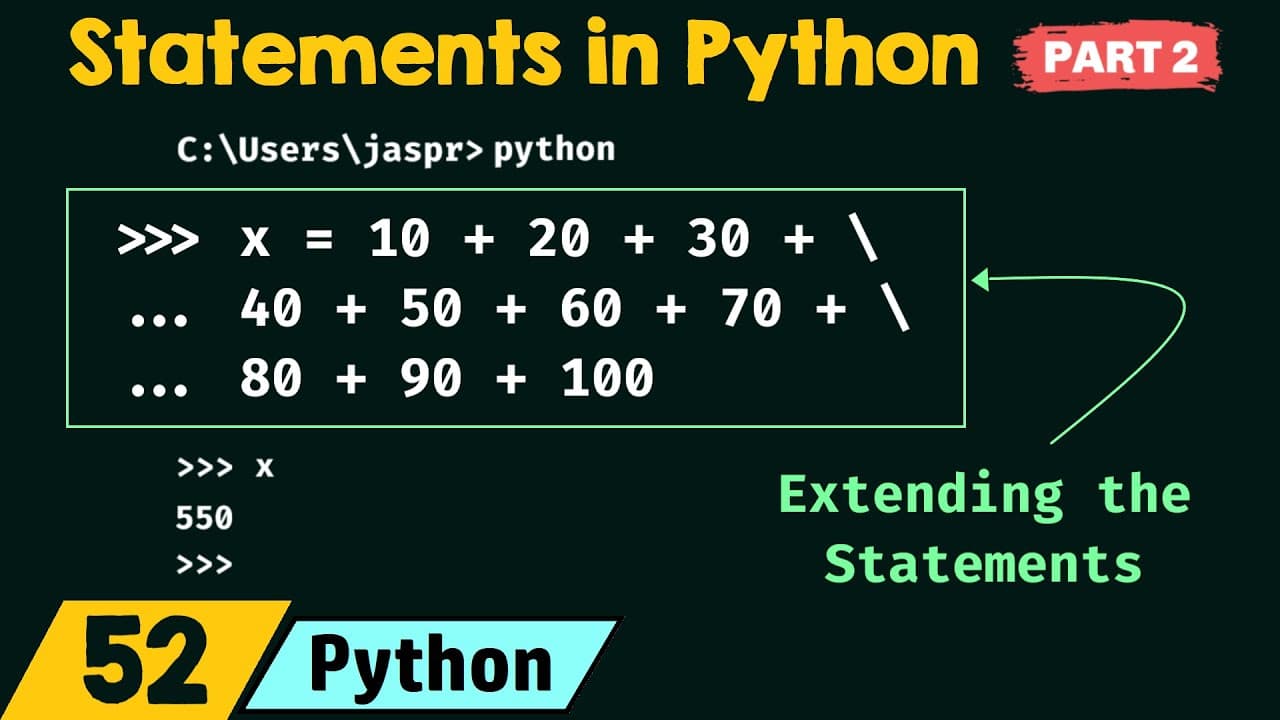
The direct answer is that Python lets you extend statements across lines using a backslash, parentheses, square brackets, or curly brackets. This video demonstrates each method with examples such as continuing an arithmetic expression over several lines, building a list across lines, and using braces to group parts of a statement, resulting in the final value 550. The approaches improve readability for long statements.
Transcript
foreign what is a statement what is an expression and the difference between the two now in this presentation we will continue our discussion on statements in Python this is part two of statements in Python so without any further delay let's get started and let's see the topics of this presentation the first topic is multi-line statements the secon... Read More
Key Insights
- Backslash allows line continuation by signaling Python to treat the next line as part of the same statement. The continuation is shown with trailing backslashes and a prompt indicating more input is expected.
- Parentheses enable multi-line statements by opening a group that remains unfinished until a closing parenthesis appears. Python shows a continuation prompt until the closing delimiter is entered.
- Square brackets can extend list literals across lines. An opening bracket without a closing one prompts continuation, and the final closing bracket completes the statement.
- Curly brackets allow multi-line statements for sets and dictionaries. They behave similarly to parentheses in signaling continuation until the closing brace is provided.
- Python’s three-dot or dot prompts indicate an unfinished statement, helping users know when to continue input. These prompts change as the interpreter expects more input.
- All four methods ultimately produce the same result for the same expression, illustrating Python’s flexibility in how long statements are formatted for readability.
- The video emphasizes that choosing a method depends on the data structure being built, such as arithmetic expressions, lists, or dictionaries, not on the ability to continue a line.
- A homework section invites students to identify expressions and statements, reinforcing the skill of distinguishing between the two in code lines.
Install to Summarize YouTube Videos and Get Transcripts
Explore YouTube Video Summarizer or Get YouTube Transcript Extractor
Questions & Answers
Q: How can I extend a long arithmetic expression to multiple lines using a backslash
To extend a long arithmetic expression using a backslash, place a backslash at the end of the line you want to continue from, then press Enter. Python will display a continuation prompt indicating the statement is not yet complete. You can add more numbers or operations on the next line, and when you finish with no trailing backslash, the interpreter will execute the complete expression and return the result, such as 550 in the example.
Q: What role do parentheses play in multi-line statements
Parentheses allow multi-line statements by creating a group that remains open across lines. As long as the opening parenthesis is not closed, Python will show a continuation prompt, letting you type the next line by line. When the closing parenthesis appears, the statement is complete and can be executed, yielding the same result as a single-line version.
Q: Can square brackets be used to split a list across lines
Yes, square brackets can enclose a list and be split across lines. Start the list with an opening bracket, continue typing elements on subsequent lines, and close the list with a closing bracket to finish the statement. Python will treat the split as a single list literal, and you can then use or print the list as usual.
Q: How are curly brackets used for multi-line statements
Curly brackets can be used to extend statements that create sets or dictionaries across multiple lines. Begin with an opening curly brace, continue adding elements or key-value pairs on new lines, and close with a closing curly brace. Python will consider the entire construct as one statement and evaluate it when complete.
Q: What does the continuation prompt indicate in Python REPL
The continuation prompt indicates that Python expects more input to complete the current statement. This occurs when a line ends with a backslash or when an opening delimiter like a parenthesis, square bracket, or curly brace has not yet been closed. The prompt reassures you that you should continue typing until the statement is complete.
Q: Is the final result affected by the method used for multi-line statements
No, the final result is not affected by the method chosen. Whether you use a backslash, parentheses, square brackets, or curly brackets, the evaluated expression should yield the same result if the statement represents the same computation or data structure. The choice mainly affects readability and structure of the code.
Q: What is the purpose of the homework problem in the video
The homework problem asks students to identify which lines of code are expressions and which are statements. This exercise reinforces the distinction between expressions that yield values and statements that perform actions. Understanding this difference helps in writing cleaner, more predictable Python code and prepares students for more advanced programming concepts.
Q: Can multi-line statements be used for any Python statement
Multi-line statements can be used for many types of statements, including arithmetic expressions and data structure literals such as lists, dictionaries, and sets. The key is that the statement must be syntactically open across lines, either through a backslash or an open delimiter like parentheses, brackets, or braces. This approach improves readability for long constructs.
Summary & Key Takeaways
-
This video explains multi-line statements in Python and shows four methods to extend statements over multiple lines: backslash continuation, parentheses, square brackets, and curly brackets. It includes live demonstrations of summing a long expression to 550 and wrapping lines to improve readability.
-
The instructor walks through concrete examples, emphasizing when Python allows line continuation and how Python signals continuation with prompts. The material also includes a homework prompt asking students to classify expressions and statements in code lines.
-
The session reinforces that multi-line statements can be cleanly written using different syntactic constructs, enabling longer statements to be organized and understood without sacrificing code correctness.
Read in Other Languages (beta)
Share This Summary 📚
Summarize YouTube Videos and Get Video Transcripts with 1-Click
Try YouTube Summary with ChatGPT & Claude or YouTube Transcript Generator
Explore More Summaries from Neso Academy 📚
Summarize YouTube Videos and Get Video Transcripts with 1-Click
Try YouTube Summary with ChatGPT & Claude or YouTube Transcript Generator