How to Grow a YouTube Channel With vidIQ
TL;DR
Install the vidIQ Chrome extension and authenticate your channel to access its integrated YouTube growth tools. Use performance metrics, outlier research, title and thumbnail remixing, competitor tracking, packaging previews, AI analysis, and upload optimization to study successful content and improve each video before publishing.
Transcript
Hey creators, it's Rob here. Welcome to VidIQ. In today's video, I want to guide you through every single channel growth tool we have integrated into the desktop YouTube experience. From video data to research to complete upload workflows, we've got you covered. Let's dive in, shall we? So, to start seeing all of these features on YouTube, you'll n... Read More
Key Insights
- Subscriber counts provide context for video performance by showing whether a video represents an unusual viral result or the level of traffic normally expected from a channel of that size. This context helps creators evaluate examples more carefully during topic and competitor research.
- Views per hour measures how many views a video is receiving at the present time, regardless of its publication date. It can reveal ongoing momentum and identify evergreen content, including the demonstrated example that continued receiving about 400 views per hour more than a year after release.
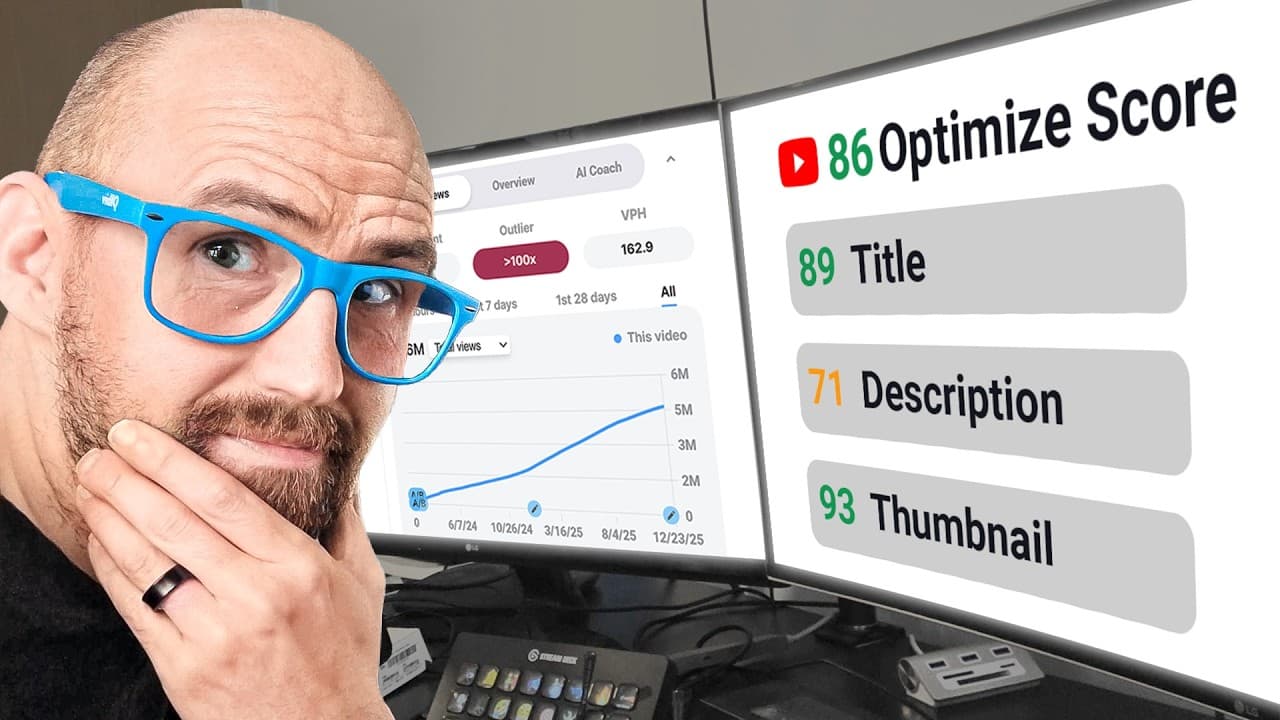
- The outlier score compares a video with the normal performance of its channel. Examples performing 21 times or 100 times better than expected can signal topics or packaging worth investigating, while the related-outliers option finds comparable high-performing videos across YouTube.
- Title remixing adapts an existing video title to the creator's own niche rather than simply copying it. vidIQ generates multiple options, assigns each an optimization score, allows new batches to be generated, and uses channel preferences to determine the relevant niche.
- Thumbnail research combines downloading, remixing, asset inclusion, collections, and visual comparison. The preview feature places packaging on simulated homepage or search-page layouts, compares it with niche content, supports different titles and thumbnails, and offers deck shuffling and light mode.
- The channel stats bar places customizable YouTube Studio metrics at the top of YouTube pages. It can display figures such as views over 48 hours, total subscribers, and views over 60 minutes, while offering other timelines and lifetime data through an expandable interface.
- The video scorecard records performance across the first 24 hours, 7 days, 28 days, or all time. Its graphs can also display title and thumbnail changes, allowing researchers to connect packaging experiments with a video's historical performance without assuming those changes caused the results.
- The AI coach can interrogate any YouTube video using suggested or custom questions. It can summarize the content, propose three channel ideas based on it, assess the hook, and explore why the video may or may not have succeeded.
Install to Summarize YouTube Videos and Get Transcripts
Explore YouTube Video Summarizer or Get YouTube Transcript Extractor
Questions & Answers
Q: How do you start using vidIQ on YouTube?
Download the vidIQ Chrome extension to make its features appear inside the desktop YouTube experience, then authenticate your channel for the best experience. Once connected, the tools become available across locations such as the homepage, watch pages, channel pages, search pages, YouTube Studio, and the upload workflow described in the guide.
Q: How can vidIQ identify unusually successful videos?
vidIQ combines channel size, views per hour, and an outlier score to give performance context. The outlier score shows how strongly a video performs relative to the normal results of its own channel. The guide demonstrates videos performing 21 times and 100 times better than expected, and its related-outliers option finds comparable examples across YouTube.
Q: What does views per hour mean in vidIQ?
Views per hour is the number of views a video is receiving right now, regardless of when it was published. It helps distinguish content with continuing demand from content whose traffic has faded. The guide presents an evergreen example maintaining about 400 views per hour a year or more after publication, showing how the metric supports long-term topic research.
Q: How does vidIQ remix YouTube video titles?
The remix tool takes the title of an existing video and transforms it into options relevant to the creator's niche. In the demonstration, a crafting-related title becomes suitable for a weight-loss channel. Each suggestion receives an optimization score, creators can refresh the results for another batch, and channel preferences define the niche used during generation.
Q: How can vidIQ help create and research thumbnails?
vidIQ lets creators download full-size thumbnails, remix them with generated imagery, include personal assets such as a face, and save examples in research collections. It can also locate thumbnails with a related topic or visual style. These capabilities support studying existing packaging, organizing references, and producing new thumbnail concepts for a creator's own content.
Q: How does the vidIQ thumbnail preview tool work?
The thumbnail preview tool places a selected thumbnail and title inside a simulated YouTube layout so creators can judge the packaging beside competing content. Users can compare thumbnail versions, load examples from their niche, switch between homepage and search-page contexts, shuffle surrounding videos, use light mode, and edit the proposed title to test a different package.
Q: What information appears in the vidIQ video scorecard?
The video scorecard shows engagement rate, views per hour, outlier performance, historical views, title changes, thumbnail changes, and channel information. It supports periods including the first 24 hours, 7 days, 28 days, and all time. Additional sections contain keyword indicators, channel and video tags, monetization-related keyword warnings, and access to the AI coach.
Q: How can vidIQ support competitor and content research?
Creators can add relevant channels as competitors, forming a work-focused list of channels in the same niche. They can then monitor topics, study viral hits, examine similar outliers, inspect thumbnail and title histories, and use the AI coach to summarize videos or suggest three related ideas. The goal is to identify useful patterns and join relevant conversations with original content.
Summary & Key Takeaways
-
vidIQ adds channel growth tools directly to the desktop YouTube experience through its Chrome extension. After installation and channel authentication, creators can view subscriber counts, current views per hour, outlier scores, and customizable channel statistics without repeatedly opening YouTube Studio, making performance monitoring and topic research more accessible.
-
The video scorecard supports detailed research into individual videos and channels. It displays engagement rate, views per hour, outlier performance, historical view trends, title changes, thumbnail changes, related outliers, channel information, keyword indicators, and tags. The AI coach can also summarize videos and examine ideas, hooks, and possible reasons for performance.
-
Creative tools help turn research into action. Creators can remix titles for their niche, generate or collect thumbnails, include personal assets, compare packaging inside simulated YouTube pages, find visually similar thumbnails, and track competing channels. The described upload workflow also helps optimize videos before the creator presses publish.
Read in Other Languages (beta)
Share This Summary 📚
Summarize YouTube Videos and Get Video Transcripts with 1-Click
Try YouTube Summary with ChatGPT & Claude or YouTube Transcript Generator
Explore More Summaries from vidIQ 📚



Summarize YouTube Videos and Get Video Transcripts with 1-Click
Try YouTube Summary with ChatGPT & Claude or YouTube Transcript Generator