How to Build a Solo Business Using Free Google AI Tools
TL;DR
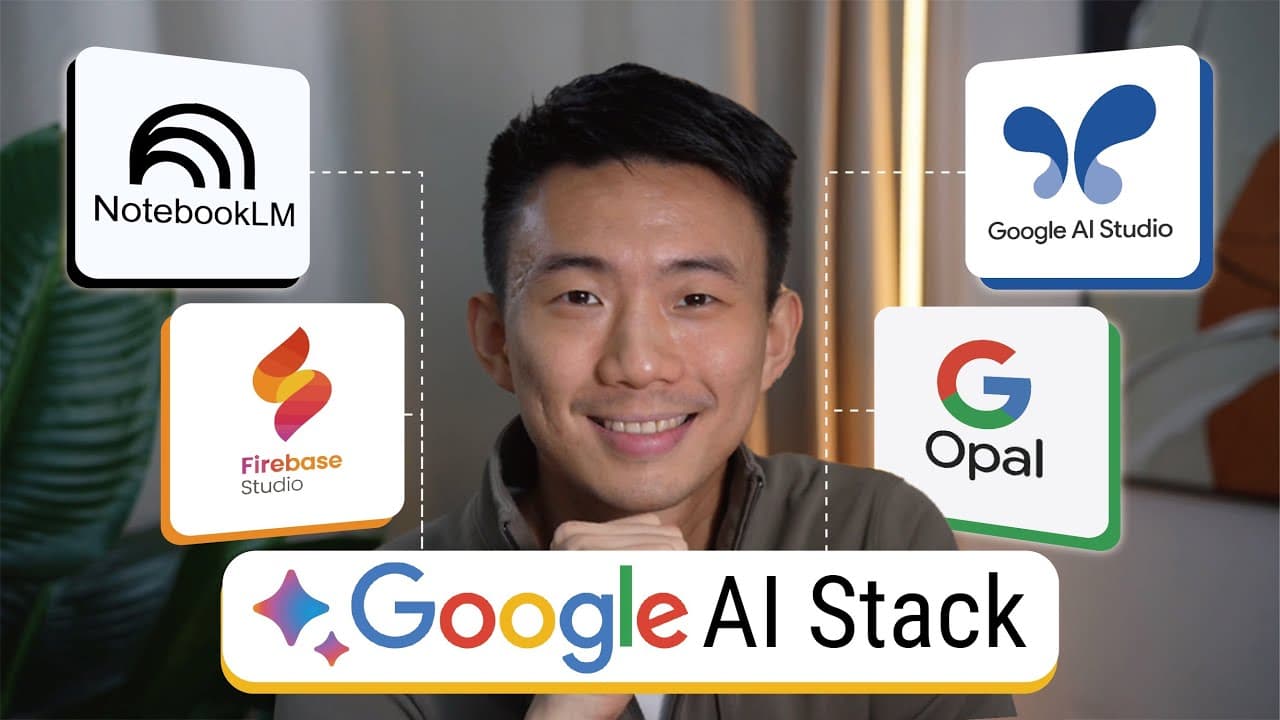
Narrow the startup process to four free Google AI tools: Noble LM for research, Google AI Studio for building the business backbone, Firebase Studio for deploying a live website, and Opal for creating marketing assets. The approach lets a single founder validate ideas, generate plans, publish a site, and launch marketing in an afternoon, forming a full workflow without a team.
Transcript
To every business owner out there, you know this impossible challenge. Running a successful business often means you need to do everything yourself. From deep research and complicated coding to smart marketing and neat designs. It's too much. And honestly, it feels like you are doing the work of a whole team all on your own. But what if you could h... Read More
Key Insights
- Noble LM serves as the starting point for research and strategy, enabling direct source discovery and structured insights.
- The core idea is to map business needs to tool strengths, using Noble LM for validation before building a website.
- Google AI Studio provides a creative backbone output including copy, offers, and deliverables, derived from research.
- Firebase Studio converts the AI Studio output into a live, hosted website without requiring code.
- Opal AI generates marketing content and assets, enabling quick client outreach after the site goes live.
- The approach models a house building analogy where each tool handles a different facet of the stack.
- The video presents a rapid workflow designed for solo founders to simulate a full agency setup.
- The emphasis is on low upfront costs and high leverage by using free or accessible Google tools.
Install to Summarize YouTube Videos and Get Transcripts
Explore YouTube Video Summarizer or Get YouTube Transcript Extractor
Questions & Answers
Q: A real search query question about the video (e.g. 'How to...', 'What is...', 'Why does...', 'When should...'). Question 1
How can Noble LM help a founder validate a business idea quickly using data and sources. Noble LM allows discovering reports and studies inside the notebook, importing resources, and prompting analysis that yields a market viability rating and clear recommendations. This makes early validation tangible without external consultants.
Q: Question 2
What is the step-by-step flow of the four Google AI tools in the video and how do they connect to form a complete business workflow. The flow starts with Noble LM for research, then AI Studio for the backbone, Firebase for deployment, and Opal for marketing assets. Each step feeds the next to create a cohesive system.
Q: Question 3
How does the video propose handling niche selection and market validation before building a website. The presenter uses Noble LM to analyze target audiences, size markets, assess profitability and barriers to entry, then uses Google AI Studio to translate findings into a business backbone, ensuring the idea is viable prior to site creation.
Q: Question 4
What role does Firebase Studio play in turning ideas into an online presence. Firebase Studio is presented as the delivery mechanism that takes copy, structure, and deliverables from AI Studio and deploys a live website, enabling rapid launch without traditional coding or hosting steps.
Q: Question 5
How does Opal AI contribute to marketing readiness in the workflow. Opal AI is used to automate marketing deliverables like social posts, ads, and creative assets, enabling启动 immediate client outreach once the site is live, effectively bridging product and promotion.
Q: Question 6
What are the benefits of using a four-tool stack for a solo founder according to the video. The stack provides specialized capabilities for research, backbone creation, deployment, and marketing without hiring a team, speeding up execution, reducing costs, and enabling a cohesive, end-to-end workflow.
Q: Question 7
What is the recommended sequence for moving from idea to a working business in the video. Start with market research with Noble LM, build the business backbone with AI Studio, deploy via Firebase, then generate marketing assets with Opal to start acquiring clients as soon as the site exists.
Q: Question 8
Does the video present any data or claims about the potential success of using Google's AI tools for business. The narrative cites a market-adjacent claim that using Google's AI tools is a strong strategic move and that the AI model has favorable prospects, framing the tools as advantageous for solo founders.
Summary & Key Takeaways
-
Noble LM is used to organize market research and map out a clear strategy, pulling sources directly into a notebook for a data-driven analysis.
-
Google AI Studio is employed to transform research into a creative business backbone, generating website copy, service offers, and deliverables.
-
Firebase Studio turns the backbone into a live, hosted website without coding, acting as a delivery vehicle for the brand.
-
Opal AI handles marketing deliverables, automating social posts, ads, and creative assets to start client outreach.
-
The workflow assigns each tool a specialized role: research with Noble LM, backbone with AI Studio, deployment with Firebase, and marketing with Opal.
-
The video emphasizes building like a team of specialists even when solo, leveraging AI to speed up each stage of the business stack.
-
The presenter demonstrates a practical sprint from idea validation to live site in a single afternoon.
-
The strategy targets a niche audience (school communities) and uses data-driven validation to reduce risk.
Read in Other Languages (beta)
Share This Summary 📚
Summarize YouTube Videos and Get Video Transcripts with 1-Click
Try YouTube Summary with ChatGPT & Claude or YouTube Transcript Generator
Explore More Summaries from Andy Lo 📚
![100+ Jobs Per Day - Full Job Search AI Automation System [Free Template] thumbnail](/_next/image?url=https%3A%2F%2Fi.ytimg.com%2Fvi%2FvfMHPb0Uayc%2Fhqdefault.jpg&w=750&q=75)
Summarize YouTube Videos and Get Video Transcripts with 1-Click
Try YouTube Summary with ChatGPT & Claude or YouTube Transcript Generator