How to Build a WhatsApp AI Restaurant Agent
TL;DR
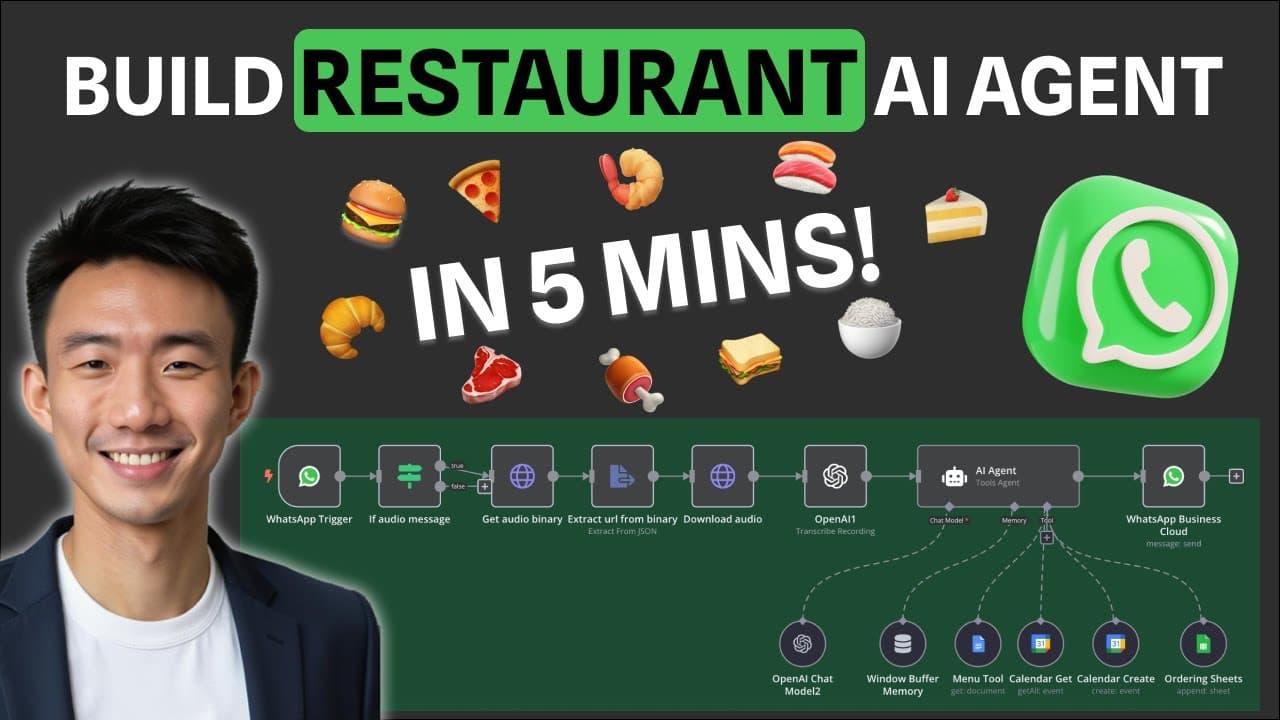
The video shows how to create a WhatsApp AI receptionist in minutes using a no code workflow with OpenAI, Google Sheets, and calendar tools. It guides setting up a WhatsApp trigger, transcribing voice messages, sharing the menu, taking orders, recording data in Google Sheets, and scheduling reservations with Google Calendar. A template and 5 minute build are demonstrated.
Transcript
on the left hand side you can see the WhatsApp chat interface first let's get the menu hi may I have the menu of today please all right we are retrieving the menu and it's loading now great the restro menu is now displayed in the WhatsApp chat room now I'll place an order hi can I order two Caesar salad please and deliver to my place please all rig... Read More
Key Insights
- The system uses a WhatsApp chat interface to act as a restaurant receptionist.
- OpenAI is used to power AI responses and handle conversations.
- Menu content is retrieved via a dedicated tool to share live options with customers.
- Orders are recorded in Google Sheets to track customer requests and fulfillment.
- Google Calendar is used to check availability and to create reservations.
- n8n is employed to connect WhatsApp, Calendar, and AI services in a no-code workflow.
- Voice messages are supported by transcribing audio to text for processing.
- The template and premium options offer ready-made AI agent setups for restaurants.
Install to Summarize YouTube Videos and Get Transcripts
Explore YouTube Video Summarizer or Get YouTube Transcript Extractor
Questions & Answers
Q: How can I set up a WhatsApp AI agent for my restaurant
The setup uses a WhatsApp trigger connected to your WhatsApp account, an OpenAI powered agent for responses, a menu tool to fetch current options, a Google Sheets sheet to record orders, and a Google Calendar integration to manage reservations. The process is described as a five minute build with a template and no code required.
Q: What role does Google Sheets play in the workflow
Google Sheets acts as the primary order recording and memory sheet. When customers place orders or provide contact details, the information is written to the sheet, creating a persistent log for fulfillment and future reference, ensuring data is easily retrievable during conversations or after purchases.
Q: How are reservations handled in this system
Reservations are checked for availability through a calendar tool and then created in Google Calendar. The AI prompts determine the correct start and end times, and the system stores the time slot and customer name in the calendar to complete the booking and avoid conflicts.
Q: Can customers send voice messages and still get responses
Yes, the setup includes transcription of voice messages using an audio to text process. The transcribed text is then processed by the AI to generate helpful menu information, order updates, or reservation confirmations, enabling responsive voice and text support.
Q: What tools are mentioned for building this without code
The tutorial references tools like n8n for building the workflow, OpenAI for natural language understanding, a menu retrieval tool, Google Sheets for data storage, and Google Calendar for reservations, all assembled in a no-code automation that connects WhatsApp to these services.
Q: Is there a ready made template to use
Yes, the description mentions a template and premium options with more than 50 AI agent templates. Users can import a template to replicate the restaurant AI agent setup, speeding up deployment and allowing customization to fit different menus and reservation policies.
Q: What is the intended outcome of the build
The intended outcome is a fully functional WhatsApp AI agent that can browse the menu, take orders, confirm delivery details, and book reservations while recording all interactions in Google Sheets and reflecting availability in Google Calendar, providing a smooth automated customer experience.
Q: What are the core learning outcomes of the tutorial
The tutorial teaches how to automate restaurant interactions via WhatsApp, handle AI conversations with OpenAI, share live menus, check availability with a calendar tool, place bookings and orders, and record data in sheets, all within a no-code workflow that can be implemented quickly.
Summary & Key Takeaways
-
The tutorial demonstrates building a WhatsApp AI agent that can browse a menu, place orders, and record data in Google Sheets, all through a chat interface, powered by no code tools.
-
It covers handling voice messages, transcribing them, and using OpenAI for natural language responses, with tools for menu retrieval and order tracking.
-
Google Calendar integration is shown to check availability and create reservations, completing the guest flow from inquiry to booking.
Read in Other Languages (beta)
Share This Summary 📚
Summarize YouTube Videos and Get Video Transcripts with 1-Click
Try YouTube Summary with ChatGPT & Claude or YouTube Transcript Generator
Explore More Summaries from Andy Lo 📚



Summarize YouTube Videos and Get Video Transcripts with 1-Click
Try YouTube Summary with ChatGPT & Claude or YouTube Transcript Generator