How to build a real-time Slack clone with Next.js
TL;DR
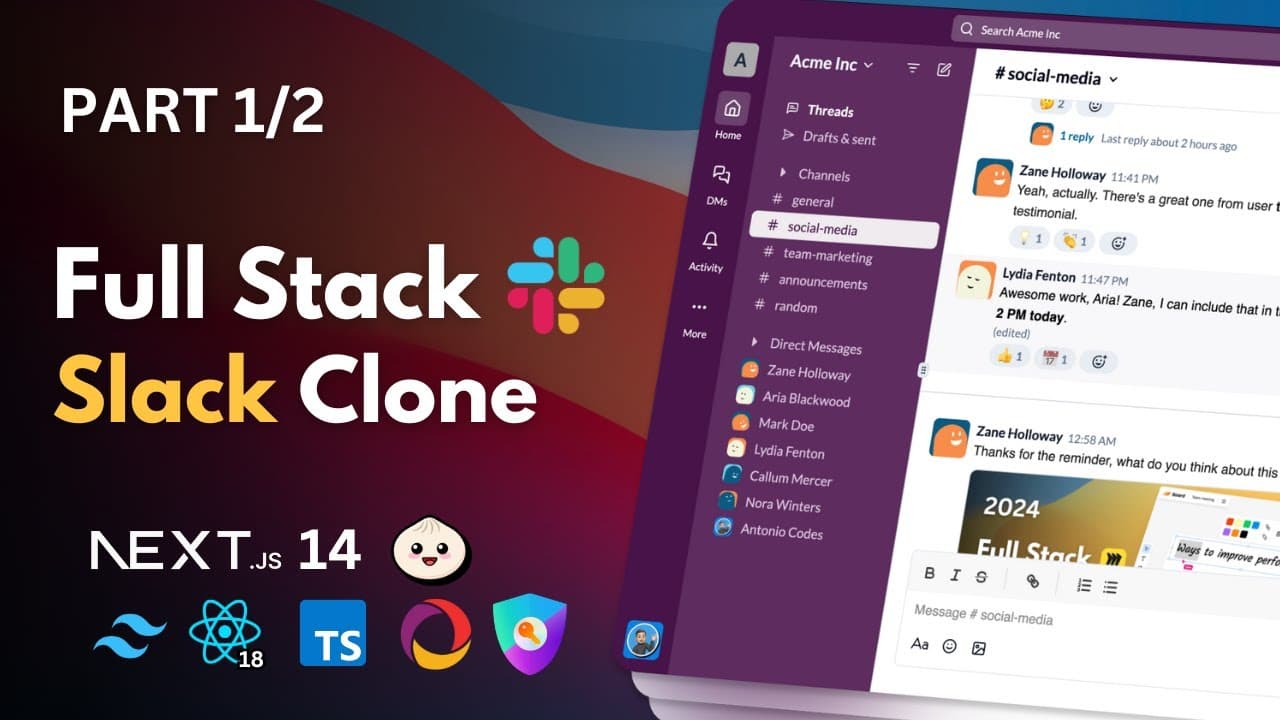
You can build a real-time Slack clone using Next.js, React, Tailwind, and Auth.js, with channels, threads, reactions, image attachments, and direct messaging. The course covers setup with Bun or npm, Shadcn UI integration, and building admin roles and an invite system. Part 1 focuses on core messaging, channels, and workspace structure.
Transcript
hey there my name is Antonio and in this course I'm going to show you how to build a fully functional slack clone using Cutting Edge web Technologies this project is perfect for developers looking to enhance their skills in real-time communication and modern web development in our slack clone we'll Implement a wide range of features that you expect... Read More
Key Insights
- Real-time communication is a central feature of the Slack clone project.
- The system supports reactions, threads, and message editing and deletion to mimic a professional chat tool.
- Image attachments and direct messaging are included as core capabilities.
- Role based access control is introduced to manage permissions within workspaces.
- Authentication is handled with Next.js based methods, aligning with NextAuth v5 in the course scope.
- Channels can be created and managed to organize conversations within a workspace.
- An invite system using a six character code enables secure workspace access.
- The course integrates Shadcn UI and Tailwind CSS for a polished, modern UI.
Install to Summarize YouTube Videos and Get Transcripts
Explore YouTube Video Summarizer or Get YouTube Transcript Extractor
Questions & Answers
Q: How is real-time messaging enacted in this Slack clone course?
Real-time messaging is a core feature demonstrated in the course by building a fully functional chat system within a Next.js app. The project emphasizes live updates, responsive interfaces, and seamless user interactions for sending, editing, deleting, and replying to messages in channels and direct conversations. This is designed to mirror a professional team communication environment.
Q: What messaging features are highlighted in part 1 of the course?
Part 1 highlights messaging features such as sending messages, editing and deleting messages, reacting to messages, replying in threads, and attaching images. The lessons focus on creating a robust core messaging experience, including how users interact within channels and direct messages, with real-time updates to reflect changes instantly.
Q: What authentication approach does the course use?
The course covers authentication using Next.js based methods, aligning with NextAuth v5. This includes setting up user sign in flows, securing access to workspaces, and facilitating personalized interactions within channels and direct messages, all integrated into the Slack clone framework.
Q: How are channels and workspaces handled in the project?
Channels and workspaces are foundational to the project, enabling creation and management of multiple channels within a workspace. Admins have control over channel creation and deletion, while workspaces provide a structure for organizing conversations, members, and roles, creating a scalable environment for team collaboration.
Q: What kind of invite system is implemented?
The project introduces an invite system using a six character code and sharable invite links, adding a security layer and exclusivity for workspace access. This mechanism allows controlled onboarding of members while maintaining ease of distribution for new participants.
Q: What UI tools are used to build the interface?
The UI is built with Shadcn UI and Tailwind CSS, allowing rapid component creation and customization. This setup enables a polished, modern look while keeping the codebase accessible for modifications, such as adjusting variants or extending components to fit the Slack clone design.
Q: What roles and permissions are discussed in part 1?
Part 1 introduces the concept of member roles and admin status within a workspace, setting the foundation for role based access control. This includes how admins can manage channels and workspace settings, as well as guiding future enhancements for permissions and security across the application.
Q: What is the scope of the course in this video and what comes next?
The video outlines a two part course that builds a end to end fullstack real time Slack clone. Part 1 covers project setup, authentication UI, database considerations, and core messaging with channels, while Part 2 expands with features like Google and GitHub authentication, workspace management, and deeper UI components. The next part deepens server side logic and deployment strategies.
Summary & Key Takeaways
-
The lesson demonstrates how to set up a Next.js project with Tailwind CSS and Shadcn UI, including package manager choices and project structure for a real-time workspace app.
-
It covers fundamental features such as channels, direct messages, message editing and deletion, and reactions to messages, all designed to feel like a professional team communication tool.
-
The course also introduces user roles, an invite system with codes, and prepares for more advanced functionality in later parts, such as authentication and deployment considerations.
Read in Other Languages (beta)
Share This Summary 📚
Summarize YouTube Videos and Get Video Transcripts with 1-Click
Try YouTube Summary with ChatGPT & Claude or YouTube Transcript Generator
Explore More Summaries from Code With Antonio 📚
Summarize YouTube Videos and Get Video Transcripts with 1-Click
Try YouTube Summary with ChatGPT & Claude or YouTube Transcript Generator