How to Use Claude Mods to Enhance Productivity
TL;DR
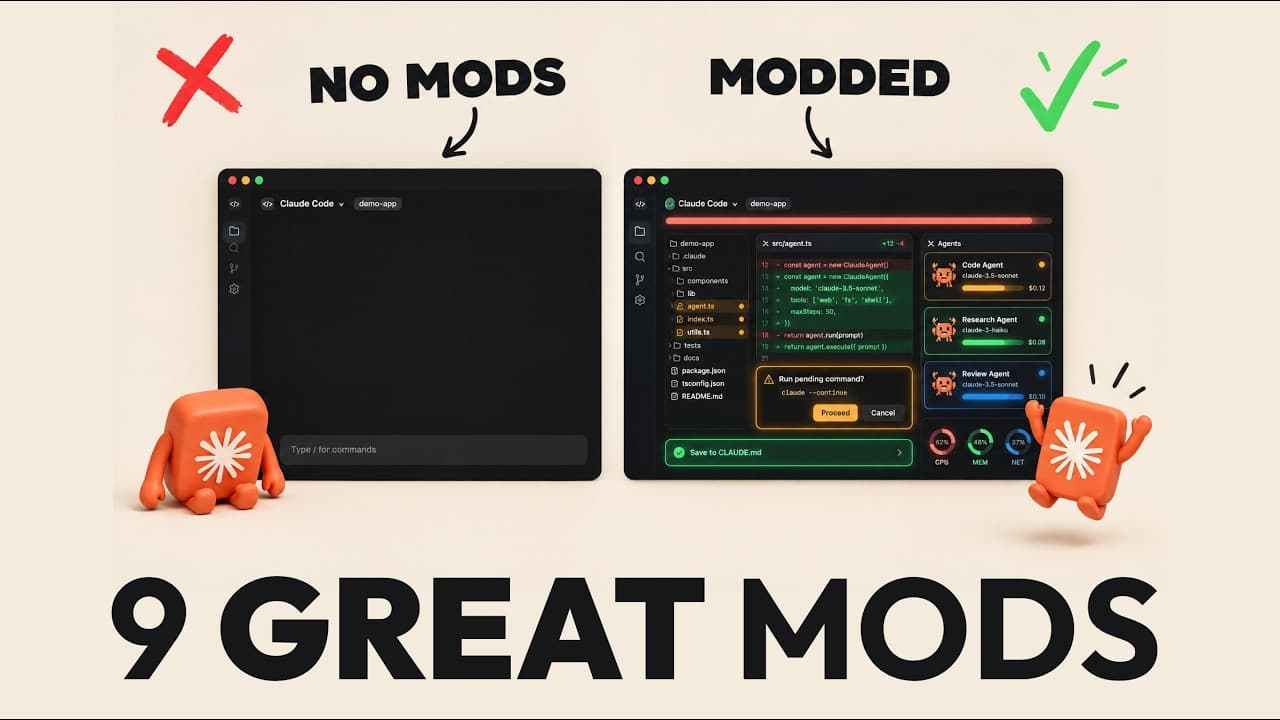
Claude Mods, introduced by Entropic, allow users to customize and enhance the functionality of Claude Code. By installing these mods, users can transform Claude into a versatile tool tailored to their specific needs, making work processes smarter and faster. The video discusses nine key mods that can significantly improve user experience and efficiency.
Transcript
So, Entropic just shipped one of the biggest Cloud Code updates we've ever had, and they're calling it mods. The idea is simple. If you can describe a feature that you wish Claude Code had, it can now build that feature into itself. So, Cloud Code can become almost any tool that you need. And in this video, I'll walk you through the nine mods that ... Read More
Key Insights
- Mods are small add-ons that change Claude Code's appearance and functionality.
- Mods can be easily created by describing desired features to Claude Code.
- Savvy Progress mod provides a visual progress bar and live sub-agent panel.
- Claude Skins mod allows customization of Claude Code's visual themes.
- You Should Know mod flags important information in Claude's output.
- File Tree mod displays a file panel showing files Claude is working on.
- Cache Tax mod prevents excessive token usage by managing prompt cache.
- Blast Radius mod ensures user confirmation before executing risky commands.
Install to Summarize YouTube Videos and Get Transcripts
Explore YouTube Video Summarizer or Get YouTube Transcript Extractor
Questions & Answers
Q: How do Claude Mods enhance productivity?
Claude Mods enhance productivity by allowing users to customize and modify the Claude Code environment to suit their specific needs. By installing mods, users can transform Claude into a versatile tool with features like progress tracking, visual customization, and important information flagging, which streamline workflows and improve efficiency.
Q: What is the Savvy Progress mod?
The Savvy Progress mod adds a visual progress bar above the prompt in Claude Code, allowing users to see how close Claude is to completing a task. It also provides a live panel showing the status of sub-agents working on longer tasks, making it easier to monitor complex operations and manage resources effectively.
Q: How do Claude Skins work?
Claude Skins mod allows users to customize the visual appearance of Claude Code by changing icons and colors. It comes with several pre-designed themes, but users can also create their own by providing a design system or color palette, making it a safe and simple first mod to try without altering the workflow.
Q: What does the You Should Know mod do?
The You Should Know mod, built by Entropic, runs a secondary agent that reads Claude's output and flags important information that might be overlooked. This is particularly useful for highlighting critical details buried in lengthy outputs, ensuring that users do not miss essential information when reviewing Claude's responses.
Q: How does the File Tree mod improve workflow?
The File Tree mod provides a visual file panel on the right side of Claude Code, showing which files Claude is currently working on. This feature is particularly useful for developers and those handling multiple documents, as it allows users to track file changes and edits in real-time, enhancing transparency and efficiency.
Q: What is the purpose of the Cache Tax mod?
The Cache Tax mod helps manage token usage by monitoring the prompt cache's status. It prevents excessive token consumption by alerting users before a message causes Claude to reload the entire conversation. This is especially important during long sessions, as it helps optimize resource usage and control costs effectively.
Q: How does the Blast Radius mod prevent data loss?
The Blast Radius mod ensures that potentially risky commands, such as deleting entire folders, require user confirmation before execution. It displays the files that would be affected and prompts the user to press a proceed button, preventing accidental data loss and ensuring that critical actions are reviewed by a human before completion.
Q: Can users create their own Claude Mods?
Yes, users can create their own Claude Mods by describing the desired functionality to Claude Code. Claude Code includes a built-in skill for plugin authoring, which allows it to build mods based on user descriptions. This makes mod creation accessible to users without coding expertise, enabling them to tailor Claude Code to their specific needs.
Summary & Key Takeaways
-
Claude Mods offer a way to tailor the Claude Code environment to individual preferences, enhancing productivity and user experience. Users can create mods by simply describing the desired functionality, making it accessible even to those without coding expertise. The video highlights nine mods, including Savvy Progress and Claude Skins, that provide visual enhancements and operational efficiencies.
-
Savvy Progress mod adds a progress bar and live sub-agent panel, making it easier to track task completion. Claude Skins mod allows users to customize the visual theme of Claude Code, while You Should Know highlights important information in Claude's output. File Tree provides a visual representation of files being worked on, and Cache Tax helps manage token usage.
-
Blast Radius mod requires user confirmation for risky actions, preventing accidental data loss. These mods make Claude Code a more dynamic and adaptable tool, catering to various user needs and preferences. By leveraging these mods, users can enhance their workflows and make Claude Code an integral part of their productivity toolkit.
Read in Other Languages (beta)
Share This Summary 📚
Summarize YouTube Videos and Get Video Transcripts with 1-Click
Try YouTube Summary with ChatGPT & Claude or YouTube Transcript Generator
Explore More Summaries from Jay E | RoboNuggets 📚



Summarize YouTube Videos and Get Video Transcripts with 1-Click
Try YouTube Summary with ChatGPT & Claude or YouTube Transcript Generator