How to Auto-Generate Longform YouTube Videos with n8n
TL;DR
You can build a no-code system that produces and publishes longform YouTube videos automatically using two AI agents: a ChatGPT ideas agent that outputs video concepts into a Google Sheet, and an n8n creator agent that generates the visuals, voiceover, and background music before uploading to YouTube on a daily or hourly schedule.
Transcript
i just built this AI system to create long- form YouTube videos hourly using AI and no code automation tools because if you haven't seen them before there are actually these videos and channels that are getting millions of views and millions of subscribers which are basically clips of a voice speaking motivational content and people do find value i... Read More
Key Insights
- The system runs on just two agents: an ideas agent built in ChatGPT that generates video concepts, and a creator agent built in n8n that produces and publishes the actual videos daily or hourly.
- Faceless motivational channels can grow fast, and the video cites one channel with only about 33 videos that already has 1.35 million subscribers, showing the appeal of automating this format.
- The same workflow adapts to many niches beyond stoicism, including sleep stories, horror-themed videos, children's storybook films, trivia videos, and zen meditation content, by changing the topic input.
- The ideas agent is set up by pasting a ChatGPT prompt, changing the bracketed topic to something like stoicism, and requesting five ideas plus keywords so it outputs a structured table.
- The generated ideas table is copied into a Google Sheets template, obtained via File then Make a Copy, giving an editable file with preset columns for video ideas, captions, and production status.
- n8n is the automation software used for the creator agent, described as similar to Zapier or Make.com, and is highlighted as the most popular such tool recently on Google Trends due to its flexibility with AI.
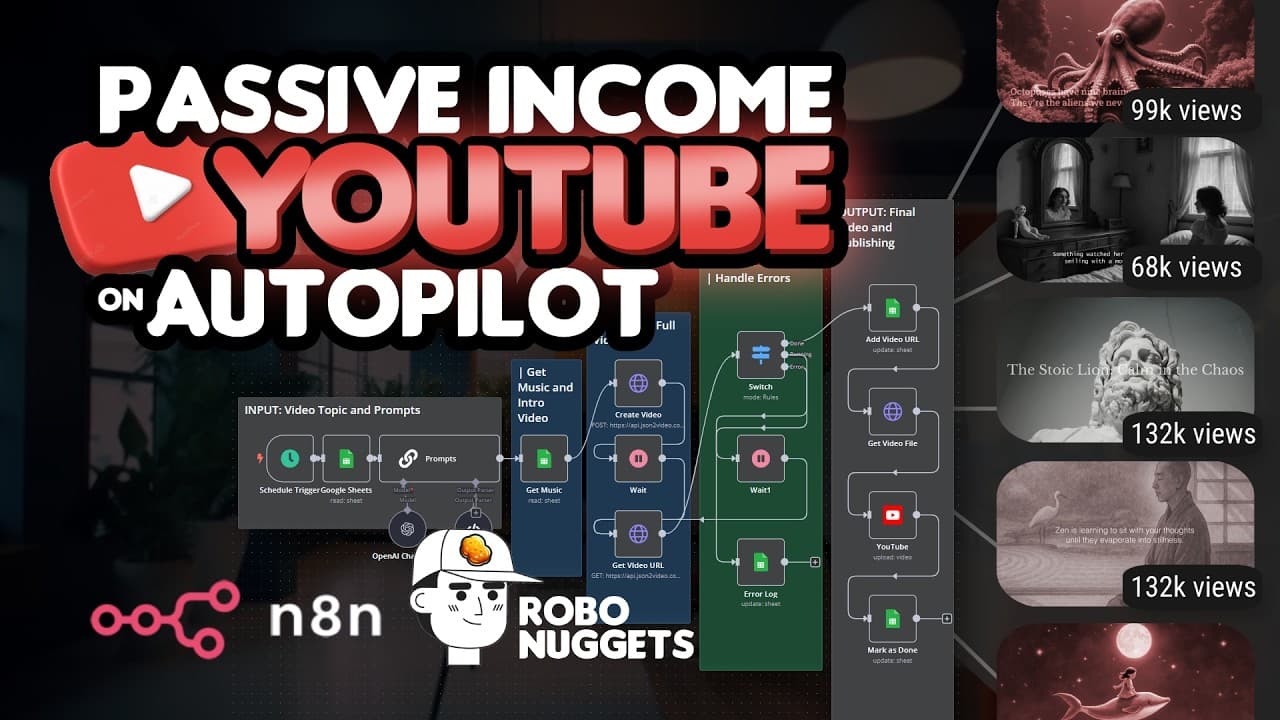
- The n8n workflow breaks into three parts: an input section pulling ideas and building image prompts, a green generation section creating voiceovers, images, and music, and an output section storing results and publishing to YouTube.
- A Google Sheets 'get row' node with a filter on the production status column set to 'for production' pulls one idea at a time, and rows are later marked done so completed videos are skipped.
Install to Summarize YouTube Videos and Get Transcripts
Explore YouTube Video Summarizer or Get YouTube Transcript Extractor
Questions & Answers
Q: How do you automatically create longform YouTube videos with AI and no code?
You set up two agents. An ideas agent in ChatGPT generates video concepts and prompts, which are stored in a Google Sheet. A creator agent built in n8n then generates the visuals, voiceover, and background music, and publishes the finished longform video to YouTube. You configure the system once, and it can produce and upload videos every day or every hour without further manual work, using only drag-and-drop no-code tools.
Q: What tools are needed to build this AI video automation system?
The core tools are ChatGPT for generating video ideas, Google Sheets for storing those ideas and outputs, and n8n as the automation software that produces and publishes the videos. The presenter describes n8n as similar to Zapier or Make.com. The description also lists tools used in the build including Blotato, Make, ElevenLabs, Apify, and JSON2Video, several offered with free trials or free credits.
Q: What kinds of videos can this workflow create?
The main example is a stoicism niche, such as a story using a lion as an analogy for stoic wisdom. The presenter says the same workflow adapts to other niches depending on your interest, including sleep stories, horror-themed videos, children's storybook style films, videos providing interesting trivia, and zen meditation content you can listen to. Changing the topic input lets the system produce whatever video type you want.
Q: Why are faceless motivational YouTube channels worth automating?
These channels post clips of a voice speaking motivational content, and people find value in the motivation the words provide. The presenter says such channels can get millions of views and subscribers. As proof of the format's power, one cited channel has only about 33 videos yet already has 1.35 million subscribers, illustrating how impactful an automated system producing these videos regularly can be.
Q: How do you set up the ideas agent in ChatGPT?
You head to ChatGPT and use a prompt from the community, changing the values inside the brackets to set your topic, for example stoicism. You ask ChatGPT to generate five ideas, which you can increase, and add a few keywords to help it ideate better. The prompt includes defined columns, so ChatGPT outputs a structured table of unique video ideas, each with a caption and other columns, ready to copy into Google Sheets.
Q: What is n8n and why does the video recommend it?
n8n is an automation software used to build the creator agent that produces and publishes the videos. The presenter compares it to Zapier or Make.com. It is recommended because, according to Google Trends, n8n has become the most popular tool recently due to how flexible it is with the AI tools gaining traction lately. The presenter says it is not that difficult to learn if you have someone to guide you and offers a free trial.
Q: How is the n8n workflow structured?
The workflow is broken into three simpler parts. The input section on the left is where you provide the ideas from ChatGPT and create prompts to generate the images. The green area handles creating the video itself, including the voiceovers, images, and the music behind it. The output section stores that output into Google Sheets and then publishes it to YouTube on the frequency you choose, whether daily or hourly.
Q: How does the automation pull one video idea at a time from Google Sheets?
After a schedule trigger set to run once a day, a Google Sheets node uses the get row action with a filter. The filter targets the production status column with the value 'for production,' and the option 'return only first matching row' is toggled on. This returns the first row marked for production, such as the stoic lion idea. By the end of the automation that row is marked done, so the video is skipped next time.
Summary & Key Takeaways
-
The tutorial demonstrates a no-code AI system that creates longform YouTube videos automatically. It generates ideas, prompts, visuals, voiceover, and background music, then uploads to YouTube daily or hourly. The example shown uses a stoicism niche, but the presenter notes the workflow adapts to many content types.
-
Setup relies on two agents. The ideas agent is ChatGPT, where a prompt with a chosen topic and keywords produces five structured video ideas in a table. That table is pasted into a copied Google Sheets template with preset columns, completing the input half of the system.
-
The creator agent is built in n8n, an automation tool the presenter compares to Zapier and Make.com. The workflow uses a schedule trigger, a Google Sheets node to fetch a 'for production' row, and a basic LLM chain node named 'prompts' to generate the image and voice text prompts.
Read in Other Languages (beta)
Share This Summary 📚
Summarize YouTube Videos and Get Video Transcripts with 1-Click
Try YouTube Summary with ChatGPT & Claude or YouTube Transcript Generator
Explore More Summaries from Jay E | RoboNuggets 📚




Summarize YouTube Videos and Get Video Transcripts with 1-Click
Try YouTube Summary with ChatGPT & Claude or YouTube Transcript Generator