How to Connect ChatGPT to n8n Workflows via MCP
TL;DR
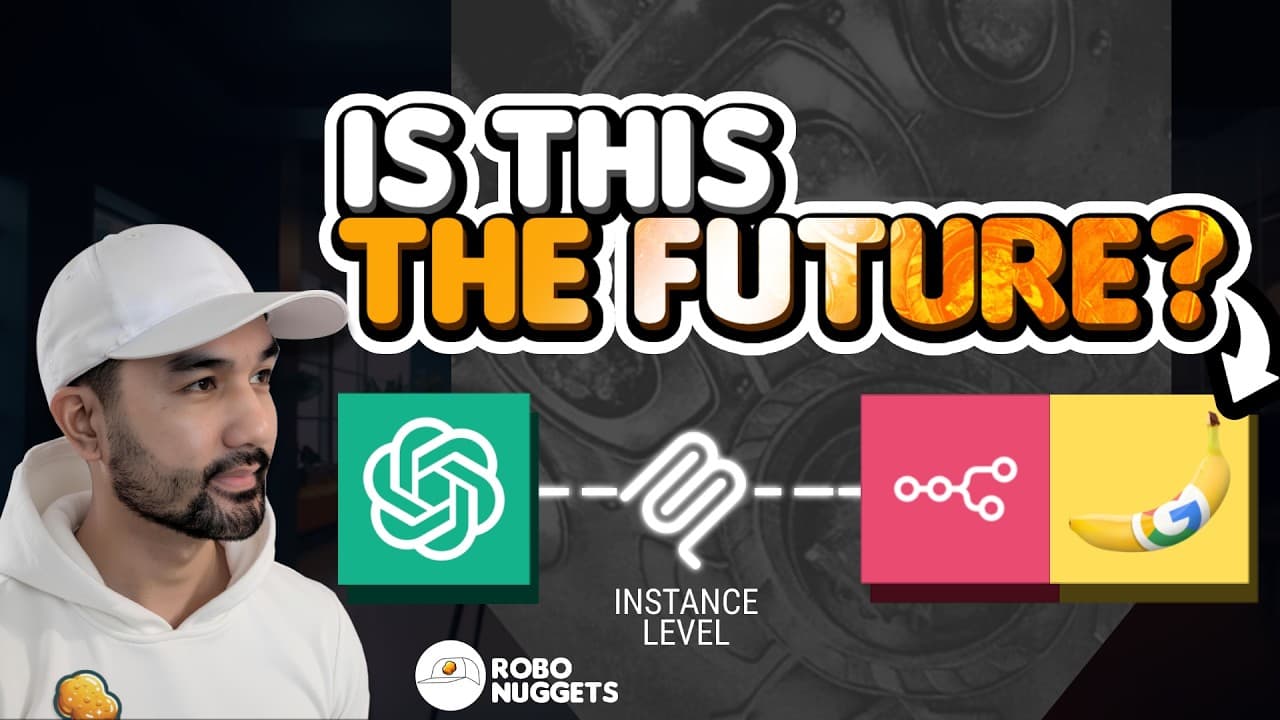
Connect ChatGPT to n8n by enabling developer mode in ChatGPT, turning on instance-level MCP access in an updated n8n installation, and adding the provided MCP server URL as a custom connector. Once selected workflows are active and MCP-enabled, ChatGPT can inspect and execute them, use Nano Banana Pro to generate brand-aware creative assets, and send approved posts to Instagram.
Transcript
And because we've linked Chad GPT to our brand's style and also gave it our product list, if we [music] ask it to create a holiday sale ad, for example, that's happening on these dates featuring [music] this specific dress, Chad GPT will use Nano Banana Pro in the background and generate that advert faithfully representing the brand and the product... Read More
Key Insights
- Instance-level MCP access is a connection that lets MCP-compatible AI applications discover and run workflows from an n8n installation. The lesson compares MCP to a USB connector for AI tools because it provides a shared way for applications such as ChatGPT to access external capabilities.
- The ChatGPT connection process is handled through developer mode in the apps and connectors settings. After creating a custom MCP connector with n8n's server URL, the user signs into n8n through a single sign-on page and explicitly allows the requested connection.
- An n8n workflow is exposed to ChatGPT only after it is active and its available-in-MCP setting is enabled. The n8n MCP access page lists the workflows that meet these conditions, helping users verify which automations the connected AI application can reach.
- Executable MCP workflows currently require a form, webhook, or chat trigger. The demonstration uses a form trigger because it supports execution through ChatGPT while preserving the option to run the same workflow manually from within n8n.
- Workflow descriptions are useful operational context for ChatGPT. A clear description can explain the workflow's purpose and expected usage, although the model can often infer those details by inspecting the workflow's syntax, structure, nodes, and configuration.
- ChatGPT can inspect workflows in addition to executing them. The demonstrated connection supports asking what each workflow does, requesting troubleshooting suggestions, and checking whether a workflow intended for external sharing contains exposed API keys or other sensitive details that should be anonymized or hashed.
- Brand context is necessary for creative output that matches a desired aesthetic. A Nano Banana Pro workflow can follow requested text without that context, but the initial demonstration produces an image that does not align with the intended brand style, mood, or product identity.
- The creative agent combines several delegated actions inside one ChatGPT conversation. It can generate advertisements with specified products and dates, revise the character or language, suggest captions based on the brand's tone of voice, and publish an image to Instagram after the user approves it.
Install to Summarize YouTube Videos and Get Transcripts
Explore YouTube Video Summarizer or Get YouTube Transcript Extractor
Questions & Answers
Q: How do you connect ChatGPT to n8n using MCP?
Enable developer mode from ChatGPT's advanced apps and connectors settings, then choose the option to create a custom MCP connection. Update n8n to the latest version, open its settings, enable MCP access, and copy the displayed server URL into ChatGPT. Creating the connection opens an n8n sign-in and authorization page. After approval, n8n becomes an available tool in ChatGPT conversations.
Q: How do you make an n8n workflow available to ChatGPT?
Open the workflow in n8n, set it to active, and enable the available-in-MCP option in its settings. The workflow should then appear in the list under n8n's MCP access settings. ChatGPT can confirm access by searching the available workflows from a conversation where the n8n tool is enabled. Only intentionally exposed workflows should appear in that list.
Q: What triggers can an n8n workflow use with MCP access?
A workflow that an AI application will execute through the demonstrated MCP connection currently needs a form trigger, webhook trigger, or chat trigger. The lesson uses a form trigger because it also allows the automation to be run manually within n8n. This trigger requirement is described as a current limitation associated with the early state of the technology.
Q: Why should an n8n workflow have a clear description?
A clear workflow description gives ChatGPT direct context about what the automation does and how it should be used. This is presented as a best practice when preparing a workflow for production use. ChatGPT can often interpret an undescribed workflow from its syntax and structure, but an explicit description reduces ambiguity and helps the model choose and operate the correct automation.
Q: How can ChatGPT troubleshoot or review n8n workflows?
The MCP connection gives ChatGPT access to the workflow's structure and setup details, so users can ask it to explain the automation or identify potential improvements. It can also review a workflow before it is shared as a template and flag sensitive information, such as exposed API keys or other details that may need to be anonymized or hashed.
Q: How does ChatGPT generate images through an n8n workflow?
ChatGPT sends the requested creative inputs to an MCP-enabled n8n workflow. In the demonstration, the workflow calls Nano Banana Pro to generate a PNG image, and its final node returns the image URL. ChatGPT then retrieves that result for the conversation. The completed execution also appears in n8n's execution history, where the user can inspect the triggered run and its output.
Q: Why does an AI creative agent need brand context?
Brand context tells the agent which aesthetic, mood, product details, and tone of voice its output should follow. The lesson first runs Nano Banana Pro without this information and receives an image that follows the requested text but does not match the intended brand. Adding the brand's style and product list allows later advertisements to represent the requested brand and product more faithfully.
Q: How can ChatGPT publish an AI-generated ad to Instagram?
ChatGPT uses one MCP-enabled n8n workflow to generate the advertisement and another workflow to handle Instagram posting. Within the same conversation, it can propose captions based on the supplied brand tone of voice. The user reviews the result and approves the action before publication. After approval, the workflow sends the selected image and caption to the brand's Instagram feed.
Summary & Key Takeaways
-
The setup begins by enabling developer mode under ChatGPT's apps and connectors settings, then creating a custom MCP connection with the server URL supplied by n8n. After signing into n8n and approving access, n8n appears as an available ChatGPT tool that can search for workflows exposed through the connection.
-
Individual n8n workflows must be active and marked as available in MCP before ChatGPT can access them. Executable workflows currently require a form, webhook, or chat trigger. Clear workflow descriptions give ChatGPT better operational context, although it can often interpret a workflow directly from its structure and configuration details.
-
A creative agent becomes more useful when it receives brand style, tone, and product context alongside workflow access. The demonstrated system sends prompts to Nano Banana Pro, returns generated images to ChatGPT, revises creative details within the conversation, suggests brand-aligned captions, and publishes an approved image to Instagram through another n8n workflow.
Read in Other Languages (beta)
Share This Summary 📚
Summarize YouTube Videos and Get Video Transcripts with 1-Click
Try YouTube Summary with ChatGPT & Claude or YouTube Transcript Generator
Explore More Summaries from Jay E | RoboNuggets 📚
Summarize YouTube Videos and Get Video Transcripts with 1-Click
Try YouTube Summary with ChatGPT & Claude or YouTube Transcript Generator