How to Automate Long-Form Veo 3 Videos in n8n
TL;DR
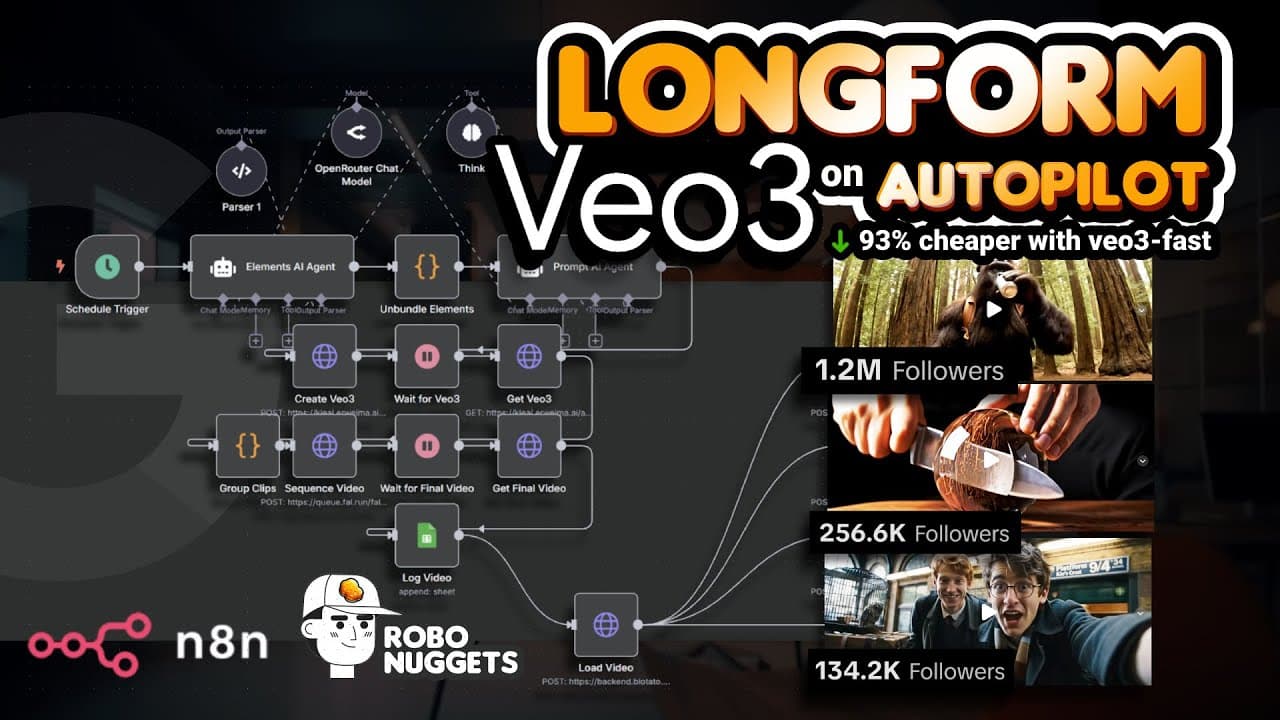
Build an automated content pipeline in n8n that schedules AI agents to write structured scene prompts, sends those prompts to Veo 3 Fast, combines the resulting clips, and optionally publishes finished videos across social channels. The workflow uses no-code nodes, a structured output parser, and an OpenRouter-connected chat model, while a custom GPT can adapt the template to different faceless niches.
Transcript
in this video I'll teach you how to make this V3 AI factory which can create and post long form videos for any niche on autopilot Because over at Tik Tok V3 videos like this Bigfoot account are getting millions of followers and tens of millions of views And that's also true for this account this account and this account all created with V3 And even... Read More
Key Insights
- The automation consists of three core stages: generating video prompts with AI agents, creating multiple clips with Veo 3 Fast, and combining those clips into a finished long-form video. A fourth stage can optionally publish the completed video to multiple social channels.
- Veo 3 Fast is presented as the lowest-cost route used in the workflow because a specific n8n integration provides access at 93% less cost than standard methods. The reduced generation expense makes longer automated videos more practical while retaining generated dialogue and sound.
- The schedule trigger controls when the entire n8n workflow starts. The demonstrated configuration runs once every day at midnight, allowing content production to operate automatically after the workflow, credentials, prompts, generation steps, and optional publishing connections have been configured.
- An n8n node has three working regions: input data from earlier nodes, configurable parameters in the middle, and transformed output for later nodes. Understanding this recurring structure helps beginners follow how information moves through every stage of the automation.
- The system prompt defines the AI agent's role, behavior, niche, instructions, examples, and required output structure. The demonstrated prompt positions the agent as an expert visual prompt generator and initially targets AI ASMR, although the broader workflow can be customized for other niches.
- Exact node names are important because n8n uses node names as references within workflows. Naming the demonstrated node Elements AI Agent helps users follow the tutorial consistently and reduces confusion when expressions or later nodes need to retrieve its generated information.
- OpenRouter connects the AI agent to a chat model through an API key and offers access to multiple model choices. GPT-4.1 is identified as the preferred model for this setup, while free DeepSeek and Google Gemini options are suggested for users seeking a no-cost alternative.
- A structured output parser forces the AI agent to return information in JSON instead of loosely formatted prose. This tighter output control makes generated scene data easier and more dependable for subsequent workflow nodes to consume when producing clips and assembling videos.
Install to Summarize YouTube Videos and Get Transcripts
Explore YouTube Video Summarizer or Get YouTube Transcript Extractor
Questions & Answers
Q: How do you automate long-form Veo 3 videos with n8n?
Create an n8n workflow with a schedule trigger, then connect AI agent nodes that produce detailed scene prompts in a controlled format. Pass those prompts to Veo 3 Fast to generate multiple clips, and send the clips into a combining stage that creates the final long-form video. Add an optional fourth stage if the finished content should be published automatically to multiple social channels.
Q: What are the main stages of the Veo 3 automation workflow?
The workflow has three required stages and one optional stage. First, AI agents generate the final prompts for individual scenes. Second, Veo 3 Fast uses those prompts to create multiple video clips. Third, the generated clips are combined into one longer finished video. The optional fourth stage publishes that final video to multiple social platforms without requiring a separate manual upload process.
Q: How do you schedule the n8n video workflow to run automatically?
Start a new workflow in the n8n dashboard and add a Schedule Trigger as the first node. The trigger determines when and how the automation begins. In the demonstrated setup, its default configuration is left unchanged, which runs the workflow once every day at midnight. Each scheduled run then initiates the prompt generation, clip production, combination, and any configured publishing stages.
Q: How do you configure an AI agent for Veo 3 scene prompts?
Add an AI Agent node, rename it Elements AI Agent, set the prompt source to Define Below, and enter a user instruction such as "generate scenes." Then add a system message under the node's options. The system message should define the agent as an expert visual prompt generator, provide niche-specific guidance, and require a precise output structure supported by examples.
Q: Why does the n8n AI agent need a system prompt?
A short user request such as "generate scenes" does not tell the agent what kinds of scenes, details, or formatting the workflow requires. The system prompt supplies that missing operational context by defining the agent's role, niche, instructions, examples, and expected response structure. This guidance enables the workflow to generate consistently formatted, high-quality prompts that can be passed to Veo 3 Fast.
Q: How do you connect a chat model to an n8n AI agent?
Click the plus icon beneath the AI Agent node and select a supported chat-model node. The tutorial uses the OpenRouter Chat Model, which requires an OpenRouter API key entered through a new credential. After saving the credential, choose a model. GPT-4.1 is recommended for the demonstrated setup, while free DeepSeek and Google Gemini models are mentioned as alternative choices.
Q: Why should an n8n AI agent use a structured output parser?
The structured output parser restricts the AI agent to a defined JSON response instead of allowing unpredictable free-form text. To enable it, turn on Require Specific Output Format in the AI Agent node and connect the parser subnode that appears. Consistent JSON makes scene information easier for later nodes to reference, transform, and pass into the Veo 3 clip-generation stage.
Q: How can the workflow be adapted to different faceless niches?
The workflow can be customized by changing the niche-specific instructions and examples that guide its AI agents. The demonstrated setup begins with an AI ASMR prompt, but the accompanying custom GPT accepts a screenshot of a niche used for inspiration and customizes the automation template. Future workflow runs can then generate and publish videos aligned with that selected niche.
Summary & Key Takeaways
-
The workflow is organized into three required stages and one optional publishing stage. AI agents first generate detailed scene prompts, Veo 3 Fast turns those prompts into multiple clips, and another stage combines the clips into a longer finished video. The completed content can then be distributed automatically to multiple social platforms.
-
Setup begins in n8n with a schedule trigger configured to run the workflow once each day at midnight. An Elements AI Agent receives a simple user instruction and a detailed system message that defines its role, niche, output requirements, and examples. Exact node names matter because n8n uses them as references.
-
The AI agent requires a connected chat model and a controlled output format. OpenRouter provides access to multiple models through an API key, with GPT-4.1 presented as the preferred option and free DeepSeek or Gemini models mentioned as alternatives. A structured output parser constrains the agent response to JSON for reliable downstream processing.
Read in Other Languages (beta)
Share This Summary 📚
Summarize YouTube Videos and Get Video Transcripts with 1-Click
Try YouTube Summary with ChatGPT & Claude or YouTube Transcript Generator
Explore More Summaries from Jay E | RoboNuggets 📚
Summarize YouTube Videos and Get Video Transcripts with 1-Click
Try YouTube Summary with ChatGPT & Claude or YouTube Transcript Generator