What Is New in macOS Sonoma and Who Can Use It?
TL;DR
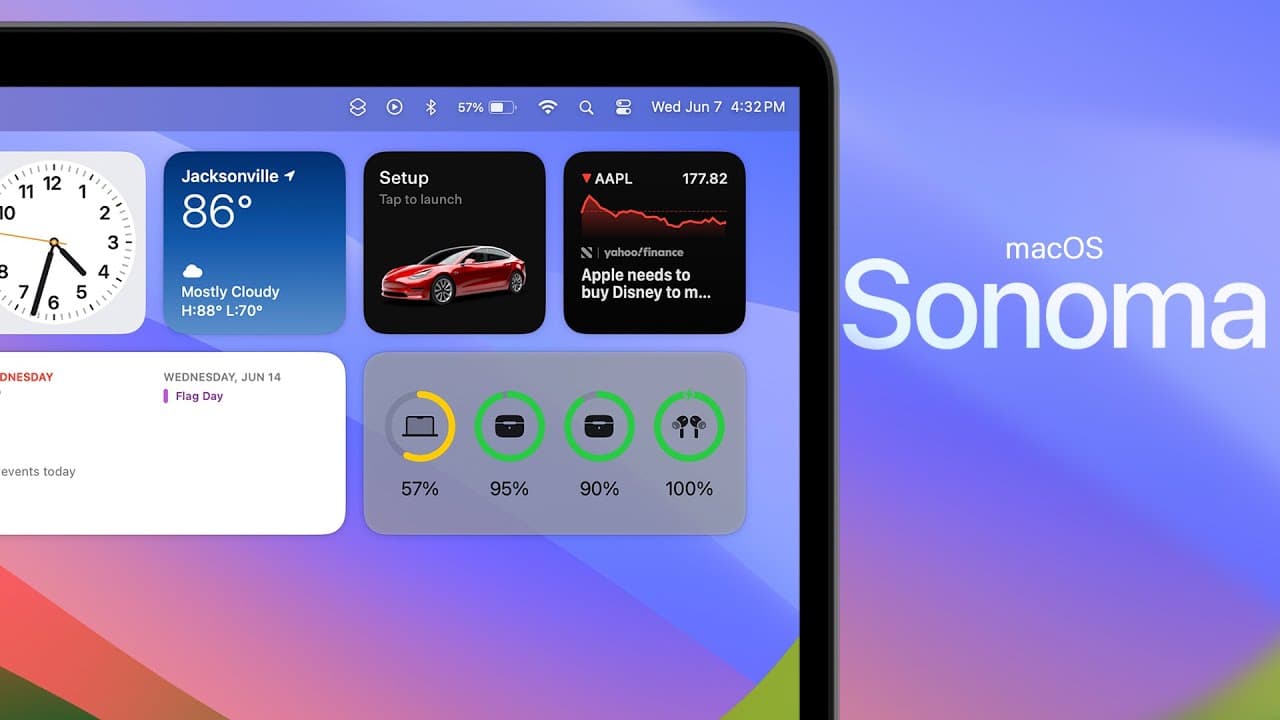
macOS Sonoma adds desktop widgets, animated lock-screen backgrounds, improved video-call tools, predictive text, simultaneous typing and dictation, and a simpler Siri command. It also drops support for the 2017 MacBook Pro, 2017 iMac, and 2017 12-inch MacBook, while introducing configurable widgets, presenter overlays, gesture-triggered reactions, Safari changes, web apps, profiles, and Game Mode.
Transcript
what's up guys my name's brand and apple just released the first developer beta for the brand new Mac OS 14 Sonoma and in this video we're going to discuss all of the new features and changes included in the updates and if you're wondering what's new in iOS 17 and watch OS 10 I also made videos on both of tho... Read More
Key Insights
- macOS Sonoma ends compatibility with three models that supported Ventura: the 2017 MacBook Pro, the 2017 iMac, and the 2017 12-inch MacBook. Users of those specific models cannot move from Ventura to the new macOS release described in the presentation.
- The new lock screen uses a moving high-resolution background that continues during authentication, gradually slows, and becomes the desktop wallpaper. Available categories shown include landscape, cityscape, underwater, and Earth, although each video background must be downloaded before it can be used.
- Desktop widgets can be placed nearly anywhere and aligned by holding them in position. A widget can also be resized from its right-click menu, avoiding the need to delete it and add a differently sized version, as demonstrated with the Weather widget.
- Continuity allows supported iPhone widgets to appear on the Mac even when their applications are unavailable or not installed on macOS. The widget settings include a toggle for using iPhone widgets and an option for choosing which iPhone supplies them.
- Widget appearance is configurable through the Desktop and Dock settings. Automatic mode changes widgets to a gray monochrome appearance when another application is active, while the other choices keep widgets monochrome or in full color regardless of whether the desktop is currently active.
- Clicking the desktop wallpaper can hide the active application and expose desktop items and widgets. The behavior can remain generally enabled or be limited to Stage Manager, allowing people who dislike the default interaction to restrict when it operates.
- Text input gains predictive suggestions and dictation that remains active while the user types. The beta demonstration indicates that predictive text initially responds less effectively than its iOS counterpart, but it is expected to improve as the system learns the user's typing patterns.
- Video-call controls work beyond FaceTime, including in Zoom and Google Meet. They provide adjustable portrait and Studio Light intensity, gesture-triggered augmented-reality reactions such as hearts and thumbs-up, and Presenter Overlay for positioning the presenter over shared screen content.
Install to Summarize YouTube Videos and Get Transcripts
Explore YouTube Video Summarizer or Get YouTube Transcript Extractor
Questions & Answers
Q: Which Macs lose support with macOS Sonoma?
macOS Sonoma drops support for three Mac models that were compatible with macOS Ventura: the 2017 MacBook Pro, the 2017 iMac, and the 2017 12-inch MacBook. The presentation identifies these specific devices as the models removed from the compatibility list, so owners of them cannot install the Sonoma update described.
Q: How do animated wallpapers work in macOS Sonoma?
The new animated backgrounds appear on the redesigned lock and login screen, where the scenery moves behind the time, date, profile picture, and password field. After the user unlocks the Mac, the background continues moving briefly, gradually comes to a stop, and forms the still desktop wallpaper. The high-resolution videos require separate downloads.
Q: How do you add and resize desktop widgets in macOS Sonoma?
Right-click the desktop and choose the widget editing option to open the widget panel, then select an available widget and its desired layout. Once a widget is on the desktop, it can be moved and aligned with nearby widgets. Right-clicking it also provides size controls, so changing its size does not require deletion and replacement.
Q: Can macOS Sonoma display widgets from an iPhone?
macOS Sonoma can display iPhone widgets through Continuity, even if the related application is not installed or available on the Mac. The demonstrated widget gallery includes iPhone applications such as Instagram and Tesla. Under Desktop and Dock settings, users can enable or disable iPhone widgets and select which iPhone should provide them.
Q: How can you change widget colors in macOS Sonoma?
Widget appearance is controlled in the Widgets section of Desktop and Dock settings. Automatic mode shows widgets in color on the desktop and fades them into a gray monochrome style when an application is open. Users can instead choose monochrome for all situations or full color so widgets never fade when another application becomes active.
Q: How does clicking the wallpaper reveal the desktop in macOS Sonoma?
When the feature is enabled, clicking an exposed area of the desktop hides the active application and reveals desktop items and widgets. Clicking the application again brings it back. The Desktop and Dock settings provide a control called Click wallpaper to show desktop items, which can apply broadly or operate only while Stage Manager is enabled.
Q: What keyboard and voice-input changes are included in macOS Sonoma?
macOS Sonoma introduces a typing indicator whose color changes with the current application, plus a blue on-screen indicator that remains visible while Caps Lock is active. It also adds predictive text and lets users type while dictation remains active, then resume speaking without restarting dictation. Siri can additionally respond to the shorter Siri command.
Q: What new video-call features does macOS Sonoma provide?
Video-call controls include adjustable strength for portrait blur and Studio Light, augmented-reality reactions, and Presenter Overlay. Reactions such as hearts and thumbs-up can be selected from a menu or activated with hand gestures. These tools are not limited to FaceTime, since the presentation also demonstrates their availability in services such as Zoom and Google Meet.
Summary & Key Takeaways
-
macOS Sonoma refreshes the Mac experience with animated lock-screen backgrounds that slow into still wallpapers after login. Apple also redesigned the login layout, added new landscape, cityscape, underwater, Earth, Sonoma, and MacBook Air wallpaper options, and subtly increased the roundness of Dock menus and Spotlight Search.
-
Desktop widgets can be positioned and aligned freely, resized through a contextual menu, and displayed in full color or monochrome. Continuity also allows widgets from an iPhone to appear on the Mac without the corresponding Mac application being installed. Clicking the wallpaper can temporarily hide open applications and reveal desktop items.
-
Communication and input improvements include application-colored typing indicators, a persistent blue Caps Lock indicator, predictive text, simultaneous typing and dictation, and the shorter Siri invocation. Video calls gain adjustable portrait and Studio Light effects, gesture-triggered augmented-reality reactions, and Presenter Overlay options that place the presenter alongside shared screen content.
Read in Other Languages (beta)
Share This Summary 📚
Summarize YouTube Videos and Get Video Transcripts with 1-Click
Try YouTube Summary with ChatGPT & Claude or YouTube Transcript Generator
Explore More Summaries from Brandon Butch 📚

Summarize YouTube Videos and Get Video Transcripts with 1-Click
Try YouTube Summary with ChatGPT & Claude or YouTube Transcript Generator