What Is New and Different in iOS 26 Beta 3?
TL;DR
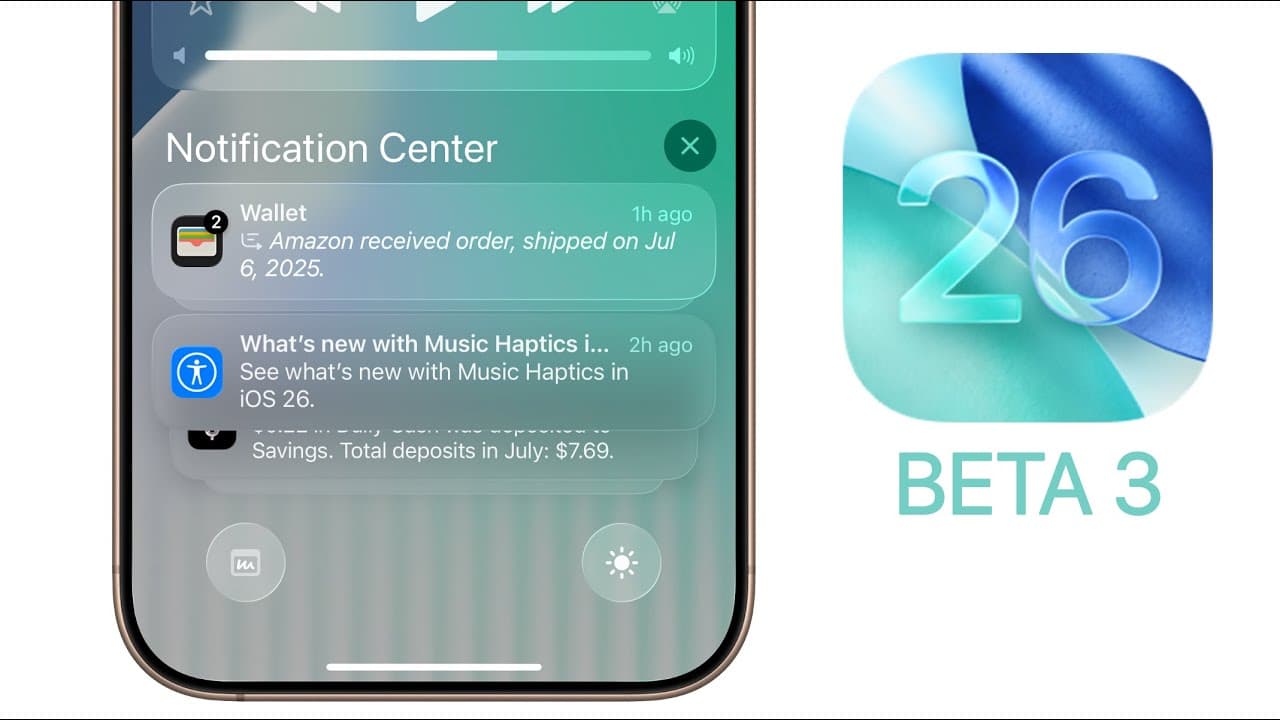
iOS 26 beta 3 makes Liquid Glass interfaces more opaque and readable, especially in Control Center, Notifications, Music, Safari, Weather, and Photos. It also updates Maps navigation and business details, adds four default wallpaper variations, fixes disappearing lock-screen widgets, adjusts Safari bookmarks and Mail categories, and retains the modem firmware from beta 2.
Transcript
What's up guys? My name is Brandon and today Apple released iOS 26 beta 3 to registered developers and we should be seeing the first public beta very soon and we'll talk about that in a little bit. But along with this iOS 26 beta 3 update, we also got the third beta for iPad OS 26, watch OS 26, Mac OS 26, and Vision OS 26. But of course, in this vi... Read More
Key Insights
- iOS 26 beta 3 uses build number 23A5287G, while its modem firmware remains at version 2.03. The update displayed as 9.53 GB on an iPhone 16 Pro Max, but download sizes differed among users and the unusually fast installation suggested that the displayed size might have been inaccurate.
- Liquid Glass is more opaque throughout much of iOS 26 beta 3. Control Center and Notification Center now resemble frosted glass, making their controls and notification bubbles easier to read than the more transparent versions found in beta 2.
- Music, Photos, Safari, and Weather reveal some of the clearest design differences. Music and Photos show less background color through interface surfaces, Safari uses a whiter and more readable address bar, and Weather presents a darker-looking interface even when dark mode is not active.
- The Liquid Glass design remains subject to further revisions during the beta cycle. Apple changed it in each of the first three betas, and the presenter expects additional adjustments before the September release while encouraging testers to submit requests and problems through the Feedback application.
- Notes displays more Liquid Glass styling in beta 3 than in beta 2, contrary to the reduced transparency seen elsewhere. Its contextual menu demonstrates that the design changes are not applied uniformly across every application or interface element in the operating system.
- Maps business pages now center hours, accepted payment information, and distance beneath the call and website buttons. Hours receive a separate heading with open status, today's schedule, and a Normal Hours option, while phone numbers, websites, and addresses move to the right side.
- Maps navigation now uses Liquid Glass styling instead of the previous black and gray design. Expanded navigation information shows arrival time, remaining travel time, and remaining miles, while Add Stop, Report an Incident, and Voice Controls receive updated glyph icons and Share ETA is available.
- iOS 26 beta 3 adds four default wallpaper variations named Shadow, Sky, Halo, and Dusk. The wallpaper adjusts with time, and beta 3 also fixes a bug that caused lock-screen widgets to disappear after entering and leaving the full-screen animated album artwork view.
Install to Summarize YouTube Videos and Get Transcripts
Explore YouTube Video Summarizer or Get YouTube Transcript Extractor
Questions & Answers
Q: What changed in the Liquid Glass design in iOS 26 beta 3?
Liquid Glass became less transparent and more frosted across much of iOS 26 beta 3. Control Center and Notification Center are easier to read, while Music, Photos, Safari, and Weather show more opaque interface surfaces. The change is not universal, since the Notes contextual menu contains more Liquid Glass styling than its beta 2 counterpart.
Q: What are the build number and update size for iOS 26 beta 3?
iOS 26 beta 3 carries build number 23A5287G. The update appeared as a 9.53 GB download on an iPhone 16 Pro Max upgrading from beta 2, although users reported substantially different sizes. The installation also finished unusually quickly, leading the presenter to suggest that the displayed size could have resulted from a visual bug.
Q: How did Safari change in iOS 26 beta 3?
Safari's address bar is whiter and less glass-like, which makes its text easier to read than in beta 2. The bookmarks interface also removes the outline around the upper-right three-dot icon, reduces padding beneath Folders, and adds gray backgrounds behind its glyph icons. The presenter preferred the more transparent appearance used in the previous beta.
Q: What new Maps features are included in iOS 26 beta 3?
Maps now centers business hours, accepted payment information, and distance beneath the call and website controls. Hours have a dedicated heading, open status, today's schedule, and a Normal Hours option. Phone numbers, websites, and addresses are right-aligned, while navigation adopts Liquid Glass styling and presents arrival time, remaining time, and remaining miles when expanded.
Q: How did turn-by-turn navigation change in iOS 26 beta 3?
Turn-by-turn navigation replaces its previous black and gray appearance with a Liquid Glass design. The grabber moves to the bottom, and tapping the lower navigation bar reveals arrival time, remaining travel time, and remaining miles, with live updates. Add Stop, Report an Incident, and Voice Controls have revised glyph icons, and Share ETA is also shown.
Q: What wallpapers were added in iOS 26 beta 3?
iOS 26 beta 3 adds four variations of the default system wallpaper: Shadow, Sky, Halo, and Dusk. Shadow becomes the new default and has a darker appearance, while Dusk is identified as the presenter's personal favorite. These wallpapers adjust with time, which the presenter cites as the main reason for using the default design.
Q: What bugs and interface issues were fixed in iOS 26 beta 3?
Beta 3 fixes a lock-screen problem involving full-screen animated album artwork. In beta 1 and beta 2, lock-screen widgets could disappear after opening the full-screen music artwork and then closing it. With beta 3 installed, the widgets remain visible after leaving that view, indicating that this specific interface bug has been corrected.
Q: How did Mail change in iOS 26 beta 3?
Mail now displays the currently selected message category beneath the Inbox heading and beside the last updated time. For example, the label changes to Promotions or Updates when the user switches categories. The glyph icons in the manual message categorization interface also use slightly darker colors than they did in beta 2, with Promotions showing a particularly noticeable difference.
Summary & Key Takeaways
-
iOS 26 beta 3 carries build 23A5287G and appeared as a 9.53 GB download on an iPhone 16 Pro Max, although reported sizes varied and the installation completed unusually quickly. The modem firmware remains unchanged at version 2.03, matching the firmware included with the previous beta release.
-
The most widespread change is a less transparent Liquid Glass design. Control Center and notification elements are more legible, while Music, Safari, Weather, and Photos use more opaque or frosted surfaces. Notes is an exception because its contextual menu displays more of the Liquid Glass effect than it did previously.
-
Maps reorganizes business information, introduces updated navigation styling, and adds clearer trip details and glyph icons. Beta 3 also supplies Shadow, Sky, Halo, and Dusk wallpaper variations, fixes disappearing lock-screen widgets after closing full-screen album artwork, modifies Safari bookmarks, and identifies the selected category beneath the Mail inbox heading.
Read in Other Languages (beta)
Share This Summary 📚
Summarize YouTube Videos and Get Video Transcripts with 1-Click
Try YouTube Summary with ChatGPT & Claude or YouTube Transcript Generator
Explore More Summaries from Brandon Butch 📚
Summarize YouTube Videos and Get Video Transcripts with 1-Click
Try YouTube Summary with ChatGPT & Claude or YouTube Transcript Generator