Must-Have Mac Apps for Daily Productivity
TL;DR
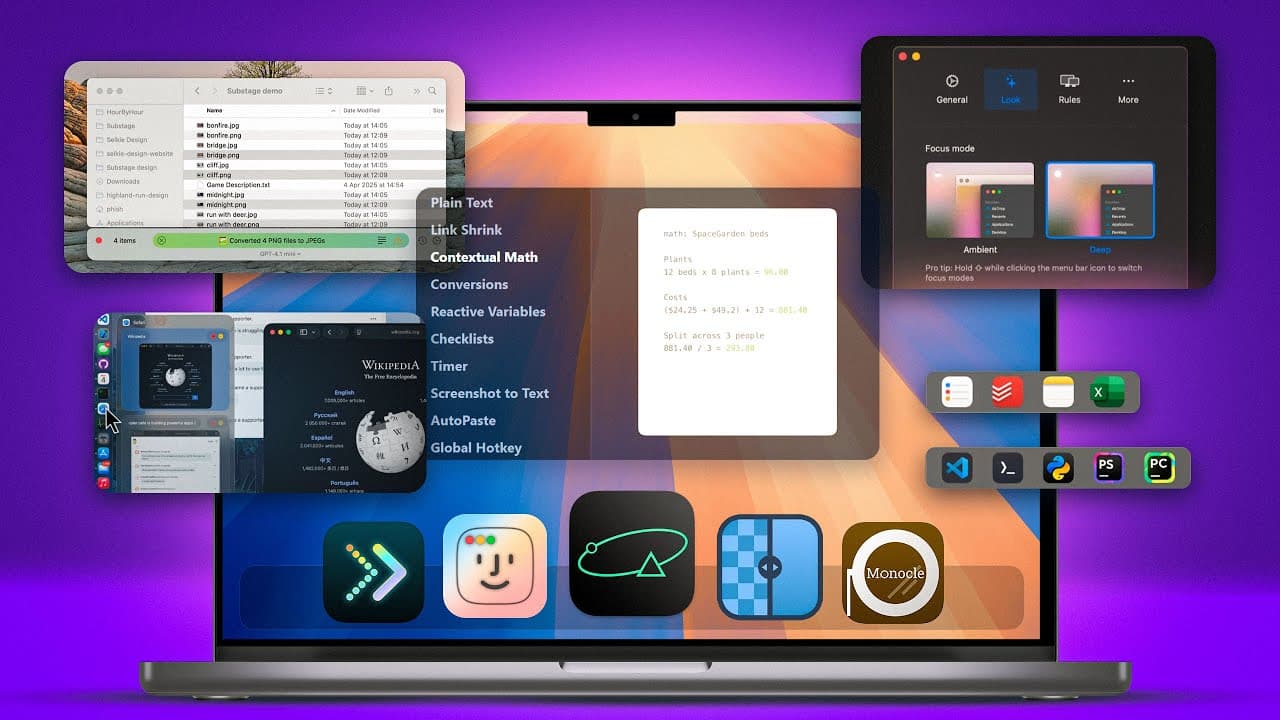
Discover 11 essential Mac applications that enhance productivity and streamline daily tasks. From advanced note-taking with AntiNote to optimizing storage with CleanMyMac, these apps offer unique features to improve efficiency. Whether it's converting files easily or managing multiple windows with Monle, these tools are designed to make your Mac experience smoother and more effective.
Transcript
I've got 11 Mac applications that I use every single day. And I think that after watching this video, you'll see exactly why. Let's jump in. First up is a very simple yet sophisticated and time-saving sticky note application called AntiNote. And at first glance, this just looks like your average run-of-the-mill scratch pad for the Mac, but it is so... Read More
Key Insights
- AntiNote is a versatile note-taking app that supports commands like list, math, and text recognition from images.
- Folder Preview allows quick access to folder contents by pressing space, enhancing file navigation efficiency.
- Substage uses AI for Finder windows, enabling natural language commands for tasks like file conversion.
- Dock Door provides Windows-style previews for applications in the dock, facilitating quick window management.
- CleanMyMac's cloud cleanup feature helps manage iCloud, Google Drive, and OneDrive storage by removing unused files.
- Monle removes distractions by blurring inactive windows, allowing users to focus on a single task.
- Dockey accelerates the dock animation, making app access faster when the dock is hidden.
- Upscale uses AI to enhance image resolution, improving clarity for both digital art and natural images.
Install to Summarize YouTube Videos and Get Transcripts
Explore YouTube Video Summarizer or Get YouTube Transcript Extractor
Questions & Answers
Q: How does AntiNote improve note-taking on Mac?
AntiNote enhances note-taking by offering a range of commands like list, math, and sum, allowing users to organize notes efficiently. It supports automatic text recognition from images and provides customization options for themes and fonts. The app also features a paste function that continuously pastes clipboard content until stopped, making it a versatile tool for managing information.
Q: What is the benefit of using Folder Preview?
Folder Preview simplifies file navigation by allowing users to view folder contents quickly by pressing the space bar. This feature acts like a mini Finder window, providing sorting options and interactive elements to manage files without opening multiple windows. It enhances efficiency by reducing the time spent navigating through folders, especially for users with complex directory structures.
Q: How does Substage utilize AI in Finder windows?
Substage integrates AI into Finder windows, enabling users to perform tasks using natural language commands. For example, users can resize videos or convert file formats by typing simple commands. It supports file management tasks like zipping files or moving them to trash, making it a powerful tool for streamlining workflow. While not the fastest, its AI capabilities offer significant potential for file management.
Q: What features does Dock Door add to the Mac dock?
Dock Door enhances the Mac dock by providing Windows-style previews for open applications. Users can view multiple windows of an app, see the full title of each page, and perform actions like closing or minimizing windows directly from the dock. It includes appearance settings for customizing preview sizes and row numbers, improving multitasking efficiency and window management.
Q: How does CleanMyMac's cloud cleanup feature work?
CleanMyMac's cloud cleanup feature scans and removes large, unused files from cloud storage services like iCloud, Google Drive, and OneDrive. It operates locally on the device, ensuring data security, and allows users to restore deleted files if needed. This feature helps manage cloud storage efficiently, freeing up space and optimizing storage usage without compromising security.
Q: What is the purpose of Monle on Mac?
Monle is designed to eliminate distractions by blurring inactive windows, allowing users to focus solely on the active window. It offers customization options for blur intensity and theme, helping users maintain concentration on their tasks. By reducing visual clutter, Monle enhances productivity for users who often work with multiple open windows.
Q: How does Dockey improve dock interaction on Mac?
Dockey accelerates the animation speed for revealing the dock when it's hidden, allowing for faster access to applications. It provides options to adjust animation delay and speed, enabling users to customize how quickly the dock appears. This feature is particularly useful for users who prefer to keep their dock hidden to maximize screen space and reduce distractions.
Q: What is the function of Upscale in image processing?
Upscale uses AI to enhance the resolution of images, improving clarity and detail. Users can select different AI models based on the image type, such as natural images or digital art, and choose the desired scale. The application allows for significant resolution increases, making it valuable for improving image quality for various purposes, including digital publications and personal projects.
Summary & Key Takeaways
-
The video introduces 11 Mac applications that the creator uses daily to enhance productivity and efficiency. AntiNote offers advanced note-taking capabilities, while Folder Preview simplifies folder navigation. Substage provides AI-assisted file management, and Dock Door enhances dock functionality. CleanMyMac's new feature optimizes cloud storage, and Monle helps maintain focus by blurring inactive windows.
-
Dockey speeds up dock animations for quicker access to applications, and DockFlow allows custom dock configurations based on tasks. Sidebar Calendar provides a minimalistic approach to managing events, and Latest updates all applications, not just those from the App Store. Umbra and Upscale offer unique features for managing wallpapers and enhancing image resolution using AI.
-
These applications cater to various needs, from managing storage and enhancing file access to improving focus and image quality. The creator emphasizes the importance of finding hidden gems in the Mac app ecosystem and encourages viewers to explore these tools to improve their daily workflow.
Read in Other Languages (beta)
Share This Summary 📚
Summarize YouTube Videos and Get Video Transcripts with 1-Click
Try YouTube Summary with ChatGPT & Claude or YouTube Transcript Generator
Explore More Summaries from Brandon Butch 📚




Summarize YouTube Videos and Get Video Transcripts with 1-Click
Try YouTube Summary with ChatGPT & Claude or YouTube Transcript Generator