How to Configure Essential iOS 26 Settings
TL;DR
Configure call screening, time-sensitive message alerts, Wallet order tracking, headphone audio retention, and keyboard character previews after installing iOS 26. You can also refine screenshots, call filtering, alarm snooze duration, recent-call behavior, and Safari navigation so the iPhone better matches your privacy preferences and daily habits.
Transcript
iOS 26 is jam-packed with hundreds of new features, but it also includes several new settings that you probably didn't even know existed. So, in this video, I'm going to be showing you 24 settings that you need to change immediately on your iPhone. Okay, so this first one is going to be very useful for those with CarPlay. So, before if you took a s... Read More
Key Insights
- CarPlay screenshot capture is enabled by default in the new Screen Capture settings. Turning it off prevents an iPhone screenshot taken during a CarPlay connection from also placing an image of the CarPlay interface in the photo library.
- HDR screen capture saves screenshots and screen recordings with full dynamic range in the HEIF format. The same settings area also controls full-screen screenshot previews and automatic visual lookup, allowing users to balance image quality, convenience, and automatic analysis.
- Keeping audio with headphones prevents an active connection from automatically moving to a car, speaker, or HomePod. Audio remains in AirPods or other Bluetooth headphones until the user removes them or manually chooses another output.
- Time-sensitive notifications can remain available while unknown senders are screened. Enabling that notification category allows authentication-code alerts to appear and supports Safari AutoFill without restoring every unknown message to the primary Messages feed.
- Wallet order tracking can collect shipment information detected in email receipts. Enabling the Mail beta under Wallet order-tracking settings allows Apple Intelligence and Siri to update Wallet with order numbers, tracking details, delivery progress, and completed deliveries.
- Call screening can ask an unknown caller for a name and reason before producing the normal audible notification. Enabling separate spam and unknown-caller filters also moves those calls into dedicated Phone app sections instead of leaving them in the main feed.
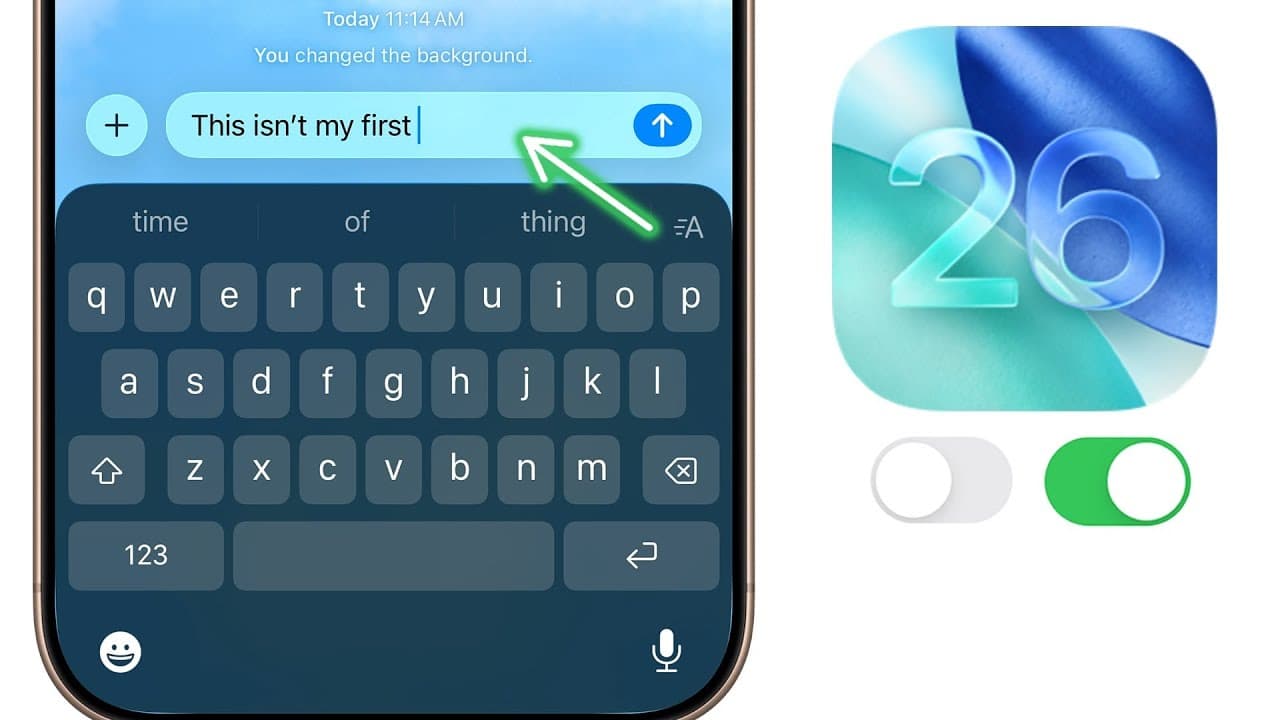
- Keyboard character preview restores the enlarged visual cue that appears above a key when it is pressed. The feature is disabled by default in iOS 26, but it can be enabled under General and Keyboard when typing otherwise feels unfamiliar.
- Alarm snooze duration is adjustable from 1 to 15 minutes in iOS 26. The setting is available while creating or editing a standard alarm, and it can also be changed for the wake-up alarm instead of using one fixed duration.
Install to Summarize YouTube Videos and Get Transcripts
Explore YouTube Video Summarizer or Get YouTube Transcript Extractor
Questions & Answers
Q: How do I stop CarPlay screenshots in iOS 26?
Open Settings, select General, and then open Screen Capture. Turn off CarPlay Screenshots, which is enabled by default. With that option disabled, taking an iPhone screenshot while connected to CarPlay will no longer also capture the CarPlay interface and place that additional image in the photo library.
Q: How can I receive authentication codes while screening unknown senders?
Open the Messages settings and keep Screen Unknown Senders enabled so ordinary unknown messages and their notifications remain filtered. Under Allow Notifications, enable the Time-Sensitive category. This permits alerts for time-sensitive messages such as two-factor authentication codes and preserves the ability to use those codes with AutoFill in Safari.
Q: How do I enable Wallet order tracking from email receipts?
Open Settings, go to Wallet, scroll to the Order Tracking section, and enable the Mail beta. This permits Apple Intelligence and Siri to detect order information in emails and update Wallet. Supported shipment entries can then display the relevant order number, tracking progress, expected movement, and delivery completion alongside orders associated with Apple Pay.
Q: How does call screening work for unknown callers in iOS 26?
Under the Phone settings, open Screen Unknown Callers and choose Ask Reason for Calling instead of simply silencing unknown calls. An unsaved caller is asked to provide a name and reason for calling. The iPhone shows activity in the Dynamic Island and on the Lock Screen, but waits for the caller's response before issuing the normal audible notification.
Q: How can I organize spam and unknown calls in the Phone app?
Enable both Spam and Unknown Callers under the Phone app's call-filtering settings. The Phone app will then place these calls into separate sections rather than allowing them to occupy the main call feed. The app also provides a Blocked Contacts screen where users can review saved contacts or unknown numbers and add another blocked contact.
Q: How do I keep iPhone audio playing through my headphones?
Open Settings, select General, choose AirPlay and Continuity, and enable Keep Audio with Headphones. When AirPods or other Bluetooth headphones are already in use, audio will remain routed through them after entering a car or approaching connected speakers such as HomePods. It changes only when the headphones are removed or the output is switched manually.
Q: How do I restore keyboard character previews in iOS 26?
Open Settings, choose General, scroll to Keyboard, and enable Character Preview. When active, each pressed key rises above the keyboard and displays an enlarged visual cue. The option is disabled by default in iOS 26 even though the preview was the default behavior in previous iOS versions, which can make typing initially feel different.
Q: How can I customize alarms and recent-call behavior in iOS 26?
Create or edit an alarm in the Clock app, then set Snooze Duration anywhere from 1 to 15 minutes. The same customization is available for the wake-up alarm. For calls, open Phone settings and enable Tap Recent to Call if you prefer tapping a contact's name to call immediately instead of using the separate callback glyph.
Summary & Key Takeaways
-
iOS 26 adds screenshot controls under General and Screen Capture. Users can disable automatic CarPlay screenshots, select HDR for screenshots and recordings, choose between full-screen and older-style previews, and turn off automatic visual lookup when they do not want captured content analyzed immediately.
-
Communication settings receive substantial changes. Messages can screen unknown senders while still allowing time-sensitive alerts for authentication codes and Safari AutoFill. The Phone app can ask unknown callers to identify themselves, separate unknown and spam calls, display blocked contacts, assist while a caller is on hold, and customize recent-call behavior.
-
Other practical controls include keeping audio connected to headphones when entering a car or approaching speakers, importing shipment details from email into Wallet, restoring keyboard character previews, and setting alarm snooze periods from 1 to 15 minutes. Safari also supports gestures and shortcuts for reaching the tab view.
Read in Other Languages (beta)
Share This Summary 📚
Summarize YouTube Videos and Get Video Transcripts with 1-Click
Try YouTube Summary with ChatGPT & Claude or YouTube Transcript Generator
Explore More Summaries from Brandon Butch 📚
Summarize YouTube Videos and Get Video Transcripts with 1-Click
Try YouTube Summary with ChatGPT & Claude or YouTube Transcript Generator