How to Set Up AirPods Pro 3 and Key Features
TL;DR
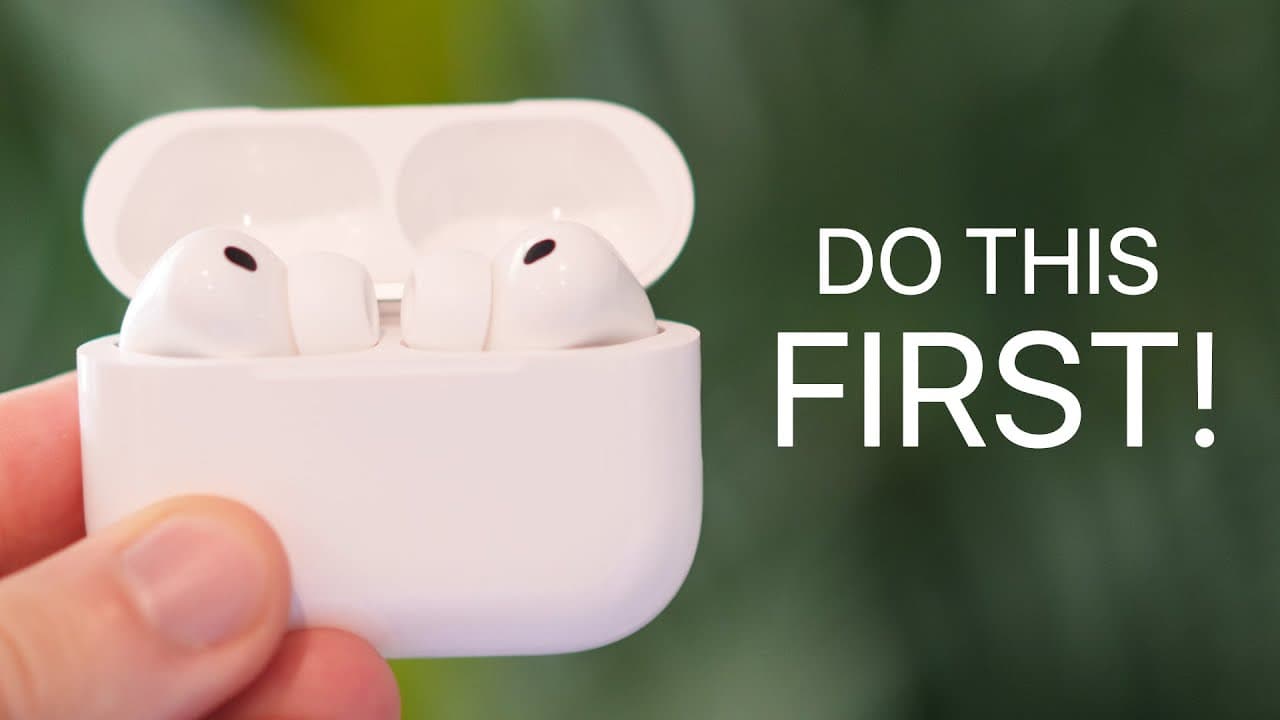
Choose the correct ear tips and run the acoustic seal test first, because fit directly affects comfort and performance. Then configure camera remote, heart rate monitoring, microphone input, charging notifications, and battery widgets. The case uses a front haptic control for manual pairing and resetting, while IP57 resistance and wireless charging make the earbuds suitable for workouts and everyday use.
Transcript
If you just got the AirPods Pro 3, there's probably a lot more to them than you realize. So, in this video, I'm going to show you the first 18 things that you need to do and some tips and tricks that you need to know to get the most out of your AirPods Pro 3. And these tips are going to be useful if you've had AirPods before or if these are your ve... Read More
Key Insights
- Correct ear tip selection is the first setup priority. AirPods Pro 3 arrive with medium tips installed, but the box includes additional sizes, including extra extra small. Users should try the available options and choose the size that feels most appropriate in each ear.
- The acoustic seal test is available under Fit and Comfort in the iPhone's AirPods settings. After the earbuds are inserted, the test plays sound through both sides and reports whether the selected tips create a good seal in the left and right ears.
- Manual pairing is controlled by a haptic area on the front of the charging case. With the case open, double-tapping the front activates a white light and enters pairing mode, allowing connection to a PC or another device outside Apple's ecosystem.
- A factory reset is performed through the same front haptic control. Three consecutive double-taps reset AirPods Pro 3 to factory settings, after which the earbuds can be paired with the iPhone again.
- Camera Remote is an optional AirPods setting that is disabled by default. Once enabled, a stem press can start a timer and capture a burst of 10 photos. The AirPod can be removed after activation, allowing the user to pose without wearing it.
- Heart rate monitoring is built into AirPods Pro 3 and samples 256 times per second using infrared light. It works with Fitness workouts, requires only one AirPod, and can collect heart rate data without an Apple Watch being worn.
- AirPods Pro 3 can serve as the microphone input for iPhone video recording. Users can select them under Sounds and Haptics, then Input, or through Camera controls in Control Center. This permits recording while the phone is positioned up to 40 feet away.
- Battery visibility is improved by enabling charging notifications and adding a Batteries widget. Notifications provide reminders for low and fully charged states, while Home Screen and Lock Screen widgets can show the AirPods and charging case battery percentages at a glance.
Install to Summarize YouTube Videos and Get Transcripts
Explore YouTube Video Summarizer or Get YouTube Transcript Extractor
Questions & Answers
Q: How do you choose the correct AirPods Pro 3 ear tips?
AirPods Pro 3 come with medium ear tips installed and additional sizes in the box, including an extra extra small option. Try the different sizes in your ears and identify the pair that feels most comfortable and secure. After making an initial choice, use the iPhone's acoustic seal test to confirm whether each earbud has a good seal.
Q: How do you run the AirPods Pro 3 acoustic seal test?
Insert the AirPods with your chosen ear tips, open Settings on the paired iPhone, and enter the AirPods settings. Scroll to the Fit and Comfort section, select Test Acoustic Seal, tap Continue, and press the play button. The iPhone will play sound through the left and right earbuds and report whether the fit is good on each side.
Q: How do you manually pair AirPods Pro 3 without a case button?
AirPods Pro 3 use a haptic control on the front of the charging case instead of the physical rear button found on AirPods Pro 2. Open the case and double-tap the front haptic area. The case light will turn white to indicate pairing mode, allowing the earbuds to connect manually to a PC or another non-Apple device.
Q: How do you reset AirPods Pro 3 to factory settings?
Open the AirPods Pro 3 charging case and use the haptic control located on its front. Perform three consecutive double-taps on that area. This sequence resets the AirPods to their factory settings. After the reset is complete, the earbuds can be paired with the iPhone again as part of a fresh connection process.
Q: How do you use AirPods Pro 3 as an iPhone camera remote?
Open the AirPods settings on the iPhone, locate Camera Control, and enable Camera Remote, which is off by default. Choose either a single stem press or a press-and-hold gesture. In the Camera app, perform the selected gesture to start a timer. The camera then captures a burst of 10 photos from which you can choose.
Q: Can AirPods Pro 3 measure heart rate without an Apple Watch?
AirPods Pro 3 can collect heart rate data during a workout without an Apple Watch being worn. Their infrared heart rate sensor samples 256 times per second, and only one AirPod needs to be in an ear. In the iPhone Fitness app's Workout tab, the AirPods appear as a heart rate monitoring device when available.
Q: How do you use AirPods Pro 3 as a microphone for video?
On the iPhone, open Settings, select Sounds and Haptics, enter Input, and choose AirPods Pro 3 as the microphone source. The same choice is available while using Camera by opening Control Center, tapping Controls, and selecting Input. This allows the AirPods microphone to capture audio even when the phone is positioned up to 40 feet away.
Q: How do you check AirPods Pro 3 battery levels quickly?
Enable charging notifications in the Battery section of the AirPods settings to receive reminders when the battery is low or fully charged. For quick visual access, add a Batteries widget with multiple battery slots to the Home Screen. A Batteries widget can also be placed on the Lock Screen and fixed specifically to AirPods Pro 3 by disabling Automatic selection.
Summary & Key Takeaways
-
Begin by trying the included ear tip sizes, including the new extra extra small option, and then run Test Acoustic Seal under Fit and Comfort in the AirPods settings. The test plays sound through both earbuds and reports whether the left and right seals provide a suitable fit for the user.
-
The charging case replaces the previous physical rear button with a haptic control on the front. With the lid open, double-tapping this area activates white pairing mode for computers and other devices. Performing three consecutive double-taps resets the AirPods to factory settings so they can be paired with an iPhone again.
-
AirPods Pro 3 add practical features for photography, fitness, recording, and battery management. They can remotely trigger a timed burst photo, measure heart rate during workouts, serve as a selectable video microphone, and display battery levels through Home Screen or Lock Screen widgets. Charging notifications also provide low-battery and fully charged reminders.
Read in Other Languages (beta)
Share This Summary 📚
Summarize YouTube Videos and Get Video Transcripts with 1-Click
Try YouTube Summary with ChatGPT & Claude or YouTube Transcript Generator
Explore More Summaries from Brandon Butch 📚
Summarize YouTube Videos and Get Video Transcripts with 1-Click
Try YouTube Summary with ChatGPT & Claude or YouTube Transcript Generator