How to Automate In-Depth Research with AI Agents
TL;DR
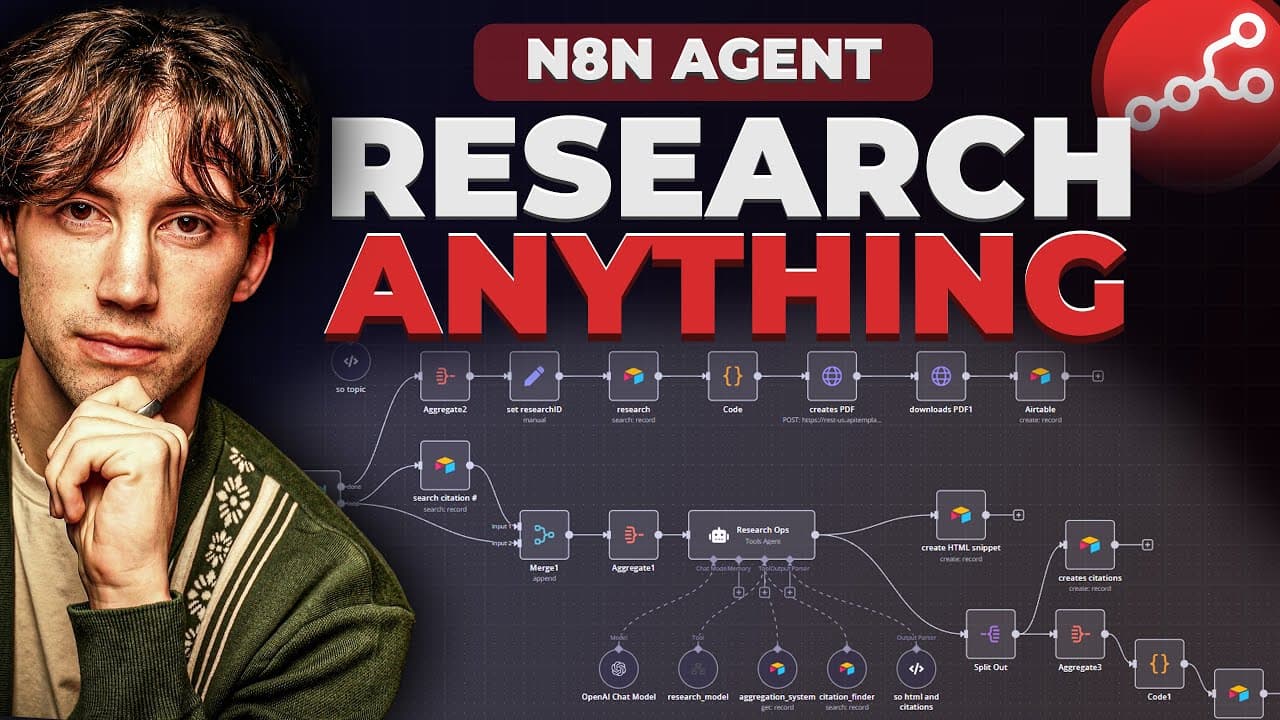
Automate in-depth research and generate detailed PDF reports by utilizing AI agents in n8n. Input any topic, and the system creates a comprehensive paper complete with citations, streamlining your research process. Mastering key principles like database management and task splitting enhances efficacy in building your own research agents.
Transcript
today I'm going to show you how I built this research agent in nadn that takes any topic you're interested in and actually does in-depth research on that and creates you a PDF with citations and a reference sheet all the way at the bottom citing every reference it used in order to do this research So This research paper in specific ... Read More
Key Insights
- The research agent in n8n automates the creation of detailed PDF reports on any topic, complete with citations and references.
- Users can input a topic, and the agent decides the structure and depth of the research paper, making the process efficient and user-friendly.
- The system uses real-world information, allowing users to verify sources through clickable links in the generated PDF.
- The research agent employs a rotating aggregation database, such as Airtable, to organize and store research data efficiently.
- Task splitting is crucial for creating comprehensive research papers, allowing the agent to focus on individual sections like introduction, body, and conclusion.
- The agent's workflow begins with user input, which is refined into search queries, structured into a style guide, and managed through a research manager.
- Open Router is used to connect various AI models for conducting research, offering flexibility in choosing the best model for the task.
- The AI Foundations Community offers resources and a supportive environment for learning and building AI agents in n8n.
Install to Summarize YouTube Videos and Get Transcripts
Explore YouTube Video Summarizer or Get YouTube Transcript Extractor
Questions & Answers
Q: How does the research agent decide the structure of the research paper?
The research agent uses a style guide to determine the structure of the research paper. It begins with user input, which is refined into search queries. These queries are then organized into a structured format by the style guide, ensuring that each section of the paper is well-defined and comprehensive.
Q: What is the role of the rotating aggregation database?
The rotating aggregation database, such as Airtable, plays a crucial role in organizing and storing research data. It allows the agent to aggregate information throughout the automation process, ensuring that each section of the research is stored in an organized manner. This system also helps in managing citations and avoiding duplication.
Q: How does task splitting enhance the research process?
Task splitting enhances the research process by allowing the agent to focus on individual sections of the research paper, such as the introduction, body, and conclusion. By handling each section separately, the agent can conduct more thorough research and ensure that each part of the paper is well-developed and detailed.
Q: What flexibility does Open Router provide in the research process?
Open Router provides flexibility by allowing users to connect various AI models for conducting research. This means that users can choose from a wide range of models, such as Deep Seek or Perplexity, to find the best fit for their research needs. This flexibility ensures that the most appropriate tools are used for each research task.
Q: How can users verify the sources used in the research paper?
Users can verify the sources used in the research paper through clickable links provided in the PDF. The research agent cites real-world information, and each citation includes a link that users can click to view the original source, ensuring transparency and accuracy in the research.
Q: What resources does the AI Foundations Community offer?
The AI Foundations Community offers a range of resources, including a 25-module course on building AI agents in n8n, automation templates, and a supportive community of learners. Members have access to live calls, discussions, and a wealth of knowledge to help them master AI agents and automation.
Q: What are the benefits of joining the AI Foundations Community?
Joining the AI Foundations Community provides access to a structured learning path for building AI agents, a supportive environment for collaboration, and resources to help members succeed in automation. Members can learn from others' experiences, access exclusive content, and develop skills that can lead to new opportunities in AI.
Q: How does the agent handle user input in the research process?
The agent begins the research process by taking user input, which is a topic of interest. This input is then refined into search queries by a query refiner, which ensures that the research is focused and relevant. The queries are structured into a style guide, which guides the research manager in creating a comprehensive research paper.
Summary & Key Takeaways
-
The video demonstrates how to automate the creation of in-depth research papers using AI agents in n8n. Users input a topic, and the agent generates a detailed PDF report with citations and references, streamlining the research process.
-
Key principles for building a research agent include fortifying the research structure, using a rotating aggregation database, and task splitting to handle different sections of the research paper effectively.
-
The AI Foundations Community provides a platform for learning and developing AI agents, offering courses, templates, and a supportive community to help users master automation in n8n.
Read in Other Languages (beta)
Share This Summary 📚
Summarize YouTube Videos and Get Video Transcripts with 1-Click
Try YouTube Summary with ChatGPT & Claude or YouTube Transcript Generator
Explore More Summaries from AI Foundations 📚




Summarize YouTube Videos and Get Video Transcripts with 1-Click
Try YouTube Summary with ChatGPT & Claude or YouTube Transcript Generator