What Are the 9 Hidden AI Niches for 2026 and the Grok FREE Unlimited Hack?
TL;DR
The tutorial’s method is to create vertical short-form videos with Grok AI’s Imagine feature, improve the results with ChatGPT-generated prompts, and submit each new prompt through the redo box. It presents nine hidden AI niches for 2026, including paint-to-live, drawing-to-fantasy, and miniature scenes. Because redo replaces the current clip, every video must be downloaded first, making the complete workflow worth reading carefully.
Transcript
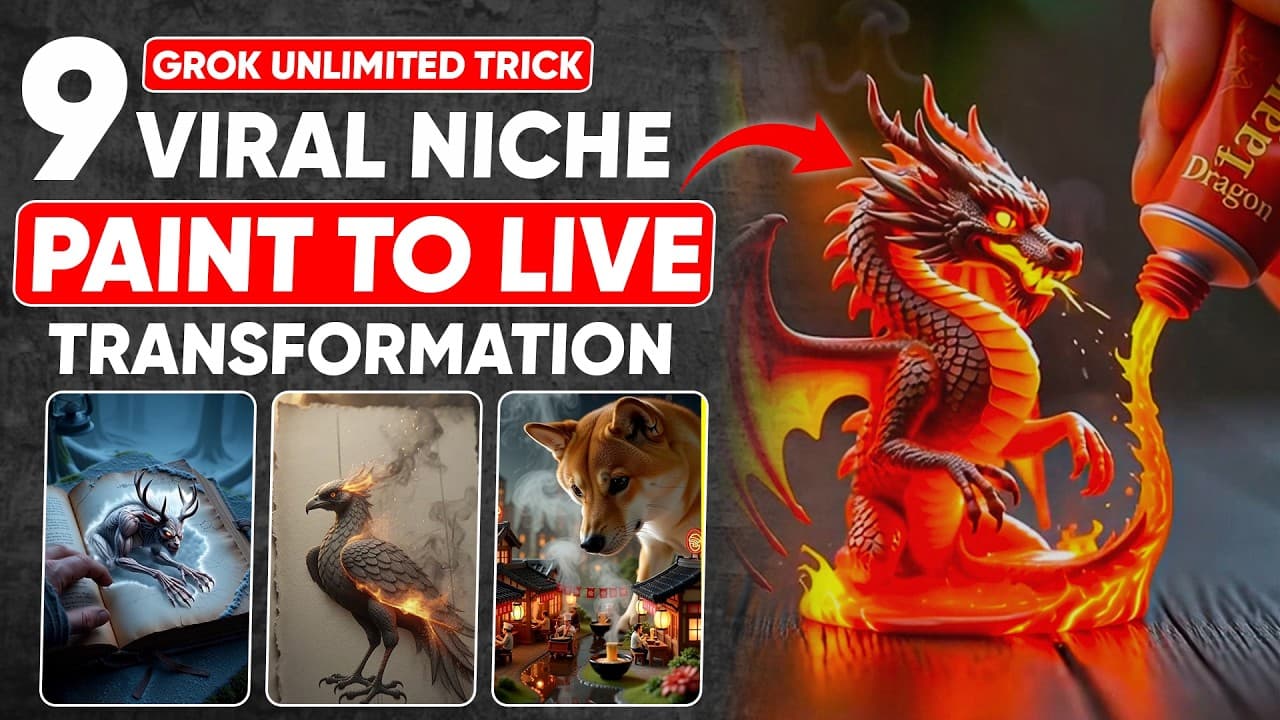
Now you can create these types of paint to live AI videos using Gro AI for free and make your YouTube shorts channel viral in just a few days because this is a 100% fresh niche. Not only this but today I will tell you eight new and viral ideas which include ancient book to live creature videos, powder seeds to tree videos, drawing to live AI videos... Read More
Key Insights
- Vertical output matches the goal: The tutorial chooses the vertical aspect ratio specifically because the intended output is viral short-form video. That choice occurs after opening Imagine and selecting the video option. The resulting clips are positioned for YouTube Shorts, Instagram, and TikTok rather than as general horizontal video content.
- Imagine enables the free workflow: The creator explicitly shows that the account is on Grok AI’s free plan before beginning. Video generation starts by selecting Imagine from the left sidebar, choosing video, setting an aspect ratio, entering a prompt, and pressing send. The first result appears within a few seconds in the demonstration.
- Prompt detail changes the result: A normal example prompt produces a video the creator considers high quality, but the enhanced version is described as clearly better and more impressive. This comparison is the reason the workflow does not stop at direct prompting. ChatGPT is used to expand a compact concept into instructions intended for Grok AI.
- The workaround changes prompt location: The claimed unlimited-generation method depends on avoiding the main prompt box after the initial generation. New prompts are placed in the redo box and submitted with redo or send. The tutorial says the main box reaches the generation limit quickly, while the redo route permits continued generation from a single free account.
- Redo creates a strict sequence: The redo box does not preserve the currently displayed video when another prompt is submitted. The tutorial repeatedly instructs users to download the existing clip first because it will disappear during replacement. The practical sequence is therefore download, paste the enhanced prompt, submit it, preview the replacement, and download again.
- Templates separate structure from ideas: The provided ChatGPT templates contain placeholders rather than requiring every enhanced prompt to be written from scratch. For paint-to-live concepts, users replace the object name and description. For drawing-to-fantasy and miniature scenes, they replace an idea placeholder, allowing one prompt structure to support multiple visual concepts.
- The panther example shows specificity: The frost feather panther is not entered as only an animal name. Its description includes icy feather-like fur that refracts light into rainbow halos, silent movement, and frozen mist trails. Those concrete visual and motion details give ChatGPT material for producing the enhanced prompt later submitted to Grok AI.
- Fantasy emerges from ordinary drawing: The drawing-to-fantasy niche begins with drawn elements and turns them into animated fantasy subjects. The example has crayon lines opening like cracks before a cute 3D dragon appears and breathes harmless glitter fire. This niche relies on a visible transformation, not merely a static drawing rendered as a video.
- Sound effects reduce manual work: In the drawing-to-fantasy example, Grok AI automatically adds a sound effect to the generated clip. The creator presents this as a major benefit because the effect does not need to be edited or added manually. The finished video can therefore move directly from generation and download toward posting.
- Miniature prompts support recognizable settings: The miniature-scene demonstration uses a Domino’s Pizza kitchen rather than an unspecified building. The accompanying template can be customized for a restaurant, building, shop, or another miniature environment. This makes the niche a repeatable format in which the setting changes while the miniature presentation remains consistent.
- Scale contrast defines another niche: Giant-animal videos combine an oversized animal with a highly detailed miniature settlement. One demonstrated idea places a giant Shiba Inu above a tiny ramen village containing miniature chefs and cooking activity. The visual premise depends on the contrast between the animal’s scale and the small city below it.
- Nine niches share one production loop: Paint-to-live, drawing-to-fantasy, miniature restaurants or buildings, giant animals with miniature cities, animals from a jar, water-drop country artwork, ancient-book creatures, and powder-seed-to-tree videos use the same core method. An idea becomes an enhanced ChatGPT prompt, the prompt goes into Grok AI, and the resulting clip is downloaded before the next redo.
Install to Summarize YouTube Videos and Get Transcripts
Explore YouTube Video Summarizer or Get YouTube Transcript Extractor
Questions & Answers
Q: What are the 9 hidden AI niches for 2026 in the tutorial?
The tutorial starts with paint-to-live and says it will provide eight more ideas, making nine niches in total. The named concepts include ancient-book-to-live-creature videos, powder-seed-to-tree videos, drawing-to-live or drawing-to-fantasy videos, water-drop-to-country artwork, cute miniature animals emerging from a jar, and miniature restaurants, shops, or buildings. It also demonstrates giant animals combined with miniature cities, including a giant Shiba Inu above a ramen village. These concepts are presented as fresh niches for short-form videos made with Grok AI.
Q: How do you make free AI videos with Grok AI?
Visit grock.com on the free plan and select Imagine from the left sidebar. Choose the video option, then select the desired aspect ratio, with vertical used in the tutorial for short-form videos. Enter an initial prompt and press send, after which Grok AI generates the clip within a few seconds in the demonstration. For later clips, the tutorial places enhanced prompts in the redo box and downloads each result before generating another one.
Q: What is the Grok FREE unlimited hack shown in the tutorial?
The tutorial says prompts entered in the main prompt box quickly hit the generation limit. Its workaround is to enter every new prompt in the redo box and submit it there, which the creator says enables unlimited free generation from a single Grok AI account. The method works by replacing the current generation rather than starting from the main prompt field. Because replacement removes the existing video, the clip must be downloaded before each new redo prompt is submitted.
Q: Why must each Grok AI video be downloaded before using redo?
A new prompt in the redo box replaces the video currently shown in Grok AI. The tutorial warns that the current clip will disappear once the next prompt is entered and submitted. Downloading first preserves the completed result before the interface generates its replacement. The creator repeats this step throughout the demonstrations because skipping it means losing the previous video.
Q: How are enhanced Grok AI video prompts created with ChatGPT?
The creator provides ChatGPT prompt templates containing replaceable fields for an object, description, or idea. A user inserts a concept, such as the frost feather panther or the crayon drawing that reveals a 3D dragon. ChatGPT returns an enhanced prompt based on those details, and that result is copied into Grok AI’s redo box. This process matters because the tutorial’s direct comparison shows the enhanced prompt producing a clearly better result than the normal prompt.
Q: How do you create a drawing-to-fantasy AI video?
Start with the drawing-to-fantasy ChatGPT template and replace its idea placeholder with a specific transformation. The tutorial’s example describes crayon lines peeling open like cracks, followed by a cute 3D dragon emerging and breathing harmless glitter fire. Copy ChatGPT’s enhanced prompt, download the video currently displayed in Grok AI, and paste the new prompt into the redo box. Submit it to generate the fantasy clip, which Grok AI also gives an automatic sound effect in the demonstration.
Q: How do you make miniature restaurant or city videos with Grok AI?
For a miniature restaurant or building, place the desired scene in the provided ChatGPT template and obtain a customized enhanced prompt. The tutorial demonstrates this process with a miniature Domino’s Pizza kitchen, then submits the prompt through Grok AI’s redo box. A related niche combines a giant animal with a miniature city, such as a giant Shiba Inu looking down at a tiny ramen village with miniature chefs. The shared method is to define the scene, enhance the idea in ChatGPT, generate it in Grok AI, and download it before the next redo.
Q: Does Grok AI automatically add sound effects to these videos?
Yes, the tutorial states that Grok AI automatically adds a sound effect to the drawing-to-fantasy video. The creator highlights this after previewing the generated dragon example. Because the sound effect is already included, the tutorial says there is no need to edit or add that effect manually. This allows the generated clip to be downloaded and posted without that extra editing step.
Summary & Key Takeaways
-
Starting with paint-to-live: The tutorial opens by presenting paint-to-live as a fresh AI video niche for YouTube Shorts, alongside eight additional ideas. On grock.com, the creator uses the free plan, opens Imagine from the left sidebar, selects video, and chooses the vertical aspect ratio. An example prompt generates the first clip within a few seconds. The initial result looks impressive, but the creator then introduces an enhanced prompt to demonstrate that more detailed instructions can produce a clearly better video.
-
Using the redo-box trick: Entering prompts in Grok AI’s main prompt box quickly reaches the generation limit, according to the tutorial. The proposed workaround is to put each new prompt in the redo box and submit it there, allowing continued generation from one free account. This workflow has an important limitation: every redo replaces the current video. The creator therefore downloads each completed clip before entering another prompt, then confirms the download before generating the replacement.
-
Building enhanced prompts: The creator supplies a reusable ChatGPT prompt template in which the object name and description can be replaced. The demonstration uses a frost feather panther with icy, feather-like fur, rainbow halos, silent movement, and trails of frozen mist. ChatGPT turns that description into an enhanced prompt, which is copied into Grok AI’s redo box. After the existing clip is downloaded, the enhanced prompt produces a new video that the creator describes as mind-blowing and suitable for a YouTube channel.
-
Expanding into fantasy scenes: The next niche transforms drawings into fantasy videos. A template lets the user replace an idea placeholder with a concept such as crayon lines peeling open like cracks and revealing a cute 3D dragon breathing harmless glitter fire. ChatGPT converts the idea into an enhanced prompt, and Grok AI generates the clip through the redo box. The tutorial also highlights Grok AI’s automatically added sound effect, which removes the need to add that effect manually before posting.
-
Exploring miniature visual niches: The tutorial then demonstrates a miniature Domino’s Pizza kitchen and explains that the same ChatGPT template approach can customize other miniature restaurants, buildings, or shops. It continues with giant animals combined with miniature cities, including a giant Shiba Inu looking down at a tiny ramen village where miniature chefs cook. The broader set also includes animals from a jar, water-drop country artwork, ancient-book creatures, and powder-seed-to-tree transformations, completing the nine niche concepts introduced for 2026.
Read in Other Languages (beta)
Share This Summary 📚
Summarize YouTube Videos and Get Video Transcripts with 1-Click
Try YouTube Summary with ChatGPT & Claude or YouTube Transcript Generator
Explore More Summaries from zapiwala ai 📚

Summarize YouTube Videos and Get Video Transcripts with 1-Click
Try YouTube Summary with ChatGPT & Claude or YouTube Transcript Generator