How to Create 12 Visuals with Nano Banana Pro
TL;DR
Nano Banana Pro can turn text prompts and uploaded images into blueprints, recipe pages, dioramas, infographics, movie posters, redesigned rooms, and other visual formats. The demonstrated workflow uses Google Gemini for image generation, carefully specifies the desired composition and style, and optionally sends completed infographics to Google Veo for animation.
Transcript
If you open Google Gemini, switch to create image to enable Nano Banana Pro and enter a prompt like this. Blueprint style diagram showing how the Egyptian pyramids were built. Labeled steps for stone quarrying, sled transport, ramp construction, block stacking, and interior chambers. Clean vector lines, cross-sections, arrows, minimal color, archae... Read More
Key Insights
- Nano Banana Pro is accessed in the demonstrated workflow by opening Google Gemini and switching to Create Image. Users then enter a text prompt, upload reference images when required, and select Generate to produce the requested visual composition.
- Blueprint prompts can visualize multistep processes through labeled stages, cross-sections, arrows, clean vector lines, and limited colors. The tutorial applies this structure to pyramid construction, car manufacturing, jeans production, smartphone manufacturing, electric guitar manufacturing, and sneaker manufacturing.
- Food photographs can become illustrated recipe pages when the prompt requests a vintage cookbook treatment. The ramen example surrounds the original bowl with hand-drawn ingredients, labels, warm colors, cute illustrations, and handwritten directions.
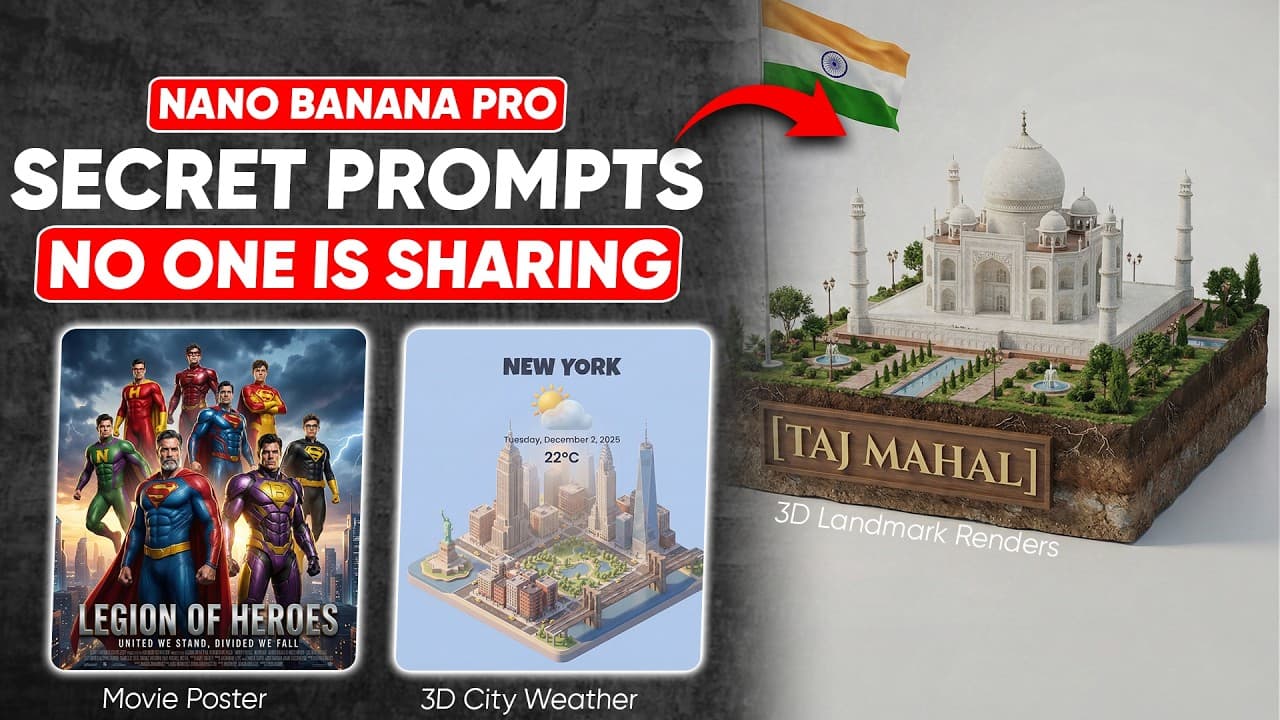
- Landmark prompts can produce miniature 3D dioramas with monuments, national flags, pathways, fountains, greenery, people, and visible soil layers. The demonstrated subjects include the Colosseum, Statue of Liberty, Taj Mahal, and Red Fort.
- Educational infographics can combine age-specific explanations with a distinctive visual style. A phases-of-the-day prompt targets a six-year-old and specifies clay characters, expressive mouths, googly eyes, handcrafted props, matte textures, and warm set lighting.
- Google Veo can animate a completed infographic after the generated image is uploaded. The demonstrated animation instruction asks Veo to bring the image to life and animate each small scene, creating material intended for an engaging educational video.
- Reference images can support cinematic transformations while preserving recognizable scene elements. The tutorial combines uploaded superhero images into a dramatic poster and converts an existing movie scene into a behind-the-scenes view containing cameras, lighting rigs, boom microphones, crew members, and production equipment.
- Bonus prompts extend the workflow to furnished-room concepts, miniature city weather scenes, product pattern sheets, architectural infographics, and portrait-based emoji sets. Each application starts with either a named subject or uploaded image and defines a specific target format.
Install to Summarize YouTube Videos and Get Transcripts
Explore YouTube Video Summarizer or Get YouTube Transcript Extractor
Questions & Answers
Q: How do you access Nano Banana Pro in Google Gemini?
The demonstrated process begins by opening Google Gemini and switching to Create Image, which enables Nano Banana Pro in the tutorial workflow. The user then enters a descriptive prompt and selects Generate. Some applications rely entirely on text, while transformations such as recipe pages, posters, room designs, product layouts, and emoji expressions first require an appropriate source image to be uploaded.
Q: How can Nano Banana Pro create a process blueprint?
A process blueprint prompt should name the subject and list the stages that need to appear. The pyramid example requests stone quarrying, sled transport, ramp construction, block stacking, and interior chambers. It also specifies labeled steps, cross-sections, arrows, clean vector lines, minimal color, and archaeological accuracy. The same general format is demonstrated for several manufacturing processes.
Q: How can a food photo become a vintage recipe page?
Upload a clear photograph of the food, then request a vintage recipe-page transformation. In the ramen example, Nano Banana Pro retains the bowl as the central subject and adds hand-drawn ingredients, accurate labels, cute illustrations, warm colors, and handwritten directions. The intended result resembles a polished cookbook page rather than a plain food photograph.
Q: How do you create a 3D landmark diorama with AI?
Use a prompt containing a landmark placeholder, then replace that placeholder with the monument you want to depict. The demonstrated dioramas include the monument, a related flag, pathways, fountains, landscaping, small people, and soil layers beneath the scene. Examples shown in the tutorial use the Colosseum, Statue of Liberty, Taj Mahal, and Red Fort.
Q: How can an AI infographic be turned into an animated video?
First generate the infographic in Nano Banana Pro with explicit instructions about the topic, audience, characters, textures, props, and lighting. The tutorial creates a clay-style phases-of-the-day chart for a six-year-old. After generation, upload the completed image to Google Veo and prompt it to bring the image to life by animating each small scene.
Q: How can uploaded character images become a movie poster?
Upload the superhero or character images that should form the cast, then request a unified Hollywood-style poster composition. In the demonstrated result, Nano Banana Pro arranges the characters into powerful poses and combines them with dramatic lighting, a thunderous sky, and a bold title at the bottom. The uploaded references provide the characters used in the final ensemble.
Q: How do you generate a behind-the-scenes version of a movie scene?
Upload the original dramatic scene and ask for a behind-the-scenes view of that exact composition. The prompt in the tutorial tells Nano Banana Pro to keep the characters in the same positions while revealing technical equipment, the lighting setup, and surrounding crew members. It also requests denoising and sharpening before generation, producing cameras, rigs, boom microphones, and production staff.
Q: What bonus visual formats can Nano Banana Pro generate?
The five bonus demonstrations cover several formats. An empty-room photograph can become a furnished and styled interior, while a city name can produce a miniature weather scene with landmarks and atmosphere. A product photograph can become a flat pattern sheet, a monument can become an architectural infographic, and a headshot can become multiple emoji-style expressions while matching the person's features and identity.
Summary & Key Takeaways
-
Nano Banana Pro is enabled by opening Google Gemini and switching to Create Image. The tutorial demonstrates seven main applications and five bonus ideas, spanning educational diagrams, stylized reference pages, miniature landmarks, animated learning materials, cinematic compositions, historical reconstructions, interior design, product layouts, and portraits.
-
Text prompts work best in the examples when they identify the subject, visual format, required components, style, and presentation details. The pyramid prompt requests labeled construction stages, cross-sections, arrows, minimal colors, clean vector lines, and archaeological accuracy, while the clay infographic prompt defines its audience, textures, expressions, props, and lighting.
-
Uploaded images provide a foundation for transformations that preserve or reinterpret existing content. Examples include converting food photography into a vintage recipe page, combining superhero images into a movie poster, revealing equipment around a cinematic scene, furnishing an empty room, separating shoes into a pattern sheet, and generating emoji expressions from a headshot.
Read in Other Languages (beta)
Share This Summary 📚
Summarize YouTube Videos and Get Video Transcripts with 1-Click
Try YouTube Summary with ChatGPT & Claude or YouTube Transcript Generator
Explore More Summaries from zapiwala ai 📚
Summarize YouTube Videos and Get Video Transcripts with 1-Click
Try YouTube Summary with ChatGPT & Claude or YouTube Transcript Generator