How to Clone a YouTube Channel With Free AI
TL;DR
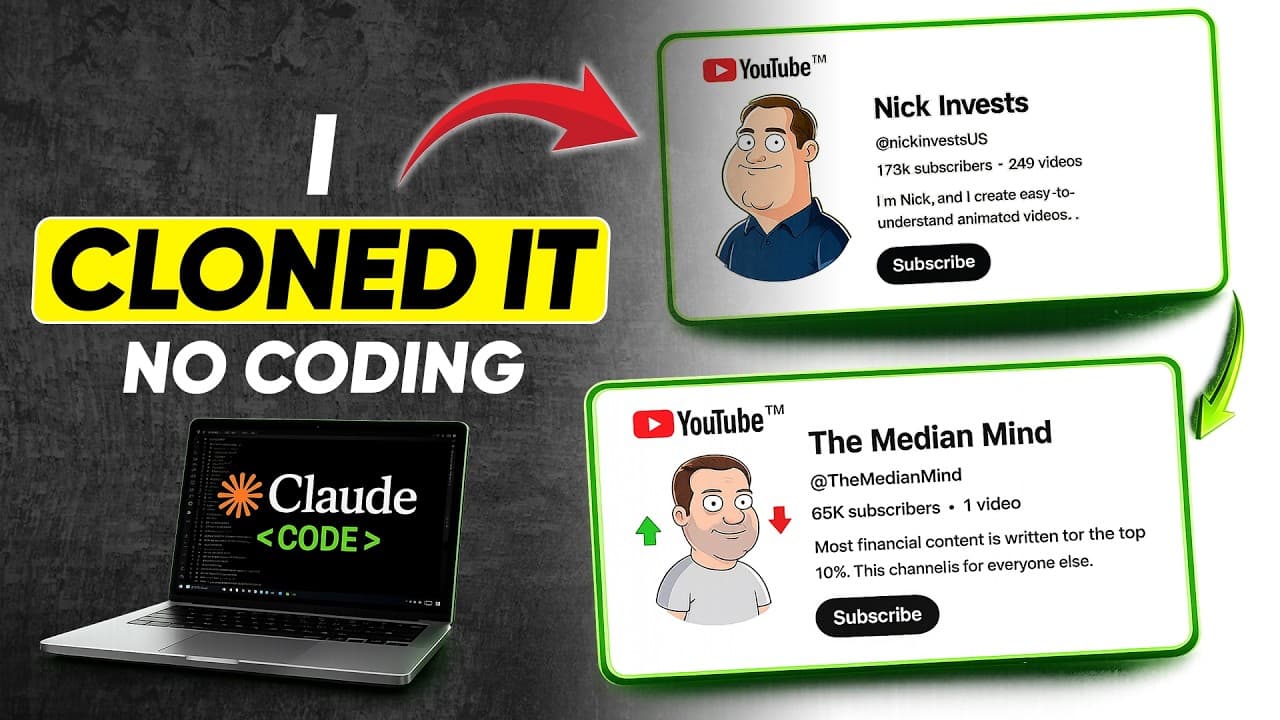
Reverse-engineer a successful YouTube channel by giving Claude AI its URL, description, screenshots, several titles, full transcripts, video frames, and thumbnails. Use the resulting channel intelligence profile to create original branding, topics, scripts, voice-overs, and scene prompts, then configure YouTube Studio and produce each video with the described free AI workflow.
Transcript
Now, you can clone literally any YouTube channel using a 100% free workflow and AI tools, whether it's documentary, history, 2D animation, true crime, or a high RPM finance channel like Nick Invest. In this video, I'll show you how I cloned the Nick Invest channel using 100% free tools. Simply visit Claude AI. You'll see an option called Claude Cod... Read More
Key Insights
- A detailed channel intelligence profile is built from the reference channel URL, description, screenshots, and two to five complete video transcripts. The profile covers the niche, audience, writing style, hook structure, script flow, narration rhythm, typical word count, topic patterns, formats, and growth angle.
- Successful and recent videos provide complementary evidence for channel analysis. The workflow starts with a recent video that gained substantial views, then adds leading videos from the popular tab, preserving both each title and its full transcript without timestamps.
- A channel name should be checked for username availability before it is finalized. The suggested method is to append the name without spaces to youtube.com/at and see whether it opens an existing channel or returns a message that the page is unavailable.
- A visual style profile is created from three to five frames taken from different parts of a reference video. Claude analyzes the art style, color palette, lighting, camera composition, character design, subject design, and overall aesthetic signature before generating image prompts.
- Channel branding can be generated from Claude's text-to-image prompts using Google Flow. The profile picture is created with a 1:1 aspect ratio, while the channel banner uses 16:9, allowing both assets to follow the visual characteristics identified during the reference analysis.
- A thumbnail style guide is produced after two to three reference thumbnails are uploaded. The resulting analysis addresses text placement, font style, colors, subject selection, background composition, and the emotional hook, providing a consistent framework for future thumbnail creation.
- The recurring video workflow uses the saved channel intelligence profile plus three to five successful titles and full transcripts. Claude then proposes 25 topics and prepares a topic report describing the viewer, hook strategy, script structure, retention techniques, and estimated length.
- Natural voice-over generation is handled in short sections rather than as one large submission. The tutorial recommends pasting two to three paragraphs at a time into Google AI Studio, generating and downloading each audio clip, and repeating the process until the complete script has been recorded.
Install to Summarize YouTube Videos and Get Transcripts
Explore YouTube Video Summarizer or Get YouTube Transcript Extractor
Questions & Answers
Q: How can Claude AI analyze a YouTube channel?
Claude AI can analyze a channel after receiving its URL, channel description, other important channel information, and a screenshot of its video page. For deeper analysis, provide two to five complete video transcripts with their titles. It can then identify the niche, audience, writing style, hook structure, script flow, narration rhythm, word count, recurring topics, formats, and growth angle.
Q: Which videos should be used as references for channel analysis?
Use a mixture of recent and popular videos from the reference channel. The tutorial begins with a recent upload that gained substantial views, then selects leading videos from the popular videos tab. For every reference, copy both the title and the complete transcript. Three references can support an in-depth analysis, while the demonstrated workflow adds a fourth for greater accuracy.
Q: How do you check whether a YouTube username is available?
Copy a proposed channel name and enter youtube.com/at followed by that name in the browser address bar, removing any spaces. If the address redirects to an existing channel, the username is already taken and another suggestion should be checked. If the page reports that it is unavailable, the tutorial treats that result as evidence that the username is free.
Q: How can AI create a YouTube profile picture and banner?
First, upload three to five frames from different parts of a reference video so Claude can define the visual style. Claude then generates separate text-to-image prompts for the profile picture and channel banner. Paste them into Google Flow, select image generation, use a 1:1 aspect ratio for the profile picture, and switch to 16:9 for the banner.
Q: What YouTube Studio settings does the workflow recommend?
The workflow recommends adding the banner, description, business email, and a watermark, then setting the country to USA and entering the tags generated by Claude. It also enables the option not to show potentially inappropriate words, completes phone and video verification, sets upload visibility to unlisted, chooses education, selects English, United States for language fields, and holds comments containing hashtags or URLs for review.
Q: How are new video topics and scripts generated?
Open a new Claude AI conversation and paste the faceless video generation prompt, followed by the previously created channel intelligence profile. Add three to five successful titles and their complete transcripts, then confirm the analysis. Claude generates 25 topic ideas. After one is selected, it creates a topic intelligence report and, following another confirmation, produces a ready-to-use script exceeding 3,500 words.
Q: How should a long AI voice-over be generated?
The tutorial uses the text-to-speech feature in Google AI Studio and selects the Algen voice for finance content. Instead of submitting the full script at once, copy only two to three paragraphs for each generation. Run the tool, download the resulting audio clip, and continue section by section until every part of the script has a corresponding voice-over file.
Q: How are visual prompts created for every scene?
Upload three to five frames from the same reference video used during the earlier channel analysis. Claude creates a visual profile covering art style, colors, lighting, composition, characters, subjects, and the overall aesthetic. After confirmation, it pairs text-to-image prompts with the relevant script lines. The demonstrated script produces prompts for 127 scenes, with images generated in Google Flow at 16:9.
Summary & Key Takeaways
-
The workflow begins by supplying Claude AI with a reference channel URL, its description, important channel information, and a screenshot of its video page. Adding two to five complete transcripts allows Claude to identify the niche, audience, writing style, hooks, script structure, narration rhythm, topic patterns, and growth angle.
-
After the analysis, Claude suggests channel names and generates a description, tags, profile-picture prompt, banner prompt, and thumbnail style guide. Google Flow creates the profile image and banner from those prompts. YouTube Studio is then configured with channel branding, country, tags, language, category, verification, upload visibility, and moderation settings.
-
For ongoing production, a separate Claude prompt combines the saved channel intelligence profile with three to five successful titles and transcripts. It proposes 25 topics, develops a topic report, writes a script exceeding 3,500 words, and creates scene-specific image prompts. Google AI Studio generates the voice-over in short sections.
Read in Other Languages (beta)
Share This Summary 📚
Summarize YouTube Videos and Get Video Transcripts with 1-Click
Try YouTube Summary with ChatGPT & Claude or YouTube Transcript Generator
Explore More Summaries from zapiwala ai 📚


Summarize YouTube Videos and Get Video Transcripts with 1-Click
Try YouTube Summary with ChatGPT & Claude or YouTube Transcript Generator