How to Direct a Consistent Anime Film in Sora 2
TL;DR
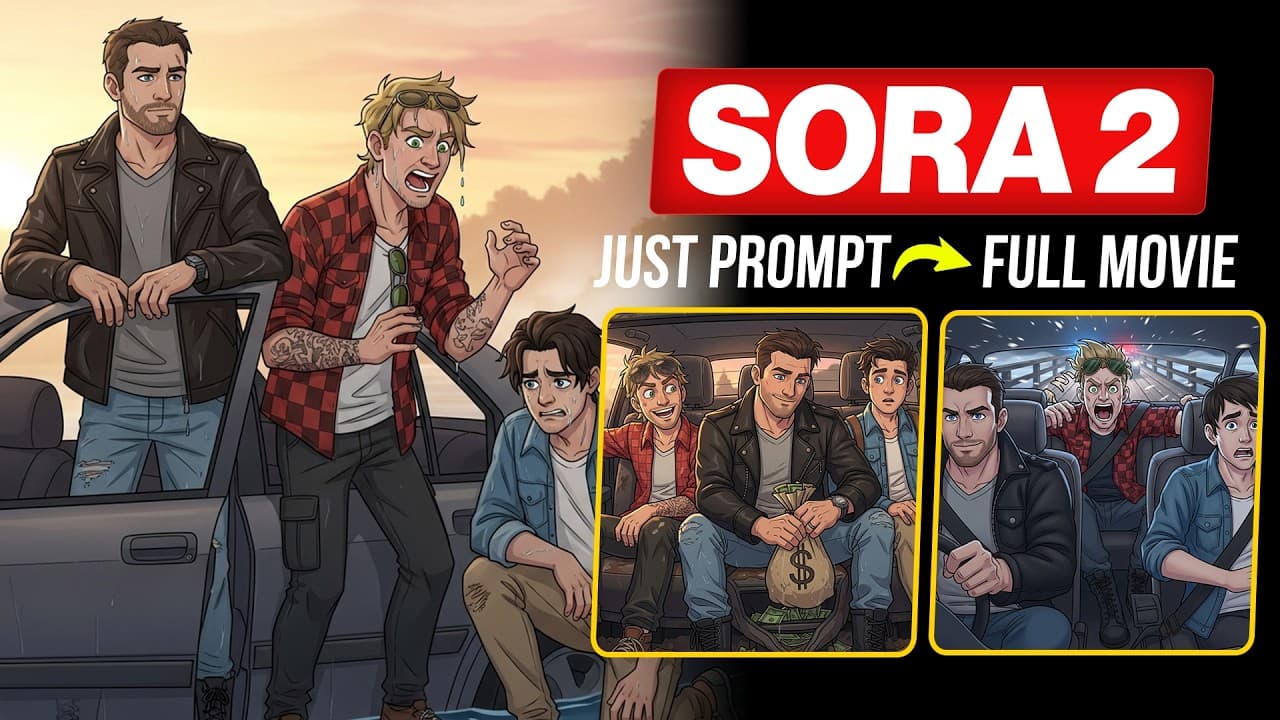
Create coherent Sora 2 anime scenes by combining multi-cut camera directions, inline character identifiers, lip-sync cues, locked dialogue order, background music, sound effects, and deliberate pacing in one prompt. Keep each generated scene under 10 seconds, limit the number of cuts and spoken lines, and use a reference image plus detailed character descriptions to help preserve identities and visual continuity.
Transcript
Dude, this place looks straight out of a horror movie. You sure the bank even exists here? Relax. Two more miles. Keep your eyes open. Jack, everyone's staring at us. Small towns do that. Fill her up. Still can't believe we're robbing a village bank. That's the point, genius. No one expects it. Quiet. We're close. All right. In and out. 6 minutes m... Read More
Key Insights
- A Sora 2 prompt can describe several camera cuts within one continuous 10-second clip. Wide shots, close-ups, and tracking shots can be connected in the same generation, provided the number of cuts and spoken lines remains manageable for the available duration.
- Inline character descriptions are identification cues that tell Sora 2 which visible person should deliver each line. Because the workflow begins with an existing scene image, these descriptions primarily distinguish speakers rather than establish their entire visual appearance from scratch.
- Camera-focus instructions are explicit directions about where Sora 2 should look during a spoken line. A command such as a close-up on a named character helps connect the correct face, dialogue, expression, and moment of emphasis within a multi-character scene.
- Lip-sync cues specify how a character's mouth should follow the spoken dialogue. When these cues are paired with inline descriptions and camera direction, the generated scene is less likely to show unrelated mouth movement or assign a line to the wrong visible character.
- Dialogue-order locking defines the sequence in which named characters speak. Listing the speakers in order reduces ambiguity during scenes with several characters and helps Sora 2 coordinate camera changes, line delivery, facial performance, and lip movement across the clip.
- Background music is the emotional layer of the prompt. Descriptions such as a low pulse for tension or soft piano for calm tell Sora 2 what musical tone should accompany the action and help connect the emotional feeling of successive scenes.
- Sound effects are the reality layer of an animated sequence. Prompting details such as footsteps, wind, a ticking clock, or rustling fabric grounds the depicted environment and makes on-screen actions feel more tangible, even when the visuals use a stylized animation format.
- Pacing is controlled through scene duration, dialogue length, cuts, and intentional pauses. Keeping scenes under 10 seconds supports tight rhythm and transition space, while a brief pause after a line can carry more emotional weight than an extended monologue.
Install to Summarize YouTube Videos and Get Transcripts
Explore YouTube Video Summarizer or Get YouTube Transcript Extractor
Questions & Answers
Q: How do you create cinematic multi-cut scenes in Sora 2?
Write a single image-to-video prompt that specifies the desired shot sequence, such as a wide shot followed by a close-up and a tracking movement. Keep the complete scene under 10 seconds, and make sure its cuts and dialogue can fit comfortably within that duration. Too many angles or lines can disrupt rhythm, while a restrained sequence supports tighter pacing, smoother transitions, and clearer camera control.
Q: How do you keep characters consistent in a Sora 2 anime film?
Begin with a scene image in which the characters already have defined appearances, then provide clear text descriptions for those characters when generating the image-to-video prompt. Reuse those identifying details throughout the workflow, and attach short inline descriptions to speakers. The storyboard and reference-image approach supports facial accuracy and continuity, while speaker cues help Sora 2 distinguish characters during dialogue-driven scenes.
Q: How do inline character descriptions improve Sora 2 dialogue?
Inline descriptions identify the person assigned to each line. Place a short visual identifier beside the character's name every time that character speaks, such as clothing, position, or another visible feature. This gives Sora 2 a direct connection between the written name and the person in the source image, reducing the risk that one character will deliver another character's dialogue.
Q: How can you improve lip sync in a multi-character Sora 2 scene?
Combine three instructions for every spoken exchange: identify the speaker with an inline description, direct the camera toward that character, and explicitly request synchronized lip movement. Also lock the order in which the characters speak. Together, these cues tell Sora 2 who should talk, where the viewer should look, how the mouth should move, and when each line occurs.
Q: Why does Sora 2 assign dialogue to the wrong character?
Speaker confusion occurs when the prompt leaves character identity, camera focus, lip sync, or dialogue order unspecified. In the demonstrated comparison, a prompt without these elements caused the person in the dark jacket to speak a line intended for the person in the denim jacket, while the camera shifted unpredictably. Adding all four forms of direction clarified the intended performance.
Q: How should background music and sound effects be prompted in Sora 2?
Describe background music according to the scene's intended emotion, using a musical quality such as a low pulse for tension or soft piano for calm. Then list environmental or action-based effects that belong in the scene, including footsteps, wind, ticking clocks, or rustling fabric. Music supplies emotional continuity, while sound effects make the animated setting and its actions feel grounded.
Q: How long should each Sora 2 movie scene be?
Keep each generated scene under 10 seconds. The dialogue, camera changes, sound cues, action, and emotional timing all need to fit within that short interval. Limit the number of cuts and spoken lines accordingly. Short scenes help maintain focus, create room for transitions, and produce a tighter rhythm, while deliberate pauses can emphasize important dialogue without requiring a long monologue.
Q: What should a complete Sora 2 cinematic prompt include?
A complete prompt should include the scene action, character descriptions, multiple camera cuts where needed, inline identifiers for every speaker, camera-focus directions, lip-sync cues, and a locked dialogue order. It should also define background music, relevant sound effects, emotional tone, and pacing. The template shown converts raw scene details and character information into this structured image-to-video direction set.
Summary & Key Takeaways
-
The workflow treats written prompts as directing instructions for an animated film. A single image-to-video prompt can specify multiple connected shots, including wide views, close-ups, and tracking movements. Each sequence should remain short enough for its dialogue, camera cuts, emotional beats, and transitions to fit naturally within the generated clip.
-
Character identification is handled through short inline descriptions placed beside each speaker's name. Camera-focus commands, explicit lip-sync instructions, and a locked dialogue order further clarify who speaks, where the camera looks, and how mouths should move. Without these cues, speakers can be confused and camera focus can shift unpredictably.
-
Sound and pacing complete the cinematic prompt structure. Background music establishes an emotional tone, while effects such as footsteps, wind, ticking clocks, or rustling fabric make the scene feel grounded. The combined template converts scene details and character descriptions into an image-to-video prompt covering visuals, dialogue, sound, timing, and emotion.
Read in Other Languages (beta)
Share This Summary 📚
Summarize YouTube Videos and Get Video Transcripts with 1-Click
Try YouTube Summary with ChatGPT & Claude or YouTube Transcript Generator
Explore More Summaries from zapiwala ai 📚




Summarize YouTube Videos and Get Video Transcripts with 1-Click
Try YouTube Summary with ChatGPT & Claude or YouTube Transcript Generator