How to Automate Twitter Threads with n8n
TL;DR
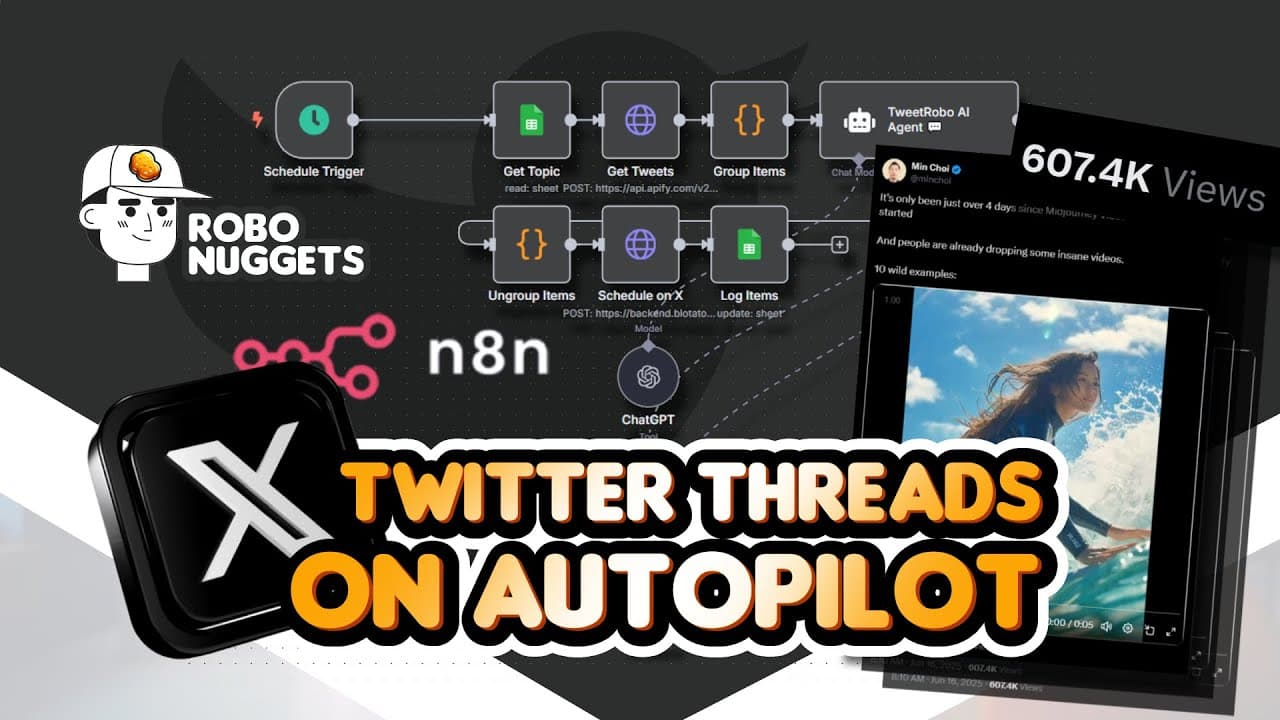
Build an n8n workflow that selects a queued topic from Google Sheets, gathers relevant tweets through an Apify scraper, uses an AI agent to organize the material into a structured thread, and passes the result toward scheduled publishing. Running the system once per day can support consistent curation, preserve generated content for logging, and turn ongoing niche research into digestible posts for an audience.
Transcript
This AI agent system just automated the style of these Twitter threads getting more than half a million views every time. Because if you haven't seen them over at Twitter, there are these accounts who are providing a lot of value by creating threads that curate interesting examples and content on the topic that they're interested in. This account f... Read More
Key Insights
- The automation is divided into two functional stages: an AI-driven section creates the Twitter threads, and a publishing section schedules and posts them at the chosen times. This separation makes the creation logic easier to understand and customize independently from distribution.
- The schedule trigger is the workflow's starting mechanism. The demonstrated setup runs once per day, which the creator considers sufficient, but n8n allows the execution frequency to be changed according to the desired publishing schedule.
- Google Sheets is the topic source and logging layer. Its rows hold a topic, a description, and additional status columns that preserve generations and indicate which topic should be processed during the next automation run.
- The selection rule is based on a clear queue status. The Google Sheets node searches for the next row where the "tweets created" column contains "for creation," ensuring that each run retrieves a topic waiting to be handled.
- The HTTP request node connects n8n to third-party services. In the demonstrated configuration, it uses a POST method and sends a request to Apify, where a Twitter scraper is used to find relevant, high-quality tweets for the selected topic.
- The target thread follows a repeatable editorial structure. Its first tweet introduces the topic, the middle tweets organize useful examples, and the final tweet closes the thread. A scheduled publishing date is also included in the agent's intended output.
- Curation serves both audience growth and personal research. The resulting threads provide followers with organized examples while giving the operator an easily digestible summary of recent material within a topic they already follow.
- Customization begins with the topic queue and niche description. Users can enter topics manually, ask ChatGPT for ideas, or connect a separate research agent that regularly searches online and adds new topics to the Google Sheet.
Install to Summarize YouTube Videos and Get Transcripts
Explore YouTube Video Summarizer or Get YouTube Transcript Extractor
Questions & Answers
Q: How do you automate Twitter threads with n8n?
Create an n8n workflow with two main sections: one for generating a curated thread and another for scheduling and publishing it. Start with a schedule trigger, retrieve the next queued topic from Google Sheets, and use an HTTP request to call an Apify Twitter scraper. The AI agent then organizes the sourced material into an opening tweet, several example tweets, a closing tweet, and a scheduled date.
Q: How does Google Sheets manage topics in the workflow?
Google Sheets functions as both a topic queue and a generation log. Each row can contain the topic, a short description, and status columns used to track processing. The n8n node searches for the next row where the "tweets created" column says "for creation." It returns that row as output, allowing the remaining nodes to research and draft a thread about the selected subject.
Q: What structure should an automated Twitter thread follow?
The demonstrated structure begins with an opening tweet that gives readers context about the selected topic. Tweets two through five then present curated examples in sequence, followed by a final closing tweet. The AI agent's output also includes a date for scheduling. This consistent arrangement converts collected material into a clean, readable thread instead of publishing disconnected source posts.
Q: Why does the workflow use an HTTP request node?
The HTTP request node lets n8n call a third-party service that is not performing its work inside the workflow itself. It is configured with the POST method and a destination URL, comparable to sending information to an address. Here, the request goes to Apify so a Twitter scraper can find relevant tweets related to the topic selected from Google Sheets.
Q: How can the automation be customized for another niche?
Change the topics and descriptions stored in the connected Google Sheet so they reflect the desired niche, such as pets, dogs, or sports. The workflow can then research and organize material around those subjects using the same creation and publishing framework. Users can also personalize the schedule, scraper configuration, agent instructions, and publishing frequency for their own account or a client's use case.
Q: How often should the n8n Twitter workflow run?
The demonstrated schedule trigger is configured to run once per day, which the creator considers enough for this use case. That timing is not mandatory. The trigger can be changed so the workflow runs according to the operator's preferred frequency. Publishing cadence should therefore be set within the schedule node before the generated threads move through the automatic publishing section.
Q: Can topic discovery also be automated?
Yes. The basic approach is to type topics and descriptions directly into Google Sheets or ask ChatGPT for topic ideas. The creator also describes a separate research AI agent that regularly searches the internet and adds discovered topics to the sheet. That research workflow is not explained fully in the provided transcript, but it can supply the thread workflow with new queued subjects automatically.
Q: What are the benefits of automating curated threads?
The system is presented as useful in two connected ways. First, it supports more consistent publication of valuable, curated Twitter content that may help increase reach. Second, it assists with research by collecting and summarizing recent material about topics the operator already cares about. The final thread becomes an easily digestible research deliverable that can also be shared with an audience.
Summary & Key Takeaways
-
The workflow separates content creation from publishing. Its upper section creates a Twitter thread through an AI agent, while its lower section schedules and automatically publishes the resulting tweets. A schedule trigger starts each run, and the demonstrated configuration runs once per day, although users can change the frequency to match their needs.
-
Google Sheets acts as the workflow's topic queue and generation log. Each row can contain a topic, its description, and status fields. The n8n Google Sheets node finds the next row whose "tweets created" column says "for creation," then passes that selected row and its topic to the following research step.
-
An HTTP request node sends the selected topic to an Apify Twitter scraper to source useful tweets. The intended output is a coherent thread with an opening tweet that establishes context, several tweets presenting examples, a closing tweet, and a scheduled date. The template can be customized for different niches or client use cases.
Read in Other Languages (beta)
Share This Summary 📚
Summarize YouTube Videos and Get Video Transcripts with 1-Click
Try YouTube Summary with ChatGPT & Claude or YouTube Transcript Generator
Explore More Summaries from Jay E | RoboNuggets 📚




Summarize YouTube Videos and Get Video Transcripts with 1-Click
Try YouTube Summary with ChatGPT & Claude or YouTube Transcript Generator