What's New in macOS 27 Golden Gate?
TL;DR
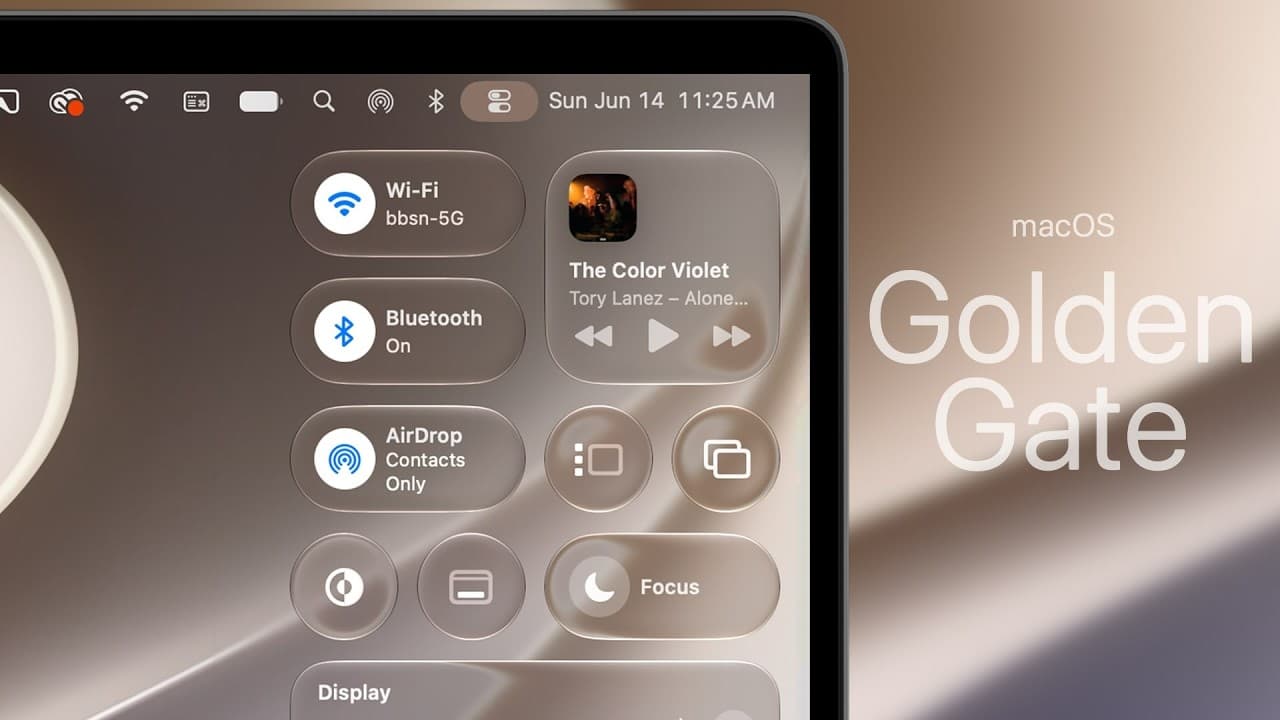
macOS 27 Golden Gate introduces over 50 new features, including a revamped design with liquid glass effects, improved Siri integration, and enhanced Finder functionalities. Users can now customize the intensity of liquid glass, experience more detailed icons, and enjoy smoother animations. Siri and Spotlight have merged, providing a more intuitive search experience.
Transcript
Apple just released Mac OS 27 Golden Gate beta 1, and it contains more than 50 new features and changes. So, in this video, we'll be walking through the muchneeded design changes, the new Siri, and much more. Okay, so first off, you can see that we do have a new wallpaper here. This is the new Golden Gate wallpaper. So, if you go ahead and put it i... Read More
Key Insights
- macOS 27 Golden Gate features a new liquid glass design, enhancing the detail and sharpness of icons and the overall interface.
- Users can adjust the intensity of liquid glass effects in the settings, offering a customizable visual experience.
- The new battery icon in macOS 27 aligns with iOS and iPadOS, providing a consistent look across Apple devices.
- Siri and Spotlight have merged, allowing users to perform searches and ask questions in one unified interface.
- Finder now includes suggested file names based on content and context, streamlining file management.
- Safari introduces features like swipe-to-refresh and automatic tab organization by topics, improving browsing efficiency.
- The new Siri AI offers enhanced personal context, screen awareness, and in-app actions for a smarter user experience.
- macOS 27 Golden Gate supports video podcasts in the Podcasts app, including captions and chapter navigation.
Install to Summarize YouTube Videos and Get Transcripts
Explore YouTube Video Summarizer or Get YouTube Transcript Extractor
Questions & Answers
Q: How to adjust liquid glass intensity in macOS 27?
To adjust liquid glass intensity in macOS 27, go to the settings and navigate to the appearance section. There, you'll find a dedicated liquid glass section where you can tweak the intensity. This feature allows you to customize the visual effects, enhancing the detail and sharpness of icons and interface elements according to your preference.
Q: What are the new features in Finder on macOS 27?
Finder in macOS 27 introduces suggested file names based on content and context, facilitating easier file management. The sidebar design is now edge-to-edge, removing the floating effect for a cleaner look. Additionally, glyph icons have been updated, and there's a new animation when searching, enhancing the overall user experience.
Q: How does the new Siri AI work in macOS 27?
The new Siri AI in macOS 27 merges with Spotlight, providing a unified interface for search and voice commands. It offers enhanced personal context, screen awareness, and in-app actions. Users can ask questions, perform tasks, and receive more accurate and context-aware responses, thanks to Siri's broader world knowledge and improved AI capabilities.
Q: What changes have been made to Safari in macOS 27?
Safari in macOS 27 introduces swipe-to-refresh gestures and automatic tab organization by topics, improving navigation and efficiency. The browser also features smoother scrolling, enhanced power efficiency, and a new 'Notify Me' option to alert users about content updates. These updates aim to streamline the browsing experience and conserve battery life.
Q: How does macOS 27 integrate video podcasts?
In macOS 27, the Podcasts app now supports video podcasts, allowing users to watch videos directly within the app. This update includes features like captions and chapter navigation, providing a richer and more accessible media consumption experience. The sidebar design has also been improved for better navigation and usability.
Q: What are the new features in the Photos app on macOS 27?
The Photos app in macOS 27 introduces generative tools such as cleanup, extend, and reframe. Cleanup allows users to remove unwanted elements, extend generates additional parts of an image, and reframe alters the composition. These features utilize cloud computing for processing, offering advanced editing capabilities directly within the app.
Q: How has user account creation improved in macOS 27?
User account creation in macOS 27 is now faster, reducing the time it takes to set up a new user profile on a fresh installation. This improvement addresses the previous issue of long wait times during account setup, streamlining the initial configuration process and enhancing the overall user experience.
Q: What accessibility improvements are included in macOS 27?
macOS 27 includes several accessibility improvements, such as the consolidation of subtitles and captioning into a single section with a new toggle to apply settings across apps. This ensures consistent accessibility features throughout the system. Additionally, the update introduces faster user account creation and enhanced captioning in the Photos app for self-shot videos.
Summary & Key Takeaways
-
macOS 27 Golden Gate introduces a revamped design with liquid glass effects, customizable intensity, and more detailed icons. The update merges Siri and Spotlight, offering a unified search and AI experience. Safari gains swipe-to-refresh and automatic tab organization, while Finder introduces suggested file names for improved file management.
-
The new battery icon and HDR usage enhance visual consistency and depth across Apple devices. Users can now perform in-app actions through Siri AI, which offers personal context and screen awareness. Safari's new features, including smoother scrolling and enhanced power efficiency, improve browsing.
-
macOS 27 supports video podcasts with captions and chapter navigation, while the Photos app gains generative tools like cleanup and reframe. The update also brings faster user account creation and improved accessibility features, making macOS 27 Golden Gate a substantial upgrade in functionality and design.
Read in Other Languages (beta)
Share This Summary 📚
Summarize YouTube Videos and Get Video Transcripts with 1-Click
Try YouTube Summary with ChatGPT & Claude or YouTube Transcript Generator
Explore More Summaries from Brandon Butch 📚
Summarize YouTube Videos and Get Video Transcripts with 1-Click
Try YouTube Summary with ChatGPT & Claude or YouTube Transcript Generator