How to Automate Meta Ads With Three AI Systems
TL;DR
Automate Meta ad production, competitor research, and campaign reporting by connecting n8n with structured interfaces and data tools. Airtable can manage product inputs, generated creatives, competitor ads, and reports, while external models and scrapers handle research, generation, and analysis. Human review remains important for adjusting product context, prompts, formats, and creative direction before final outputs are produced.
Transcript
Here are three AI meta ad systems that we've sold to marketing agencies, ecom, and SAS businesses. Meta ad management and optimization tend to be very timeconuming processes. So, these can be great use cases to sell if you're an AI agency or to implement if you're a business running meta ads. And in this video, I'll walk you through the solutions. ... Read More
Key Insights
- Meta ad automation is useful because companies and agencies may manage hundreds of similar advertisements, while creative production, competitor analysis, optimization, and client reporting are commonly time-consuming manual processes that can be organized into repeatable AI workflows.
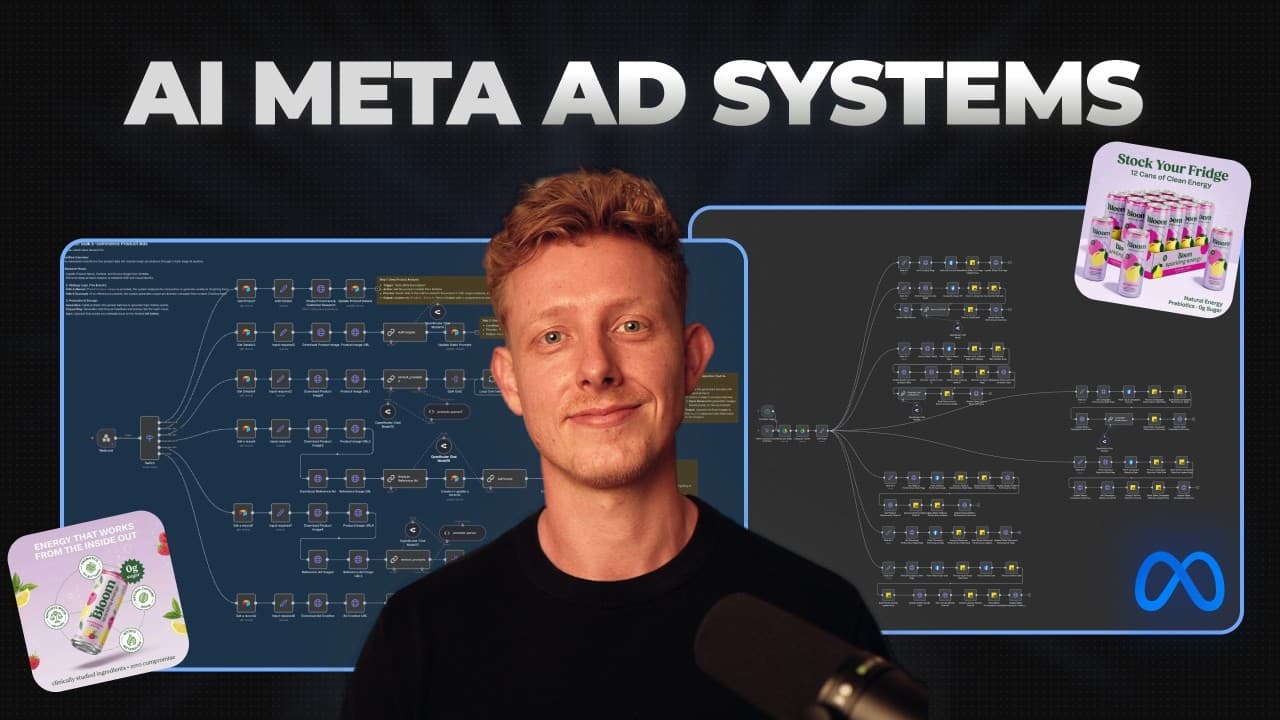
- The product ad generator is built with Airtable and n8n, using Airtable as the interface and database while separate webhook-triggered workflows perform product research, prompt creation, image generation, copywriting, and status updates.
- Product context is essential for ad generation because the system uses researched or manually edited product details to create creative prompts and advertising copy. Users can review the research output and change it before proceeding.
- Reference images guide creative style by giving the language and image models additional visual context alongside the original product image. Separate workflows handle generation depending on whether a reference image has been provided.
- Human review is retained within the creative process because users can modify generated prompts, aspect ratios, advertising angles, product details, and other instructions before initiating final image generation.
- The competitor spying system is designed to monitor public Facebook Ad Library pages, detect newly published image, video, and text ads, analyze their content, suggest possible improvements, and prepare weekly strategic reports.
- New competitor ads are processed individually by checking whether each record already exists, downloading its video or image when needed, passing the material to an LLM for analysis, and formatting the results for Airtable.
- Automated campaign reporting is built with n8n, Google Sheets, and Google Slides. The system analyzes campaign performance from previous months and generates graphs, addressing reporting work performed by Meta advertising agencies for clients and internal use.
Install to Summarize YouTube Videos and Get Transcripts
Explore YouTube Video Summarizer or Get YouTube Transcript Extractor
Questions & Answers
Q: How can businesses automate Meta ad creation with AI?
Businesses can place a product image, product name, and notes into an Airtable interface connected to n8n. The workflow researches the product, prepares contextual details, generates several creative prompts, and lets a person revise those prompts. An image model then creates the ads from the original product image, and a separate workflow can generate advertising copy using the product information and research.
Q: What tools are used in the automatic product ad generator?
The product ad generator uses Airtable as its interface and database, while n8n coordinates the backend workflows through webhooks. Perplexity search performs product research, language models create prompts and advertising copy, and Nano Banana Pro is accessed through Replicate for image generation. Each service requires the relevant account connection or API key when the supplied workflow template is cloned.
Q: How does a reference image affect generated Meta ads?
A reference image provides a desired visual style that complements the original product image. When one is uploaded, dedicated workflows download both images and supply their context to a language model, which creates advertising prompts and variations based on both sources. Another workflow then generates the ads using the reference and product images, allowing a competitor ad or another interesting creative to guide the result.
Q: Why does the ad generator keep a human in the loop?
Human review allows users to correct or refine the context before costly or unsuitable creative outputs are produced. Product research can be edited manually, and generated prompts can be adjusted for aspect ratio, advertising angle, format, or other creative preferences. Once the prompts are acceptable, the user triggers generation, and the resulting advertisements are collected in an Airtable gallery for review and copy creation.
Q: How does the Meta competitor ad spying system work?
The user adds a competitor and the URL of that competitor's public Facebook Ad Library page to Airtable. An n8n workflow retrieves the stored URLs and uses an Apify scraper to collect available ads. It formats the results, identifies new records, downloads image or video assets, analyzes each advertisement with an LLM, and stores copy details, media, insights, and improvement suggestions in Airtable.
Q: How are weekly competitor advertising reports generated?
A scheduled workflow collects the tracked advertisements associated with one competitor and passes them to a language model for combined analysis. The model identifies patterns in the competitor's advertising strategy and generates a weekly report. The workflow formats that report and writes it back to Airtable, giving brands and agencies a recurring overview without requiring them to inspect every competitor advertisement manually.
Q: What is required to set up the supplied Meta ad workflows?
Setup requires importing the workflow JSON, cloning the relevant Airtable interface and database, and connecting the user's Airtable account to each Airtable node. The unique webhook URLs must also be placed in Airtable automations. Depending on the system, users must provide API keys for Perplexity, their selected language models, Replicate, or Apify. The transcript states that image generation costs only a few cents per generation.
Q: How can Meta campaign reporting be automated?
The campaign reporting system connects n8n, Google Sheets, and Google Slides. It automatically analyzes campaign performance over previous months and creates graphs for reporting. The intended users include Meta advertising agencies that regularly prepare campaign reports for clients, as well as businesses reviewing their own results. Automating the analysis and presentation work reduces the recurring manual effort involved in campaign reporting.
Summary & Key Takeaways
-
The product ad generator accepts a product image, name, and notes through Airtable, researches the product, and creates multiple advertising prompts. Users can edit those prompts, specify formats or angles, and optionally provide a reference advertisement before an image model generates creative variations and an LLM writes corresponding advertising copy.
-
The competitor intelligence system collects ads from public Facebook Ad Library pages through an Apify scraper. It identifies new image or video ads, downloads their media, analyzes creative elements and copy with an LLM, stores structured findings in Airtable, and compiles weekly reports about each competitor's advertising strategy.
-
The campaign reporting system combines n8n, Google Sheets, and Google Slides to automate recurring performance analysis. It evaluates Meta campaign results from previous months and creates graphs for agency or internal reporting, reducing the manual work associated with communicating campaign performance to clients and reviewing results within the business.
Read in Other Languages (beta)
Share This Summary 📚
Summarize YouTube Videos and Get Video Transcripts with 1-Click
Try YouTube Summary with ChatGPT & Claude or YouTube Transcript Generator
Explore More Summaries from Ben AI 📚
Summarize YouTube Videos and Get Video Transcripts with 1-Click
Try YouTube Summary with ChatGPT & Claude or YouTube Transcript Generator